VNXe: How to find the Serial Number on the VNXe array
Samenvatting: How to find Serial Number on VNXe array (User correctable)
Dit artikel is van toepassing op
Dit artikel is niet van toepassing op
Dit artikel is niet gebonden aan een specifiek product.
Niet alle productversies worden in dit artikel vermeld.
Instructies
There are three options to find the Serial Number on a VNXe array.
Option 1: EMC Unisphere
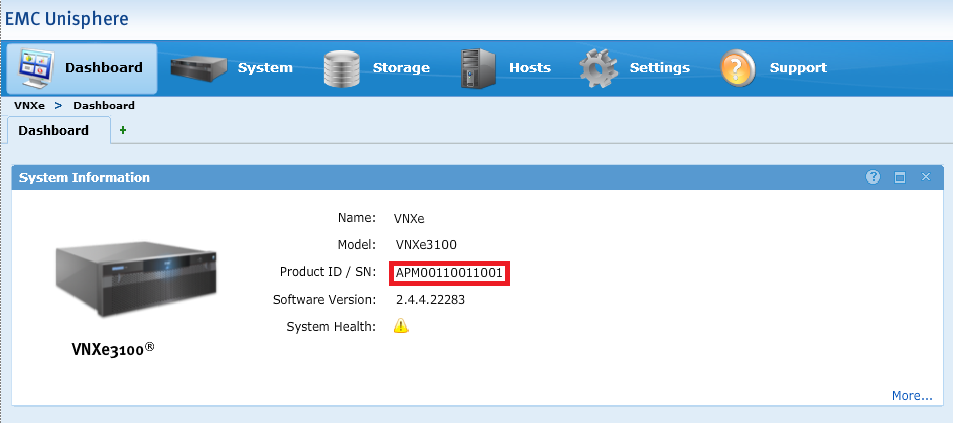
- Log in to EMC Unisphere UI.
- Go to Dashboard tab.
- The Serial Number can be found under "System Information" next to Product ID/SN:
Option 2: EMC Unisphere
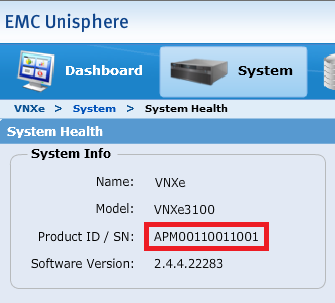
- Log in to EMC Unisphere UI.
- Go to the System tab and select System Health.
- The Serial Number can be found under "System Info" next to Product ID/SN:
Option 3: Command Line
- Open an SSH session to VNXe.
- Log in using the service account credential.
- Run the following command:
svc_diag
Example:service@(VNXe) spb:~> svc_diag ======== Now executing basic state ======== * System Friendly Host Name is: (VNXe) * System Serial Number is: APM00110011001 * Current Software version: NeoMain-2.4.4.22283-MAGNUM-RETAIL
Getroffen producten
VNX/VNXeProducten
VNXe1 Series, VNXe2 Series, VNX/VNXeArtikeleigenschappen
Artikelnummer: 000019667
Artikeltype: How To
Laatst aangepast: 09 okt. 2025
Versie: 5
Vind antwoorden op uw vragen via andere Dell gebruikers
Support Services
Controleer of uw apparaat wordt gedekt door Support Services.