NetWorker: Backup reports 'Warning <file> size grew during save'
Samenvatting: Backup succeeds but gets marked as failed in NMC. The failure message indicates: Error: 'Warning-'' size grew during save'.
Dit artikel is van toepassing op
Dit artikel is niet van toepassing op
Dit artikel is niet gebonden aan een specifiek product.
Niet alle productversies worden in dit artikel vermeld.
Symptomen
Backup succeeds but gets marked as failed in NMC. The failure message indicates: Error: 'Warning-'<file-name>' size grew during save'.
129292:save: Successfully established Client direct save session for save-set ID '3634349703' (nw_client_name:/dir) with Data Domain volume 'DataDomain.001'.
nw_client_name: /dir level=incr, 117 MB 00:00:03 8 files
completed savetime=1503641693
94694:save: The backup of save set '/dir' succeeded.
--- Job Indications ---
Warning: `/dir/some_file' size grew during save
Expected 59674974 bytes for `/dir/some_file', got 59680075 bytes
nw_client_name:/dir: retried 1 times.
Oorzaak
This is expected behavior. This warning appears when any file has a large change rate during the backup session; for example, logs.
Oplossing
This is a WARNING, not a FAILURE. The warning can be mitigated by applying logasm to the directory/file in a NetWorker directive.
logasm enables file changes during backup sessions. logasm can be used for log files and other similar files where a file changing during a backup operation is not noteworthy.
Setting logasm on a specific directory/file does not resolve the warning for all directories/files on the client, but it can be set recursively on a directory tree. Create a separate logasm for each directory/file path if it is not part of an already specified directory tree within a recursive logasm. Apply this directive to each client that reports this warning once configured.
Directives can be created in the NetWorker Management Console (NMC) under Server-->Directives.
Examples:
To apply logasm, on one specific directory (only files in the directory specified have logasm performed):
<< /var >>
logasm: *.*
To apply logasm, recursively to a directory (all directories from the directory specified down have logasm performed):
<< /var >>
+logasm: *.*
Once the directive is configured, it can be added in the client properties:
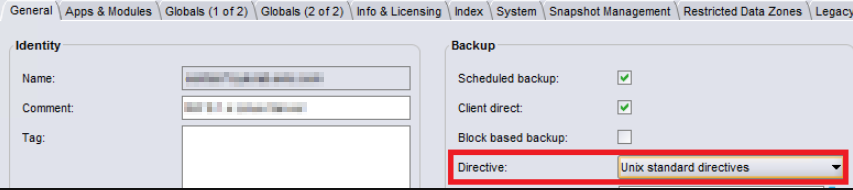
For more information about directives and other maintenance commands, see the NetWorker Administrator and NetWorker Command Reference Guides available through: https://www.dell.com/support/home/product-support/product/networker/docs
Getroffen producten
NetWorkerProducten
NetWorkerArtikeleigenschappen
Artikelnummer: 000050052
Artikeltype: Solution
Laatst aangepast: 17 apr. 2026
Versie: 6
Vind antwoorden op uw vragen via andere Dell gebruikers
Support Services
Controleer of uw apparaat wordt gedekt door Support Services.