SourceOne for File Systems: File activities cannot shortcut items
Samenvatting: File activities don't getting permission issue when trying to shortcut files.
Dit artikel is van toepassing op
Dit artikel is niet van toepassing op
Dit artikel is niet gebonden aan een specifiek product.
Niet alle productversies worden in dit artikel vermeld.
Symptomen
While running SourceOne File Archive Historical Shortcut activities, you may see that the items are not being processed. The processed counts will grow and failed counts will remain as zero.
When you open the Job Log you will see the below entry:
2020/06/09 11:34:41.558 *** Failed to create shortcut file ***
Name: File_to_be_shortcut.xls.url
File: \\?\UNC\share\folder_1\folder_2\folder_3\File_to_be_shortcut.xls
ID: 00000000D12A5D296B8C0D6AFF1A8ED7C3EFAB1383CE3EFF00
Reason: Access is denied. (-2147024891)
Source: ExDirectoryThread.cpp(5562): CExDirectoryThread::iCreateLinkFile:
Name: File_to_be_shortcut.xls.url
File: \\?\UNC\share\folder_1\folder_2\folder_3\File_to_be_shortcut.xls
ID: 00000000D12A5D296B8C0D6AFF1A8ED7C3EFAB1383CE3EFF00
Reason: Access is denied. (-2147024891)
Source: ExDirectoryThread.cpp(5562): CExDirectoryThread::iCreateLinkFile:
Oorzaak
Share permissions set for the root share are incorrect.
Oplossing
In order to resolve this issue, you need to grant SourceOne account full access on the Security tab and also on the Sharing tab.
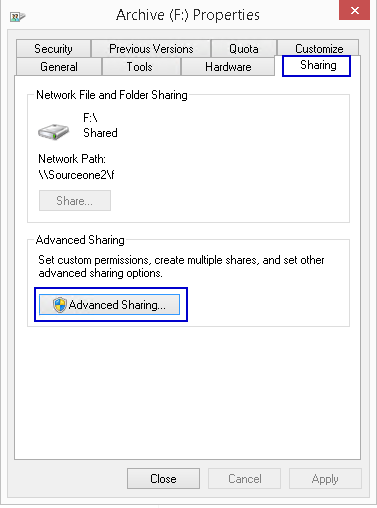
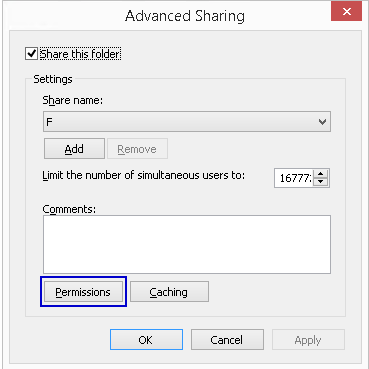
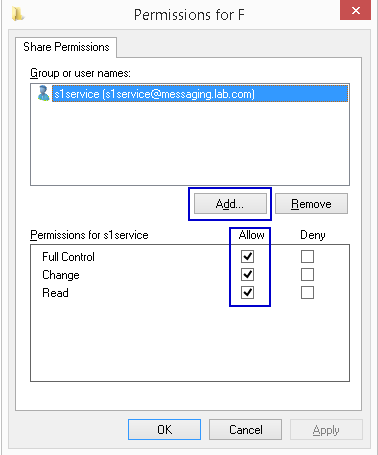
- Access the root share and open the Properties
- Select Sharing tab
- Open Advanced Sharing
- Open Permissions
- Add SourceOne service account with Full Control permissions
Getroffen producten
SourceOneProducten
SourceOne, SourceOne for File SystemsArtikeleigenschappen
Artikelnummer: 000082343
Artikeltype: Solution
Laatst aangepast: 18 apr. 2026
Versie: 5
Vind antwoorden op uw vragen via andere Dell gebruikers
Support Services
Controleer of uw apparaat wordt gedekt door Support Services.