Windows Server:如何使用 PowerShell 安装更新服务
Samenvatting: 本文旨在解决使用 Windows PowerShell 安装 Windows Server Update Services (WSUS) 角色的问题。本指南详细介绍了如何使用 PowerShell 添加 WSUS 角色,包括安装和管理 cmdlet,例如用于更新控制和同步设置的 Get-WsusUpdate。
Dit artikel is van toepassing op
Dit artikel is niet van toepassing op
Dit artikel is niet gebonden aan een specifiek product.
Niet alle productversies worden in dit artikel vermeld.
Instructies
- 在命令之前键入
Start PowerShell在 命令提示符 窗口中启动 Windows PowerShell。 - 若要安装 WSUS 角色,请运行以下命令
Install-WindowsFeature UpdateServices
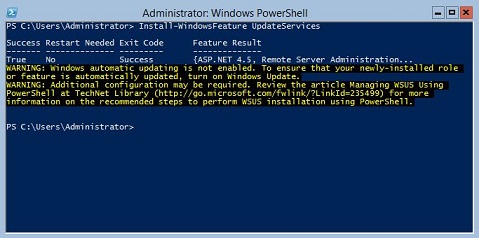
其它信息:
可以使用 Windows PowerShell 安装以下 WSUS 角色服务。
- Windows 内部数据库 (WID)
- WSUS 服务
- 数据库
WID 数据库和 WSUS 服务角色服务是在运行 Install-WindowsFeature UpdateSevices cmdlet 后安装的。
以下 Windows PowerShell cmdlet 可用于在运行 Windows Server Core 的服务器上管理 WSUS 角色。
将指定的客户端计算机添加到指定的目标组。
Add-WsusComputer
批准要应用于客户端的更新。
Approve-WsusUpdate
拒绝更新以进行部署。
Deny-WsusUpdate
获取系统中可用的所有 WSUS 分类的列表。
Get-WsusClassification
获取表示客户端计算机的 WSUS 计算机对象。
Get-WsusComputer
按类别获取 WSUS 上提供的所有产品的列表。
Get-WsusProduct
获取 WSUS 更新服务器对象的值。
Get-WsusServer
获取包含有关更新的详细信息的 WSUS 更新对象。
Get-WsusUpdate
在指定的 WSUS 服务器上执行清理过程。
Invoke-WsusServerCleanup
设置 WSUS 同步的更新分类是启用还是禁用。
Set-WsusClassification
设置是启用还是禁用表示要同步的更新类别的产品。
Set-WsusProduct
设置 WSUS) 服务器是从 Microsoft 更新同步,还是从上游服务器和上游服务器属性同步。
Set-WsusServerSynchronizationGetroffen producten
Microsoft Windows 2012 Server, Microsoft Windows 2012 Server R2Producten
C Series, HS Series, Modular Infrastructure, Rack Servers, Tower Servers, XE Servers, XR Servers, OEM Server Solutions, Microsoft Windows Server 2016, Microsoft Windows Server 2019, Microsoft Windows Server 2022, Microsoft Windows Server 2025Artikeleigenschappen
Artikelnummer: 000121387
Artikeltype: How To
Laatst aangepast: 05 sep. 2025
Versie: 8
Vind antwoorden op uw vragen via andere Dell gebruikers
Support Services
Controleer of uw apparaat wordt gedekt door Support Services.