PowerEdge:如何使用 PowerShell 安裝 Windows Server Backup
Samenvatting: 如何使用適用於 Windows Server 的 PowerShell 安裝 Windows Server Backup。請遵循這些步驟,以有效地安裝和管理伺服器備份。
Dit artikel is van toepassing op
Dit artikel is niet van toepassing op
Dit artikel is niet gebonden aan een specifiek product.
Niet alle productversies worden in dit artikel vermeld.
Instructies
- 若要啟動 Windows PowerShell ,請在 命令提示字元 視窗中輸入:
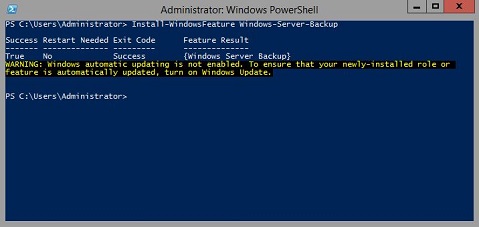
Start PowerShell - 若要安裝 Windows Server 備份 類型
Install-WindowsFeature Windows-Server-Backup
其他資訊:
Windows Server 備份 https://learn.microsoft.com/en-us/previous-versions/windows/it-pro/windows-server-2012-r2-and-2012/jj614621(v=ws.11)

Windows Server 備份 Windows PowerShell Cmdlethttps://learn.microsoft.com/en-us/powershell/module/windowsserverbackup/?view=windowsserver2022-ps
Getroffen producten
Microsoft Windows 2012 Server, Microsoft Windows 2012 Server R2Producten
C Series, HS Series, Modular Infrastructure, Rack Servers, Tower Servers, XE Servers, XR Servers, OEM Server Solutions, Microsoft Windows Server 2016, Microsoft Windows Server 2019, Microsoft Windows Server 2022, Microsoft Windows 2008 Server R2
, Microsoft Windows 2008 Server Service Pack 2, Microsoft Windows 2012 Server, Microsoft Windows 2012 Server R2
...
Artikeleigenschappen
Artikelnummer: 000122393
Artikeltype: How To
Laatst aangepast: 05 sep. 2025
Versie: 9
Vind antwoorden op uw vragen via andere Dell gebruikers
Support Services
Controleer of uw apparaat wordt gedekt door Support Services.