PowerEdge: Cómo instalar el respaldo de Windows Server mediante PowerShell
Samenvatting: Cómo instalar Respaldo de Windows Server mediante PowerShell para Windows Server. Siga estos pasos para instalar y administrar los respaldos de su servidor de manera eficiente.
Dit artikel is van toepassing op
Dit artikel is niet van toepassing op
Dit artikel is niet gebonden aan een specifiek product.
Niet alle productversies worden in dit artikel vermeld.
Instructies
- Para iniciar Windows PowerShell , escriba en la ventana Símbolo del sistema :
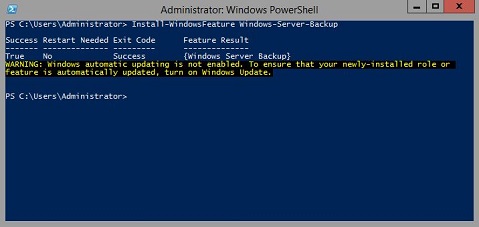
Start PowerShell - Para instalar el tipo de copia de seguridad de Windows Server:
Install-WindowsFeature Windows-Server-Backup
Información adicional:
Respaldo de Windows Serverhttps://learn.microsoft.com/en-us/previous-versions/windows/it-pro/windows-server-2012-r2-and-2012/jj614621(v=ws.11)

Cmdlets de Windows PowerShell de copia de seguridad de Windows Server https://learn.microsoft.com/en-us/powershell/module/windowsserverbackup/?view=windowsserver2022-ps
Getroffen producten
Microsoft Windows 2012 Server, Microsoft Windows 2012 Server R2Producten
C Series, HS Series, Modular Infrastructure, Rack Servers, Tower Servers, XE Servers, XR Servers, OEM Server Solutions, Microsoft Windows Server 2016, Microsoft Windows Server 2019, Microsoft Windows Server 2022, Microsoft Windows 2008 Server R2
, Microsoft Windows 2008 Server Service Pack 2, Microsoft Windows 2012 Server, Microsoft Windows 2012 Server R2
...
Artikeleigenschappen
Artikelnummer: 000122393
Artikeltype: How To
Laatst aangepast: 05 sep. 2025
Versie: 9
Vind antwoorden op uw vragen via andere Dell gebruikers
Support Services
Controleer of uw apparaat wordt gedekt door Support Services.