PowerEdge: Jak zainstalować narzędzie Kopia zapasowa systemu Windows Server przy użyciu programu PowerShell
Samenvatting: Jak zainstalować narzędzie Kopia zapasowa systemu Windows Server przy użyciu programu PowerShell dla systemu Windows Server. Wykonaj poniższe czynności, aby zainstalować i efektywnie zarządzać kopiami zapasowymi serwera. ...
Dit artikel is van toepassing op
Dit artikel is niet van toepassing op
Dit artikel is niet gebonden aan een specifiek product.
Niet alle productversies worden in dit artikel vermeld.
Instructies
- Aby uruchomić program Windows PowerShell, wpisz w oknie wiersza polecenia
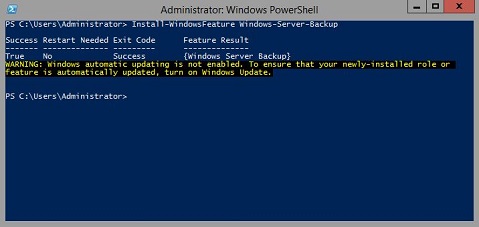
Start PowerShell - Aby zainstalować typ kopii zapasowej systemu Windows Server
Install-WindowsFeature Windows-Server-Backup
Informacje dodatkowe:
Kopia zapasowa systemu Windows Serverhttps://learn.microsoft.com/en-us/previous-versions/windows/it-pro/windows-server-2012-r2-and-2012/jj614621(v=ws.11)

Kopia zapasowa systemu Windows Server Polecenia cmdlet programu Windows PowerShellhttps://learn.microsoft.com/en-us/powershell/module/windowsserverbackup/?view=windowsserver2022-ps
Getroffen producten
Microsoft Windows 2012 Server, Microsoft Windows 2012 Server R2Producten
C Series, HS Series, Modular Infrastructure, Rack Servers, Tower Servers, XE Servers, XR Servers, OEM Server Solutions, Microsoft Windows Server 2016, Microsoft Windows Server 2019, Microsoft Windows Server 2022, Microsoft Windows 2008 Server R2
, Microsoft Windows 2008 Server Service Pack 2, Microsoft Windows 2012 Server, Microsoft Windows 2012 Server R2
...
Artikeleigenschappen
Artikelnummer: 000122393
Artikeltype: How To
Laatst aangepast: 05 sep. 2025
Versie: 9
Vind antwoorden op uw vragen via andere Dell gebruikers
Support Services
Controleer of uw apparaat wordt gedekt door Support Services.