如何識別 Dell Data Security 主安裝程式的版本 (DDSSetup 和 DDSSuite)
Samenvatting: 瞭解如何依照這些逐步指示,識別 Dell Data Security (之前稱為 Dell Data Protection) 主安裝程式的版本。
Dit artikel is van toepassing op
Dit artikel is niet van toepassing op
Dit artikel is niet gebonden aan een specifiek product.
Niet alle productversies worden in dit artikel vermeld.
Instructies
註:
- 截至 2022 年 5 月,Dell Endpoint Security Suite Enterprise 已達到維護結束的期限。Dell 已不再更新此產品及其文章。
- 截至 2019 年 1 月,Dell Endpoint Security Suite Pro 已達到維護結束的期限。Dell 已不再更新此產品及其文章。
- 如需更多資訊,請參閱 Dell Data Security 的產品生命週期 (支援結束及壽命結束) 政策。如果您對其他文章有任何問題,請聯絡您的銷售團隊或聯絡 endpointsecurity@dell.com。
- 請參考端點安全性,以取得有關目前產品的其他資訊。
Dell Data Security (之前稱為 Dell Data Protection) 主安裝程式的版本可用於:
- 識別已知問題。
- 瞭解工作流程變更。
- 確認系統需求。
受影響的產品:
- Dell Encryption Enterprise
- Dell Data Protection | Enterprise Edition
- Dell Encryption Personal
- Dell Data Protection | Personal Edition
- Dell Endpoint Security Suite Enterprise
- Dell Endpoint Security Suite Pro
受影響的作業系統:
- Windows
- 必須先下載 [MASTER INSTALLER],才能識別版本。
- [MASTER INSTALLER] 產品名稱依應用程式而有所不同:
DDSSetup.exeDell Encryption Enterprise 適用的 DDSSetup.exeDDSSetup.exeDell Encryption Personal 適用的 DDSSetup.exeDDSSuite.exe下載 Dell Endpoint Security Suite Enterprise。DDSSuite.exeDell Endpoint Security Suite 適用的 DDSSuite.exeDDPSetup.exeDell Data Protection | Enterprise Edition 適用的 DDPSetup.exeDDPSetup.exeDell Data Protection | Personal Edition 適用的 DDPSetup.exeDDPSuite.exeDell Data Protection | Endpoint Security Suite 適用的 DDPSuite.exeDDPSuite.exeDell Data Protection | Endpoint Security Suite Enterprise 適用的 DDPSuite.exe
如需有關取得 DDPSetup.exe 的資訊,請參閱如何下載 Dell Encryption Enterprise 或 Dell Encryption Personal。
- 在 [MASTER INSTALLER] 上按右鍵,然後選取內容。
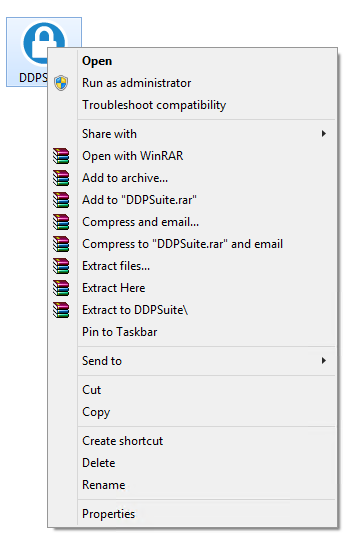
- 按一下詳細資料標籤。

- 記下產品版本。
 您的用戶端產品版本可能會與上述螢幕擷取畫面不同。
Extra informatie
Video's
Getroffen producten
Dell Encryption, Dell Endpoint Security Suite Pro, Dell Endpoint Security Suite EnterpriseArtikeleigenschappen
Artikelnummer: 000124917
Artikeltype: How To
Laatst aangepast: 06 aug. 2026
Versie: 12
Vind antwoorden op uw vragen via andere Dell gebruikers
Support Services
Controleer of uw apparaat wordt gedekt door Support Services.