Cómo identificar la versión del instalador maestro de Dell Data Security
Samenvatting: Obtenga información sobre cómo identificar la versión del instalador maestro de Dell Data Security (anteriormente Dell Data Protection) siguiendo estas instrucciones paso a paso.
Dit artikel is van toepassing op
Dit artikel is niet van toepassing op
Dit artikel is niet gebonden aan een specifiek product.
Niet alle productversies worden in dit artikel vermeld.
Instructies
Nota:
- Desde mayo de 2022, Dell Endpoint Security Suite Enterprise alcanzó el final de su período de mantenimiento. Dell ya no actualizará este producto y sus artículos.
- Desde enero del 2019, Dell Endpoint Security Suite Pro alcanzó el final de su período de mantenimiento. Dell ya no actualizará este producto y sus artículos.
- Para obtener más información, consulte Política de ciclo de vida (Fin de soporte y Final del ciclo de vida útil) de producto para Dell Data Security. Si tiene preguntas sobre artículos alternativos, comuníquese con el equipo de ventas o al correo endpointsecurity@dell.com.
- Consulte Endpoint Security para obtener información adicional acerca de los productos actuales.
La versión del instalador maestro de Dell Data Security (anteriormente Dell Data Protection) se puede utilizar para:
- Identificar problemas conocidos.
- Entender los cambios en el flujo de trabajo.
- Comprobar los requisitos del sistema.
Productos afectados:
- Dell Encryption Enterprise
- Dell Data Protection | Edición Enterprise
- Dell Encryption Personal
- Dell Data Protection | Personal Edition
- Dell Endpoint Security Suite Enterprise
- Dell Endpoint Security Suite Enterprise
Sistemas operativos afectados:
- Windows
- [INSTALADOR MAESTRO] se debe descargar antes de identificar la versión.
- El nombre del producto de [INSTALADOR MAESTRO] varía según la aplicación:
DDSSetup.exeDDSSetup.exe para Dell Encryption EnterpriseDDSSetup.exeDDSSetup.exe para Dell Encryption PersonalDDSSuite.exeDell Endpoint Security Suite EnterpriseDDSSuite.exepara Dell Endpoint Security SuiteDDPSetup.exeDDPSetup.exe para Dell Data Protection | Enterprise EditionDDPSetup.exeDDPSetup.exe para Dell Data Protection | Personal EditionDDPSuite.exeDDPSuite.exe para Dell Data Protection | Endpoint Security SuiteDDPSuite.exeDDPSuite.exe para Dell Data Protection | Endpoint Security Suite Enterprise
Para obtener información sobre cómo conseguir DDPSetup.exe, consulte Cómo descargar Dell Encryption Enterprise o Dell Encryption Personal.
- Haga clic con el botón secundario en [INSTALADOR MAESTRO] y, luego, seleccione Propiedades.
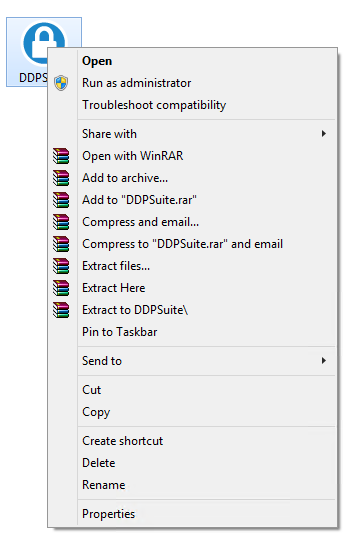
- Haga clic en la pestaña Detalles.

- Documente la información que aparece en Versión del producto.
 La versión del producto de su cliente puede ser distinta de la que aparece en la captura anterior.
Extra informatie
Video's
Getroffen producten
Dell Encryption, Dell Endpoint Security Suite Pro, Dell Endpoint Security Suite EnterpriseArtikeleigenschappen
Artikelnummer: 000124917
Artikeltype: How To
Laatst aangepast: 06 aug. 2026
Versie: 12
Vind antwoorden op uw vragen via andere Dell gebruikers
Support Services
Controleer of uw apparaat wordt gedekt door Support Services.