从 PXE 启动以使用 Windows 部署服务部署操作系统时没有启动映像加载进度条
Samenvatting: 本文介绍如何在 PXE 启动时显示加载进度条,以使用 Windows 部署服务部署操作系统。
Dit artikel is van toepassing op
Dit artikel is niet van toepassing op
Dit artikel is niet gebonden aan een specifiek product.
Niet alle productversies worden in dit artikel vermeld.
Symptomen
未显示加载进度条
从 PXE 启动至 Windows 部署服务以部署要安装的操作系统时,您可能不会看到加载进度条。这是因为某些 PXE 服务器上的 wdsmgfw.efi 会切换到 wgl4 字体,而不使用从 bootmgr. efi 获取的调整分辨率。
当从 wdsmgfw.efi 加载文件时,这会导致显示不匹配。因此,在加载引导映像时,加载进度条未按预期显示(图 1 和图 2)。
图1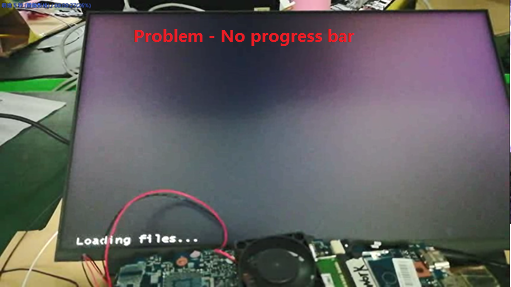
图2
受影响的系统:
- Inspiron 灵越 5402
- Inspiron 灵越 5409
- Inspiron 灵越 7500
- Inspiron 灵越 7501
- Inspiron 灵越 5502
- Inspiron 灵越 5509
- Latitude 3410
- Latitude 3510
- Vostro 成就 5402
- Vostro 成就 5502
- Vostro 成就 7500
Oorzaak
无原因信息
Oplossing
Getroffen producten
Inspiron 7500, Inspiron 7501, Latitude 3410, Latitude 3510, Vostro 7500Artikeleigenschappen
Artikelnummer: 000132044
Artikeltype: Solution
Laatst aangepast: 22 apr. 2025
Versie: 5
Vind antwoorden op uw vragen via andere Dell gebruikers
Support Services
Controleer of uw apparaat wordt gedekt door Support Services.