Isilon:使用 Powershell 與平台 API - 基礎知識
Samenvatting: 本文說明如何使用Powershell和PAPI(平臺 API) 連線至叢集。
Dit artikel is van toepassing op
Dit artikel is niet van toepassing op
Dit artikel is niet gebonden aan een specifiek product.
Niet alle productversies worden in dit artikel vermeld.
Symptomen
N/A
Oorzaak
N/A
Oplossing
注意:本主題為Isilon SDK - Isilon 資訊中心中的一部分。
介紹
隨著全新 RESTful 平臺應用程式發展介面 (PAPI) 的推出,現在使用 Powershell 來自動化和管理 Isilon 叢集的方式更加簡單且優雅。本文將說明如何使用 Powershell 和 PAPI 連線至叢集的基本知識。
強烈建議您 在此下載並閱讀 OneFS 版本的 PAPI 參考指南。
由於PAPI可透過 REST 存取叢集,因此您可以使用 HTTP 方法 (例如 GET、POST、PUT 和 DELETE) 來控制資源。物件和收藏的表示會以 JSON 格式的文件交換。若要使用PAPI,您必須透過登入WebUI並導覽至下列方式,在叢集上啟用 HTTP:協定>HTTP 設定>啟用 HTTP。
如果您沒有 Powershell v3 下載並安裝此處找到的 .NET Framework 版本 4。
然後在此下載並安裝適當的 v3 管理架構。
# 接受輸入參數
參數參數 ([String]$isilonip、[String]$username、[String]$password)
若要存取叢集上的資源,我們將使用具有適當參數的「Invoke-RestMethod」。此方法會採取多種參數,例如 URI 字串、本體 (用於 POST)、標頭等。下列代碼會建立我們需要的標頭資訊和存取的基本 URL:
# 編碼基本授權標頭並建立 baseurl
$EncodedAuthorization = [System.Text.Encoding]::UTF8。GetBytes ($username + ':'+ $password)
$EncodedPassword = [System.Convert]::ToBase64String($EncodedAuthorization)
$headers = @{“Authorization”=“Basic $($EncodedPassword)」
$baseurl = 'https://'+ $isilonip +“:8080”
在此範例中,我們將存取配額。將其新增至基本 URL,以建立最後 URI,我們將傳遞為「Invoke-RestMethod」。如果您查看 PAPI 說明檔,您會看到資源集合會以下列格式存取「/platform/1/namespace>/<<collection-name>」。舉例來說,如果想要收集代表叢集上定義之所有配額的對象,我們需要取得「/platform/1/quota/quotas」。
$resourceurl = 「/platform/1/quota/quotas」
,$uri = $baseurl + $resourceurl
現在,我們致電 Call-RestMethod,然後存取已傳回的物件,其中包含配額收集:
以下是腳本輸出的範例:

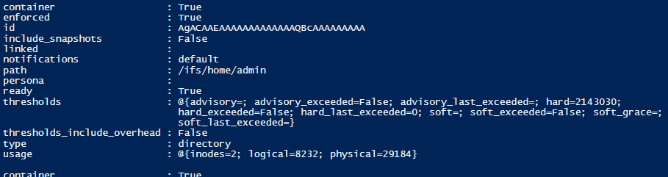
以下列出叢集上定義的所有配額及其屬性。使用此方法,PSv3 會自動將 JSON 輸出轉換為物件。
文稿檔正文:
介紹
隨著全新 RESTful 平臺應用程式發展介面 (PAPI) 的推出,現在使用 Powershell 來自動化和管理 Isilon 叢集的方式更加簡單且優雅。本文將說明如何使用 Powershell 和 PAPI 連線至叢集的基本知識。
強烈建議您 在此下載並閱讀 OneFS 版本的 PAPI 參考指南。
由於PAPI可透過 REST 存取叢集,因此您可以使用 HTTP 方法 (例如 GET、POST、PUT 和 DELETE) 來控制資源。物件和收藏的表示會以 JSON 格式的文件交換。若要使用PAPI,您必須透過登入WebUI並導覽至下列方式,在叢集上啟用 HTTP:協定>HTTP 設定>啟用 HTTP。
Powershell v3
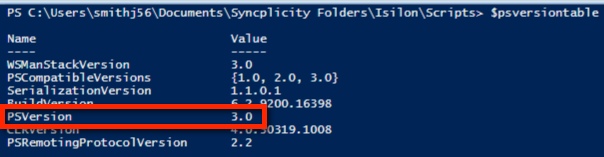
Powershell v3 內建方法可簡化 RESTful 存取。您可以查看$PSVersionTable值來檢查目前的 Powershell 版本:
如果您沒有 Powershell v3 下載並安裝此處找到的 .NET Framework 版本 4。
然後在此下載並安裝適當的 v3 管理架構。
線上至叢集
以下文稿接受 Isilon IP 位址或主機名稱、使用者名稱和密碼的參數:# 接受輸入參數
參數參數 ([String]$isilonip、[String]$username、[String]$password)
若要存取叢集上的資源,我們將使用具有適當參數的「Invoke-RestMethod」。此方法會採取多種參數,例如 URI 字串、本體 (用於 POST)、標頭等。下列代碼會建立我們需要的標頭資訊和存取的基本 URL:
# 編碼基本授權標頭並建立 baseurl
$EncodedAuthorization = [System.Text.Encoding]::UTF8。GetBytes ($username + ':'+ $password)
$EncodedPassword = [System.Convert]::ToBase64String($EncodedAuthorization)
$headers = @{“Authorization”=“Basic $($EncodedPassword)」
$baseurl = 'https://'+ $isilonip +“:8080”
在此範例中,我們將存取配額。將其新增至基本 URL,以建立最後 URI,我們將傳遞為「Invoke-RestMethod」。如果您查看 PAPI 說明檔,您會看到資源集合會以下列格式存取「/platform/1/namespace>/<<collection-name>」。舉例來說,如果想要收集代表叢集上定義之所有配額的對象,我們需要取得「/platform/1/quota/quotas」。
$resourceurl = 「/platform/1/quota/quotas」
,$uri = $baseurl + $resourceurl
現在,我們致電 Call-RestMethod,然後存取已傳回的物件,其中包含配額收集:
$ISIObject = Invoke-RestMethod -Uri $url -Headers $headers -Method Get
$ISIObject.quotas
$ISIObject.quotas
以下是腳本輸出的範例:
以下列出叢集上定義的所有配額及其屬性。使用此方法,PSv3 會自動將 JSON 輸出轉換為物件。
文稿檔正文:
##########
2013年9月18日,EMC NAS 專員中心部門
# 經修改:
#
#
# ps_isilon_get_quotas_via_papi.ps1 - 取得 Isilon 叢集
的所有配額# 注意:您必須在 OneFS 7.0.2 或更高版本使用 PAPI,且叢集上必須啟用 HTTP 存取。
#
#PARAMETERS## -isilonip = 節點 IP
# -username
# -password
# -path = /ifs directory path 包含需要配額
的目錄# -quoatasize = 配額位元組大小 (例如「500000“)
#
#
# EXAMPLE
# .\ps_isilon_get_quotas_via_papi.ps1 -isilonip 10.10.10.1 -user root -password P@ssword1
#
########### Accept input parameters
Param([String]$isilonip,[String]$username,[String]$password)
# 使用預設憑證,您通常會看到憑證錯誤 (來自 blogs.msdn.com)
add-type@“
,使用 System.Net;
使用 System.Security.Cryptography.X509Certates;
公家級 TrustAll: ICertatePolicy {
public TrustAll() {}
public bool CheckValidationResult (
ServicePoint sPoint、X509Certate cert、
WebRequest req、int problem) {
傳回 true;
}
}
“@
[System.Net.ServicePointManager]::CertificatePolicy = new-object TrustAll
#if 如果
(!$isilonip -and $username -and $password)) {
寫入「failed to specify parameters」;
寫入「範例:.\ps_isilon_get_quotas_via_papi.ps1 -isilonip 192.168.1.2 -username root -password p@ssw0rd1”
exit
}
# Encode basic authorization header and create baseurl
$EncodedAuthorization = [System.Text.Encoding]::UTF8。GetBytes ($username + ':' + $password)
$EncodedPassword = [System.Convert]::ToBase64String($EncodedAuthorization)
$headers = @{“Authorization”=“Basic $($EncodedPassword)”}
$baseurl = 'https://'+ $isilonip +“:8080”
# get all defined quotas
$resourceurl = “/platform/1/quota/quotas”
$uri = $baseurl + $resourceurl
$ISIObject = Invoke-RestMethod -Uri $uri -Headers $headers -Method Get
$ISIObject.quotas
2013年9月18日,EMC NAS 專員中心部門
# 經修改:
#
#
# ps_isilon_get_quotas_via_papi.ps1 - 取得 Isilon 叢集
的所有配額# 注意:您必須在 OneFS 7.0.2 或更高版本使用 PAPI,且叢集上必須啟用 HTTP 存取。
#
#PARAMETERS## -isilonip = 節點 IP
# -username
# -password
# -path = /ifs directory path 包含需要配額
的目錄# -quoatasize = 配額位元組大小 (例如「500000“)
#
#
# EXAMPLE
# .\ps_isilon_get_quotas_via_papi.ps1 -isilonip 10.10.10.1 -user root -password P@ssword1
#
########### Accept input parameters
Param([String]$isilonip,[String]$username,[String]$password)
# 使用預設憑證,您通常會看到憑證錯誤 (來自 blogs.msdn.com)
add-type@“
,使用 System.Net;
使用 System.Security.Cryptography.X509Certates;
公家級 TrustAll: ICertatePolicy {
public TrustAll() {}
public bool CheckValidationResult (
ServicePoint sPoint、X509Certate cert、
WebRequest req、int problem) {
傳回 true;
}
}
“@
[System.Net.ServicePointManager]::CertificatePolicy = new-object TrustAll
#if 如果
(!$isilonip -and $username -and $password)) {
寫入「failed to specify parameters」;
寫入「範例:.\ps_isilon_get_quotas_via_papi.ps1 -isilonip 192.168.1.2 -username root -password p@ssw0rd1”
exit
}
# Encode basic authorization header and create baseurl
$EncodedAuthorization = [System.Text.Encoding]::UTF8。GetBytes ($username + ':' + $password)
$EncodedPassword = [System.Convert]::ToBase64String($EncodedAuthorization)
$headers = @{“Authorization”=“Basic $($EncodedPassword)”}
$baseurl = 'https://'+ $isilonip +“:8080”
# get all defined quotas
$resourceurl = “/platform/1/quota/quotas”
$uri = $baseurl + $resourceurl
$ISIObject = Invoke-RestMethod -Uri $uri -Headers $headers -Method Get
$ISIObject.quotas
Getroffen producten
Isilon, PowerScale OneFS, Isilon Platform APIArtikeleigenschappen
Artikelnummer: 000177716
Artikeltype: Solution
Laatst aangepast: 20 jan. 2026
Versie: 7
Vind antwoorden op uw vragen via andere Dell gebruikers
Support Services
Controleer of uw apparaat wordt gedekt door Support Services.