執行 Dell Encryption 時 CPU 使用率過高
Samenvatting: 執行 Dell Encryption 的客戶可能會注意到系統程序中的 CPU 使用率很高。
Dit artikel is van toepassing op
Dit artikel is niet van toepassing op
Dit artikel is niet gebonden aan een specifiek product.
Niet alle productversies worden in dit artikel vermeld.
Symptomen
受影響的產品:
- Dell Encryption
受影響的版本:
- 10.10 版
- 11.0 版
- 11.1 版
受影響的作業系統:
- Windows
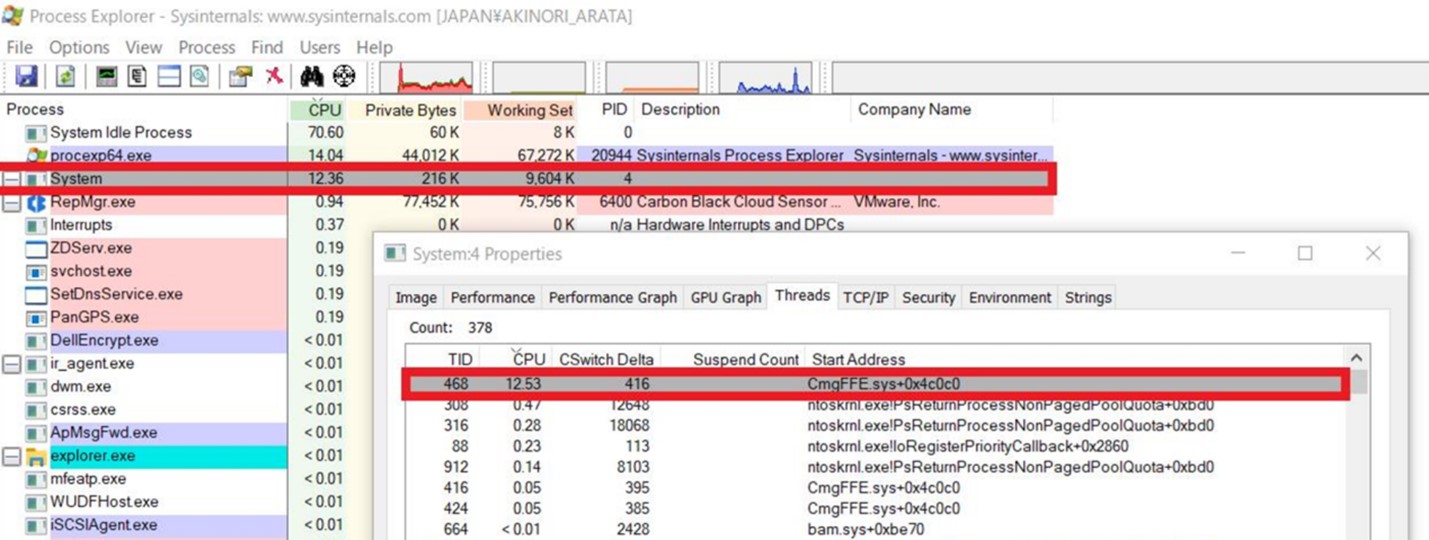
系統程序是一個容器,可讓驅動程式以核心模式背景關係執行其執行緒。執行 Dell Encryption 檔案或資料夾加密時, FFE 在系統程序下載入驅動程式執行緒。系統程序有時會耗用 CPU 時間,導致 CPU 使用率過高。下列步驟顯示如何確認 Dell Encryption 是系統程序中 CPU 使用率高的原因。
在執行 Dell Encryption 的電腦上,客戶可能會在系統程序中發現 CPU 使用率較高 (12-25%)。
注意:若要確認,我們必須使用 Process Explorer。
- 從 Process Explorer 下載 Process Explorer
- 解壓縮 .zip 檔案的內容,然後執行
procexp.exe。 - 找到系統程序。

Oorzaak
如果系統程序顯示 CPU 使用率很高,請按照以下步驟操作:
- 按兩下以開啟內容視窗。
- 按一下執行緒標籤。
如果有一個線程顯示高 CPU 利用率,且位址以 開頭, CmgFFE.sys, 這與客戶回報的問題相符。
Oplossing
此問題已在 Dell Encryption 11.3.0 及更新版本中解決,網址為: https://www.dell.com/support/home/product-support/product/dell-data-protection-encryption/drivers
如要聯絡支援部門,請參閱 Dell Data Security 國際支援電話號碼。
請前往 TechDirect,以線上產生技術支援要求。
如需更多深入見解與資源,請加入 Dell 安全性社群論壇。
Getroffen producten
Dell EncryptionArtikeleigenschappen
Artikelnummer: 000190525
Artikeltype: Solution
Laatst aangepast: 11 mei 2026
Versie: 9
Vind antwoorden op uw vragen via andere Dell gebruikers
Support Services
Controleer of uw apparaat wordt gedekt door Support Services.