运行 Dell Encryption 时 CPU 使用率较高
Samenvatting: 运行 Dell Encryption 的客户可能会注意到系统进程中的 CPU 使用率较高。
Dit artikel is van toepassing op
Dit artikel is niet van toepassing op
Dit artikel is niet gebonden aan een specifiek product.
Niet alle productversies worden in dit artikel vermeld.
Symptomen
受影响的产品:
- Dell Encryption
受影响的版本:
- v10.10
- V11.0
- 11.1 版
受影响的操作系统:
- Windows
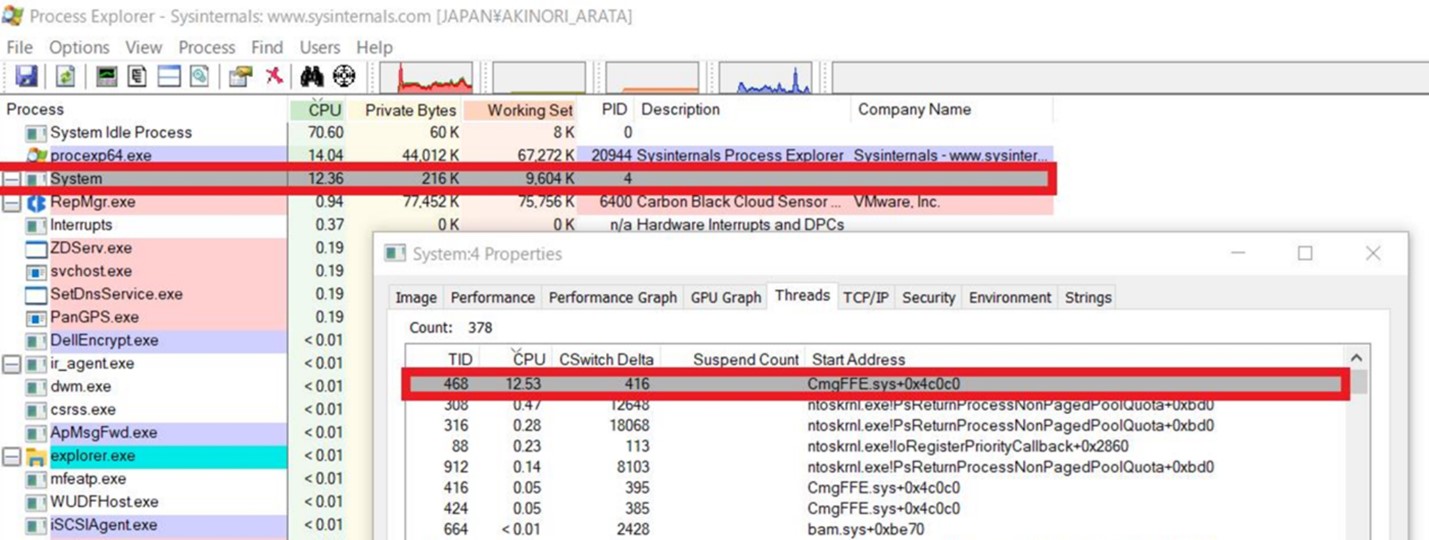
系统进程是驱动程序用于在内核模式上下文中运行其线程的容器。运行 Dell Encryption 文件或文件夹加密时,如果 FFE 驱动程序线程在系统进程下加载。系统进程偶尔会占用 CPU 时间,从而导致 CPU 使用率较高。以下步骤显示如何确认 Dell Encryption 是系统进程中 CPU 使用率较高的原因。
在运行 Dell Encryption 的计算机上,客户可能会在系统进程中观察到较高的 CPU 使用率 (12-25%)。
提醒:要确认这一点,我们必须使用进程资源管理器。
- 从进程资源管理器下载进程资源管理器
- 提取 .zip 文件的内容并运行
procexp.exe。 - 找到系统进程。

Oorzaak
如果系统进程显示 CPU 使用率较高,请执行以下步骤:
- 双击以打开属性窗口。
- 单击“Threads”选项卡。
如果有一个线程显示 CPU 利用率高,并且地址以 , CmgFFE.sys, 这与客户报告的问题相匹配。
Oplossing
此问题已在 Dell Encryption 11.3.0 及更高版本中得到解决,网址为: https://www.dell.com/support/home/product-support/product/dell-data-protection-encryption/drivers
要联系支持部门,请参阅 Dell Data Security 国际支持电话号码。
转至 TechDirect,在线生成技术支持请求。
要获得更多见解和资源,请加入戴尔安全社区论坛。
Getroffen producten
Dell EncryptionArtikeleigenschappen
Artikelnummer: 000190525
Artikeltype: Solution
Laatst aangepast: 11 mei 2026
Versie: 9
Vind antwoorden op uw vragen via andere Dell gebruikers
Support Services
Controleer of uw apparaat wordt gedekt door Support Services.