PowerFlex 3.X: How to renew the default SSL certificate
Samenvatting: PowerFlex Manager generates a 2-year default self-signed SSL certificate when it is deployed. You can replace this default SSL certificate by generating a CSR, having it signed by a trusted certificate authority and uploading the signed certificate to PowerFlex Manager. If you are not using a trusted certificate authority and must renew the default self-signed SSL certificate, then you can use the following instructions. ...
Dit artikel is van toepassing op
Dit artikel is niet van toepassing op
Dit artikel is niet gebonden aan een specifiek product.
Niet alle productversies worden in dit artikel vermeld.
Instructies
This generates a new 2 year self-signed SSL certificate. This should only be done if the default self-signed SSL certificate is still being used.
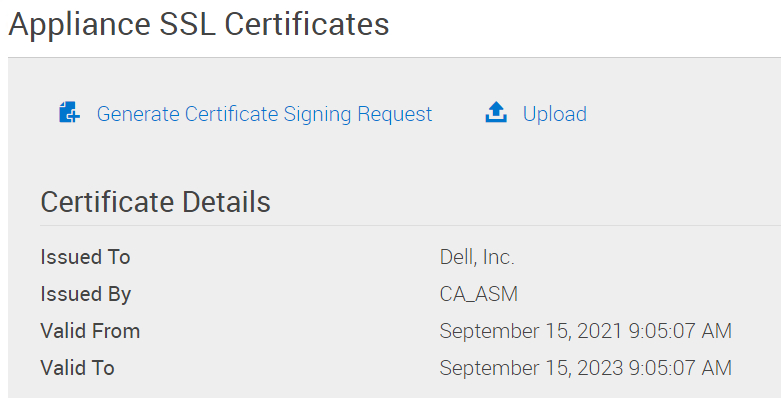
1- Confirm that the default SSL certificate is still being used:
PowerFlex Manager -> Settings -> Virtual Appliance Management ->Appliance SSL Certificates
The "Certificate Details" will have it "Issued To" "Dell, Inc." and "Issued By" "CA_ASM"
The "Valid From" date will be the date PowerFlex Manager was deployed.
The "Valid To" date will be 2 years later.
2- Log in to the PowerFlex Manager appliance with the delladmin user
3-
sudo su -
4- Delete the old self-signed CA data:
   >  cd /opt/Dell/ssl
   >  rake reset_ca
5- Remove old self-signed certificate.
> rm /etc/pki/tls/certs/localhost.crt
6- Reboot PowerFlex Manager
> shutdown -r now
7- Confirm that the new self-signed SSL certificate is loaded: PowerFlex Manager -> Settings -> Virtual Appliance Management -> Appliance SSL Certificates The "Certificate Details" will have it "Issued To" "Dell, Inc." and "Issued By" "CA_ASM" The "Valid From" date will be the current date. The "Valid To" date will be 2 years later.
Getroffen producten
PowerFlex rackProducten
VxFlex Ready Nodes, PowerFlex custom node, PowerFlex appliance R650, PowerFlex appliance R6525, PowerFlex appliance R660, PowerFlex appliance R6625, Powerflex appliance R750, PowerFlex appliance R760, PowerFlex appliance R7625, PowerFlex custom node
, PowerFlex custom node R650, PowerFlex custom node R6525, PowerFlex custom node R660, PowerFlex custom node R6625, PowerFlex custom node R750, PowerFlex custom node R760, PowerFlex custom node R7625, PowerFlex custom node R860, PowerFlex appliance R640, PowerFlex appliance R740XD, PowerFlex appliance R7525, PowerFlex appliance R840
...
Artikeleigenschappen
Artikelnummer: 000191512
Artikeltype: How To
Laatst aangepast: 11 mei 2026
Versie: 6
Vind antwoorden op uw vragen via andere Dell gebruikers
Support Services
Controleer of uw apparaat wordt gedekt door Support Services.