CloudLink: CloudLink SSL Web certificate is Expiring
Samenvatting: The CloudLink SSL Web certificate is expiring.
Dit artikel is van toepassing op
Dit artikel is niet van toepassing op
Dit artikel is niet gebonden aan een specifiek product.
Niet alle productversies worden in dit artikel vermeld.
Symptomen
The CloudLink SSL Web certificate is expiring.
By default, CloudLink Center uses a self-signed certificate. When connecting to CloudLink Center, the web browser may display several security warnings. These warnings are displayed because self-signed certificates do not have the same level of trust as certificates issued and signed by a trusted certification authority (CA).
Oorzaak
The SSL certificate date was set to expire.
To stop these warnings from being displayed, obtain and upload to CloudLink Center a certificate that has been signed for CloudLink by a trusted CA.
You can upload an externally generated certificate and private key, or generate a certificate signing request for a private key generated by CloudLink Center.
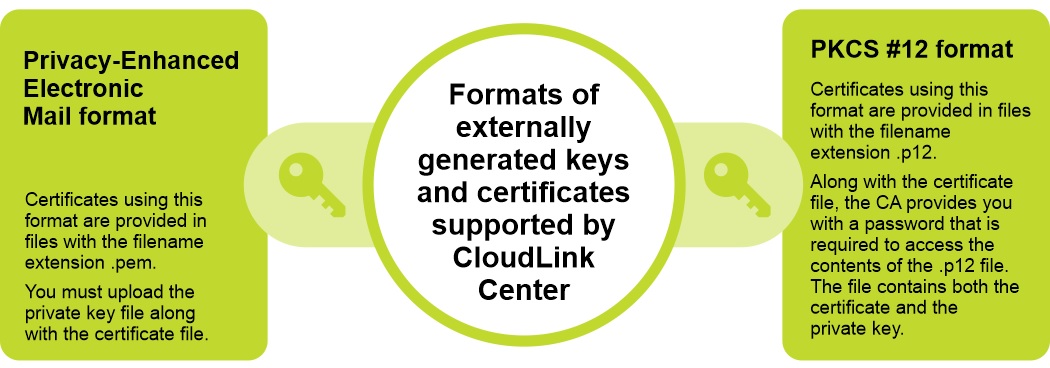
CloudLink supports two formats for externally generated keys and certificates:
Privacy-Enhanced Electronic Mail format and PKCS #12 format.
Oplossing
To resolve this issue, upload a new SSL certificate to the CloudLink appliance.
Steps:
Note: When uploading a new certificate and an optional private key, the web server restarts and the connection is terminated. After uploading a certificate signed for CloudLink Center, verify the subject, fingerprint, and end date to ensure that it is the certificate that is wanted.
Steps:
- Log in to CloudLink Center.
- Click Server > SSL > Upload. The Upload Web SSL Certificate is displayed.
- In the Upload Web SSL Certificate dialog box, enter the following information:
- From the Certificate Format list, select the required certificate format.
- In the Certificate box, click to select the certificate.
- In the Key box, click to select the key.
- Click Upload.
Getroffen producten
CloudLinkArtikeleigenschappen
Artikelnummer: 000199912
Artikeltype: Solution
Laatst aangepast: 14 mei 2026
Versie: 8
Vind antwoorden op uw vragen via andere Dell gebruikers
Support Services
Controleer of uw apparaat wordt gedekt door Support Services.