AppSync: In AppSync UI customer was unable to set the logging mode to debug as Apply button stayed disabled when debug option was selected.
Samenvatting: In AppSync UI customer was unable to set the logging level to debug as Apply button stayed disabled when debug option was selected.
Dit artikel is van toepassing op
Dit artikel is niet van toepassing op
Dit artikel is niet gebonden aan een specifiek product.
Niet alle productversies worden in dit artikel vermeld.
Symptomen
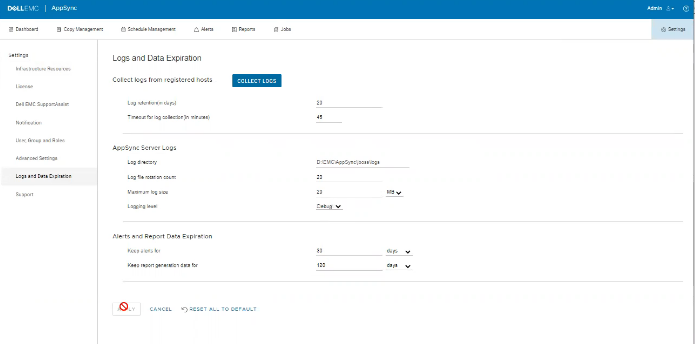
No errors in the logs but the issue can be observed on the UI as shown in the below.
Oorzaak
The Issue is because customer on the same screen, had set "Timeout for log collection(in minutes)" option value to 45 which is invalid.
Oplossing
Set The value for "Timeout for log collection(in minutes)" option to a valid value of 90 and 120.
Extra informatie
AppSync 4.5 will not allow an invalid value for "Timeout for log collection(in minutes)."
Valid values can be from 90 to 120.
Valid values can be from 90 to 120.
Getroffen producten
AppSync, AppSyncArtikeleigenschappen
Artikelnummer: 000203604
Artikeltype: Solution
Laatst aangepast: 09 sep. 2025
Versie: 8
Vind antwoorden op uw vragen via andere Dell gebruikers
Support Services
Controleer of uw apparaat wordt gedekt door Support Services.