CloudLink SFTP 백업 저장소 오류 "Auth fail" 수정
Samenvatting: SFTP 백업 저장소 액세스를 테스트할 때 "Auth fail" 오류 해결
Dit artikel is van toepassing op
Dit artikel is niet van toepassing op
Dit artikel is niet gebonden aan een specifiek product.
Niet alle productversies worden in dit artikel vermeld.
Symptomen
SFTP 백업 저장소 액세스를 테스트할 때 "Auth fail"오류가 발생합니다.
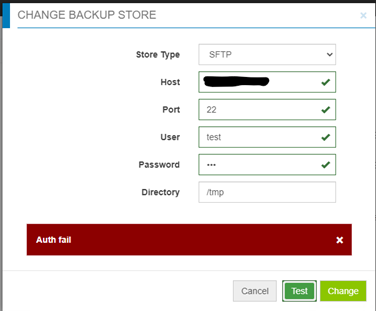
Oorzaak
- 비밀번호가 올바르지 않습니다.
- 타겟 서버의 비밀번호 인증이 비활성화되었습니다(Challenge response만 활성화됨) - CloudLink가 SFTP 백업 저장소에 비밀번호 인증을 사용하고 있지만 challenge response는 사용하고 있지 않습니다.
Oplossing
비밀번호가 잘못된 것이 아닐 경우 타겟 서버에서 /etc/ssh/sshd_config 파일을 찾아 "PasswordAuthentication" 설정을 확인합니다.
PasswordAuthentication이 "no"로 설정되어 있으면 "yes"로 변경한 다음 ssh 서비스를 재시작합니다.
예를 들면 다음과 같습니다. "systemctl restart sshd.service"
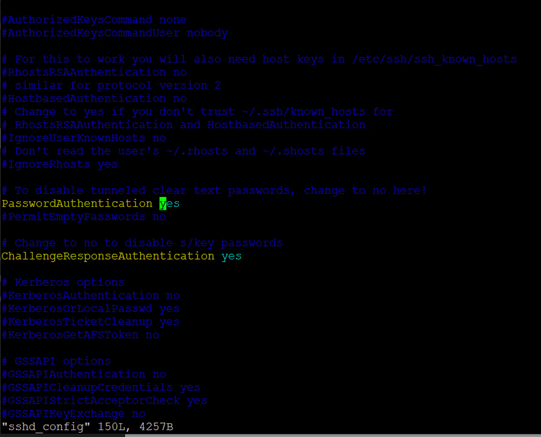
PasswordAuthentication이 "no"로 설정되어 있으면 "yes"로 변경한 다음 ssh 서비스를 재시작합니다.
예를 들면 다음과 같습니다. "systemctl restart sshd.service"
Getroffen producten
CloudLink SecureVM, CloudLinkArtikeleigenschappen
Artikelnummer: 000210190
Artikeltype: Solution
Laatst aangepast: 16 mei 2026
Versie: 6
Vind antwoorden op uw vragen via andere Dell gebruikers
Support Services
Controleer of uw apparaat wordt gedekt door Support Services.