修复 Cloudlink sftp 备份存储错误“身份验证失败”
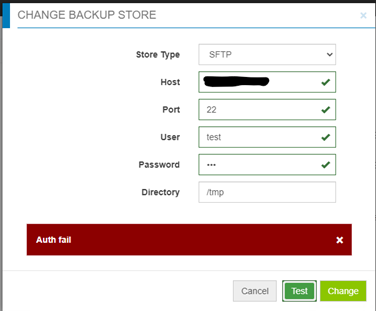
Samenvatting: 解决测试对 sftp 备份存储区的访问权限时出现的错误“Auth fail”。
Dit artikel is van toepassing op
Dit artikel is niet van toepassing op
Dit artikel is niet gebonden aan een specifiek product.
Niet alle productversies worden in dit artikel vermeld.
Symptomen
身份验证失败“时测试对 sftp 备份存储区的访问:
Oorzaak
- 密码不正确。
- 目标服务器上的密码身份验证处于禁用状态(仅启用质询响应)— CloudLink 对 sftp 备份存储使用密码身份验证,但不对质询响应使用密码身份验证。
Oplossing
如果不是不正确的密码大小写,请检查目标服务器上的文件 /etc/ssh/sshd_config,找到“PasswordAuthentication”设置。
如果 PasswordAuthentication 设置为“no”,则更改为“yes”,然后重新启动 ssh 服务。
例如:“systemctl restart sshd.service”。
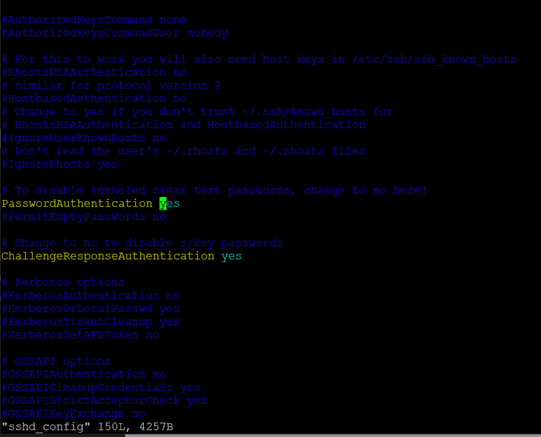
如果 PasswordAuthentication 设置为“no”,则更改为“yes”,然后重新启动 ssh 服务。
例如:“systemctl restart sshd.service”。
Getroffen producten
CloudLink SecureVM, CloudLinkArtikeleigenschappen
Artikelnummer: 000210190
Artikeltype: Solution
Laatst aangepast: 16 mei 2026
Versie: 6
Vind antwoorden op uw vragen via andere Dell gebruikers
Support Services
Controleer of uw apparaat wordt gedekt door Support Services.