如何啟動 Microsoft Copilot in Windows
Samenvatting: 這是使用 Windows 和 Microsoft Edge 中的鍵盤、快速鍵或按鈕啟動 Microsoft Copilot in Windows 的方式。
Dit artikel is van toepassing op
Dit artikel is niet van toepassing op
Dit artikel is niet gebonden aan een specifiek product.
Niet alle productversies worden in dit artikel vermeld.
Instructies
受影響的作業系統:
- Windows 11
- Windows 10
- Microsoft Copilot in Windows 未在中華人民共和國 (PRC) 提供使用
- Recall 是一項 NPU 驅動的功能,僅適用於 Microsoft Copilot+ PC
- 在適用情況下,使用者也可停用 Microsoft Copilot in Windows 和 Recall,這會導致 Microsoft Copilot 鍵出現不同行為
- 該階層適用於所有搭載 Windows 11 的電腦
- 使用 Windows Update 在搭載 Windows 10 的非 Copilot+ PC 上啟用 Microsoft Copilot 鍵 - 即將公佈 (TBA)
Microsoft Copilot in Windows 可透過多種方式啟動。
| 若要啟動 Microsoft Copilot | 鍵盤快速鍵、圖示或按鍵 |
|---|---|
| Windows 鍵 + C |  |
| Windows 工作列 |  |
| Microsoft Edge |  |
| Microsoft Copilot 鍵 |  |
注意:從 2024 年春季開始,全新 Windows 11 裝置隨附全新鍵盤配置和專屬鍵,可在 Windows 中啟動 Microsoft Copilot。此鍵會取代右側 Alt 鍵旁的功能表鍵。在部分地區配置上,按鍵位置可能會有所不同。
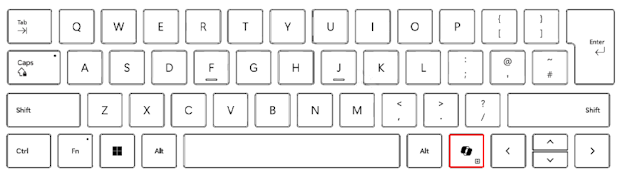
已知行為
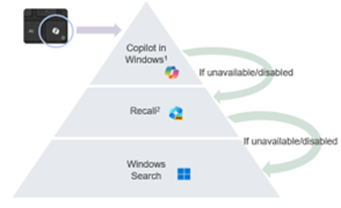
在 Microsoft Copilot+ PC 上,按下 Microsoft Copilot 鍵將:
- 啟動 Microsoft Copilot in Windows。
- 如果 Microsoft Copilot 無法使用或停用,按鍵會啟動「Recall」。
- 如果無法使用或停用「Recall」,則按鍵會啟動 Windows 搜尋
按住 Microsoft Copilot 鍵可啟動語音聽寫:
這可讓使用者在 Microsoft Copilot in Windows 中提出問題或反覆使用語音命令。此功能將在未來的某個時間點啟用。
Extra informatie

Artikeleigenschappen
Artikelnummer: 000221081
Artikeltype: How To
Laatst aangepast: 19 mei 2026
Versie: 9
Vind antwoorden op uw vragen via andere Dell gebruikers
Support Services
Controleer of uw apparaat wordt gedekt door Support Services.