Dellクライアント デバイス マネージャーを抽出する方法
Samenvatting: この記事では、Dell Client Device Manager(DCDM)を抽出する方法について説明します。
Dit artikel is van toepassing op
Dit artikel is niet van toepassing op
Dit artikel is niet gebonden aan een specifiek product.
Niet alle productversies worden in dit artikel vermeld.
Instructies
.cabファイルからコンテンツを抽出するには、いくつかのオプションがあります。Windowsエクスプローラー、コマンド ライン、または.cab ファイルをサポートするサード パーティー製アーカイブ アプリケーション。
注:サード パーティー製アプリケーションは幅広く利用できるため、例は提供されていません。
Windowsエクスプローラーを使用する場合:
- Dell Client Device Managerをダウンロードしたフォルダーでcabファイルを右クリックし、[Open With > Windows Explorer]を選択します。
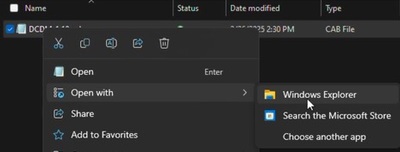 注:Dellクライアント デバイス マネージャーのダウンロードの詳細については、「 Dellクライアント デバイス マネージャーのダウンロード方法」を参照してください。
 - すべてのファイルを選択して右クリックし、[ 展開]をクリックします。
![すべてのファイルを選択して右クリックし、[展開]をクリックします。](https://supportkb.dell.com/img/ka0Do0000002ksUIAQ/ka0Do0000002ksUIAQ_ja_2.jpeg)
- [Select a Destination]ウィンドウを使用してコンテンツを抽出する場所に移動し、[ Extract ]ボタンをクリックします。
![[抽出] ボタンをクリックします。](https://supportkb.dell.com/img/ka0Do0000002ksUIAQ/ka0Do0000002ksUIAQ_ja_3.jpeg) 注:Windowsエクスプローラーを使用してキャビネット ファイルを抽出すると、フォルダー構造が失われ、DCDM_Deployment.ps1スクリプトが設計どおりに機能しません。用意されているPowerShellスクリプトを使用してDCDMを導入する場合は、 Installers という名前の新しいフォルダーを作成し、Dell.Core.Services.Installer_64bit.msi、DellCommandUpdateApp_Setup.exe、TrustedDevice-64Bit.msiをそのフォルダーに移動する必要があります。
注:Windowsエクスプローラーを使用してキャビネット ファイルを抽出すると、フォルダー構造が失われ、DCDM_Deployment.ps1スクリプトが設計どおりに機能しません。用意されているPowerShellスクリプトを使用してDCDMを導入する場合は、 Installers という名前の新しいフォルダーを作成し、Dell.Core.Services.Installer_64bit.msi、DellCommandUpdateApp_Setup.exe、TrustedDevice-64Bit.msiをそのフォルダーに移動する必要があります。
コマンド ラインを使用する場合:
- コマンド プロンプトを開き、cabファイルをダウンロードしたフォルダーにディレクトリー フォーカスを設定します。
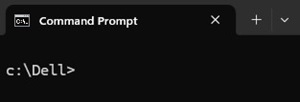 注:Dellクライアント デバイス マネージャーのダウンロードの詳細については、「 Dellクライアント デバイス マネージャーのダウンロード方法」を参照してください。
 - 次のコマンドを入力します。
expand -F:* cabfile_path existing_destination_folder
cabfile_pathはDell Client Device Manager cabファイルの名前で、existing_destination_folderはコンテンツを展開するフォルダーのフル パスです。
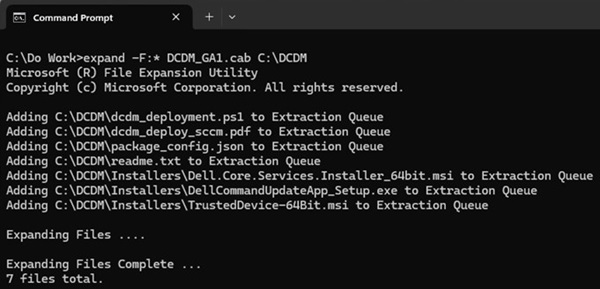
Getroffen producten
Dell Client Device ManagerArtikeleigenschappen
Artikelnummer: 000299313
Artikeltype: How To
Laatst aangepast: 22 mei 2026
Versie: 2
Vind antwoorden op uw vragen via andere Dell gebruikers
Support Services
Controleer of uw apparaat wordt gedekt door Support Services.