Alienware Command CenterがAlienware以外のPCに自動的にインストールされる
Samenvatting: 次の記事では、Alienware以外のデバイスにAlienware周辺機器をインストールした後のAlienware Command Center(AWCC)のインストール プロセスについて説明します。
Dit artikel is van toepassing op
Dit artikel is niet van toepassing op
Dit artikel is niet gebonden aan een specifiek product.
Niet alle productversies worden in dit artikel vermeld.
Instructies
Alienware Command Centerアプリケーションの自動インストール
この記事では、AWCCアプリケーションがAlienware以外のデバイスにインストールされる理由について説明します。
メモ: Windows自動識別(ID)プロセスは、アプリケーションのインストールをプッシュします。
この記事では、次の周辺機器をサポートしています。
- Alienware Proワイヤレス ゲーム キーボード
- Alienware Proワイヤレス ゲーミング マウス
- Alienware TKLゲーミング キーボード(AW420K)
- Alienwareワイヤレス ゲーミング ヘッドセット(AW920H)
- Alienwareデュアルモード ワイヤレス ゲーミング ヘッドセット(AW720H)
- Alienwareワイヤレス ゲーミング マウス(AW720M)
- Alienware有線ゲーミング マウス(AW320M)
- Alienware有線またはワイヤレス ゲーミング マウス(AW610M)
- Alienwareロー プロファイルRGBメカニカル ゲーミング キーボード(AW510K)
- Alienware RGBメカニカル ゲーミング キーボード(AW410K)
- Alienwareワイヤレス ゲーミング マウス(AW310M)
- Alienwareゲーミング マウス(AW510M)
- Alienwareメカニカル ゲーミング キーボード(AW310K)
- Alienware Tri-Modeワイヤレス ゲーミング キーボード(AW920K)
- Alienwareゲーミング ヘッドセット(AW520H)
- Alienware Tri-Modeワイヤレス ゲーミング ヘッドセット(AW725H)
- Alienware Proワイヤレス ゲーミング ヘッドセット
- Alienwareワイヤレス ゲーミング マウス(AW620M)
この記事では、次のモニターをサポートしています。
- Alienware 27インチ ゲーミング モニター(AW2725DM)
- Alienware 32インチ ゲーミング モニター(AW3225DM)
- Alienware 34インチ ゲーミング モニター(AW3425DWM)
- Alienware 27インチ ゲーミング モニター(AW2720HFA)
- Alienware 27インチ ゲーミング モニター(AW2720HF)
- Alienware 34インチ曲面ゲーミング モニター(AW3420DW)
- Alienware 55インチ有機ELモニター(AW5520QF)
- Alienware 25インチ ゲーミング モニター(ダークサイド オブ ザ ムーン)(AW2521HF)
- Alienware 25インチ ゲーミング モニター(ルナライト)(AW2521HFL)
- Alienware 25インチ ゲーミング モニター(ルナライト)(AW2521HFLA)
- Alienware 25インチ ゲーミング モニター(AW2521H)
- Alienware 25インチ ゲーミング モニター(ルナライト)(AW2521HFA)
- Alienware 38インチ曲面ゲーミング モニター(AW3821DW)
- Alienware 27インチ ゲーミング モニター(AW2721D)
- Alienware 34インチ曲面有機ELゲーミング モニター(AW3423DWF)
- Alienware 25インチ ゲーミング モニター(AW2523HF)
- Alienware 27インチ ゲーミング モニター(AW2723DF)
- Alienware 34インチ曲面有機ELゲーミング モニター(AW3423DW)
- Alienware 25インチ ゲーミング モニター(AW2524H)
- Alienware 27インチ ゲーミング モニター(AW2724DM)
- Alienware 27インチ ゲーミング モニター(AW2724HF)
- Alienware 25インチ ゲーミング モニター(AW2524HF)
- Alienware 32インチ曲面ゲーミング モニター(AW3225QF)
- Alienware 27インチ ゲーミング モニター(AW2725DF)
- Alienware 27インチ ゲーミング モニター(AW2725QF)
- Alienware 34インチ240Hz QD-有機ELゲーミング モニター(AW3425DW)
Alienware周辺機器およびモニターは、Alienwareコンピューターだけでなく、他のDell製品やサード パーティー製デバイスとも併用できます。購入したハードウェアの潜在能力を最大限に引き出すために、WindowsはAlienware周辺機器やモニターを識別した後にAWCCをインストールします。AWCCアプリケーションには、Alienwareハードウェアで使用できる追加機能が含まれています。(例:RGBカラーコントロール、プロファイル、マクロなど)
Alienwareハードウェアが識別されると、AWCCはPCに自動的にインストールされ、よりスムーズな操作性を実現します。
デルは、AWCCアプリケーションをオペレーティングシステムにインストールするかどうかを尋ねるメッセージを画面に追加しました。
DellはAWCCバージョン6.6.x.xでこれを追加しました。
WindowsがAWCCアプリケーションの最新バージョンをプッシュしているので、アプリケーションをインストールするかどうかを選択できます。
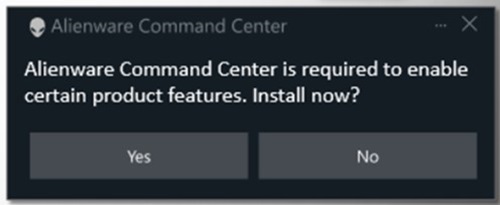
[No]を選択すると、気が変わった場合に Dell.com にアクセスすることを勧める別のメッセージが画面に表示されます。
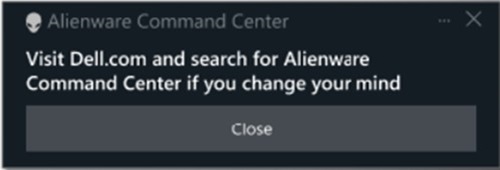
メモ: このオプションは、AWCCアプリケーションの古いバージョンには適用されません。アプリケーションのAWCCバージョン5.x.x.xは、アップデートのための開発段階を終了しました。
Alienwareチームは、新しいAWCCアプリケーションの改善に常に取り組んでおり、古いデバイスに最新のAWCCアプリケーションを実装することに取り組んでいます。
詳細については、次のガイドを参照してください。
- Dellのドキュメントおよびマニュアル: Alienware Command Centerユーザー ガイド
Getroffen producten
Alienware Mechanical Gaming Keyboard | AW310K, Alienware RGB Mechanical Gaming Keyboard AW410K, Alienware Tenkeyless Gaming Keyboard AW420K, Alienware Wireless Gaming Mouse AW310M, Alienware RGB Gaming Mouse AW510M
, Alienware Wired/Wireless Gaming Mouse AW610M, Alienware Tri-Mode Wireless Gaming Mouse AW720M, Alienware, Dell All-in-One, Dell Pro All-in-One, Dell Pro Max Micro, Dell Pro Max Slim, Dell Pro Max Tower, Dell Pro Micro, Dell Pro Slim, Dell Pro Tower, Dell Slim, Dell Tower, Inspiron, OptiPlex, Vostro, XPS, G Series, G Series, Alienware, Dell Laptops, Dell Plus, Dell Pro, Dell Pro Max, Dell Pro Plus, Dell Pro Premium, Inspiron, Latitude, Dell Pro Rugged, Vostro, XPS, Fixed Workstations, Mobile Workstations, Alienware Pro Wireless Gaming Headset, Alienware Tri-Mode Wireless Gaming Headset AW725H, Alienware Tri-Mode Wireless Gaming Headset AW920H, Alienware Wired Gaming Mouse AW320M, Alienware Pro Wireless Gaming Keyboard, Alienware Pro Wireless Gaming Mouse, Alienware Tri-Mode Wireless Gaming Keyboard AW920K, Alienware Wired Gaming Headset AW520H, Alienware Dual Mode Wireless Gaming Headset AW720H, Alienware Wireless Gaming Mouse AW620M, Alienware 27 Gaming Monitor AW2723DF, Alienware 27 Gaming Monitor AW2724DM, Alienware 27 Gaming Monitor AW2724HF, Alienware 27 360Hz QD OLED Gaming Monitor AW2725DF, Alienware 27 4K Dual-Resolution Gaming Monitor AW2725QF, Alienware 32 Gaming Monitor AW3225DM, Alienware 32 4K QD OLED Gaming Monitor AW3225QF, Alienware 34 Curved OLED Monitor AW3423DW, Alienware 34 Curved QD OLED Gaming Monitor AW3423DWF, Alienware 34 240Hz QD-OLED Gaming Monitor AW3425DW, Alienware 34 Gaming Monitor AW3425DWM, Alienware 25 Gaming Monitor AW2521H, Alienware 25 Gaming Monitor AW2521HF, Alienware 25 Gaming Monitor AW2521HFA, Alienware 25 Gaming Monitor AW2521HFL, Alienware 25 Gaming Monitor AW2521HFLA, Alienware 27 Gaming Monitor AW2720HF, Alienware 27 Gaming Monitor AW2720HFA, Alienware 27 Gaming Monitor AW2721D, Alienware AW3420DW, Alienware 38 Curved Gaming Monitor AW3821DW, Alienware 55 OLED Monitor AW5520QF, Dell Pro Max Micro XE FCM2250
...
Artikeleigenschappen
Artikelnummer: 000325948
Artikeltype: How To
Laatst aangepast: 29 mei 2025
Versie: 1
Vind antwoorden op uw vragen via andere Dell gebruikers
Support Services
Controleer of uw apparaat wordt gedekt door Support Services.