Alienware Command Center wordt automatisch geïnstalleerd op een computer die niet van Alienware is
Samenvatting: Het volgende artikel bevat informatie over het installatieproces van Alienware Command Center (AWCC) zodra een Alienware randapparaat is geïnstalleerd op een apparaat dat niet van Alienware is. ...
Dit artikel is van toepassing op
Dit artikel is niet van toepassing op
Dit artikel is niet gebonden aan een specifiek product.
Niet alle productversies worden in dit artikel vermeld.
Instructies
Automatische installatie van de Alienware Command Center applicatie
In dit artikel wordt beschreven waarom de AWCC-applicatie wordt geïnstalleerd op een niet-Alienware apparaat.
Opmerking: Het Windows Automatic Identification (ID)-proces pusht de installatie van de applicatie.
Dit artikel ondersteunt de volgende randapparatuur:
- Alienware Pro draadloos gametoetsenbord
- Alienware Pro draadloze gamingmuis
- Alienware TKL gamingtoetsenbord (AW420K)
- Alienware draadloze gamingheadset (AW920H)
- Alienware draadloze gamingheadset met dual mode (AW720H)
- Alienware draadloze gamingmuis (AW720M)
- Alienware bekabelde gamingmuis (AW320M)
- Alienware bekabelde of draadloze gamingmuis (AW610M)
- Alienware low-profile RGB mechanisch gamingtoetsenbord (AW510K)
- Alienware RGB mechanisch gamingtoetsenbord (AW410K)
- Alienware draadloze gamingmuis (AW310M)
- Alienware gamingmuis (AW510M)
- Alienware mechanisch gamingtoetsenbord (AW310K)
- Alienware draadloos gamingtoetsenbord met tri-mode (AW920K)
- Alienware gamingheadset (AW520H)
- Alienware Tri-Mode draadloze gamingheadset (AW725H)
- Alienware Pro draadloze gamingheadset
- Alienware draadloze gamingmuis (AW620M)
Dit artikel ondersteunt de volgende monitoren:
- Alienware 27" gamingmonitor (AW2725DM)
- Alienware 32" gamingmonitor (AW3225DM)
- Alienware 34" gamingmonitor (AW3425DWM)
- Alienware 27" gamingmonitor (AW2720HFA)
- Alienware 27" gamingmonitor (AW2720HF)
- Alienware 34" gebogen gamingmonitor (AW3420DW)
- Alienware 55" OLED monitor (AW5520QF)
- Alienware 25" gamingmonitor (Dark Side of the Moon) (AW2521HF)
- Alienware 25" gamingmonitor (Lunar Light) (AW2521HFL)
- Alienware 25" gamingmonitor (Lunar Light) (AW2521HFLA)
- Alienware 25" gamingmonitor (AW2521H)
- Alienware 25" gamingmonitor (Lunar Light) (AW2521HFA)
- Alienware 38" gebogen gamingmonitor (AW3821DW)
- Alienware 27" gamingmonitor (AW2721D)
- Alienware 34" gebogen OLED gamingmonitor (AW3423DWF)
- Alienware 25" gamingmonitor (AW2523HF)
- Alienware 27" gamingmonitor (AW2723DF)
- Alienware 34" gebogen OLED gamingmonitor (AW3423DW)
- Alienware 25" gamingmonitor (AW2524H)
- Alienware 27" gamingmonitor (AW2724DM)
- Alienware 27" gamingmonitor (AW2724HF)
- Alienware 25" gamingmonitor (AW2524HF)
- Alienware 32" gebogen gamingmonitor (AW3225QF)
- Alienware 27" gamingmonitor (AW2725DF)
- Alienware 27" gamingmonitor (AW2725QF)
- Alienware 34" 240 Hz QD-OLED gamingmonitor (AW3425DW)
Alienware randapparatuur en monitoren worden gebruikt met Alienware computers, maar ook met andere Dell producten en apparaten van derden. Om u te helpen het volledige potentieel van uw aangeschafte hardware te gebruiken, installeert Windows AWCC zodra het Alienware-randapparatuur en/of -monitoren identificeert. De AWCC-applicatie bevat extra functies die de Alienware-hardware kan gebruiken. (Bijvoorbeeld: RGB-kleurbeheer, profielen, macro's, enzovoort)
AWCC wordt automatisch op de computer geïnstalleerd zodra Alienware-hardware is geïdentificeerd voor de soepelere ervaring die deze biedt.
Dell heeft een bericht op het scherm toegevoegd waarin wordt gevraagd of de AWCC-applicatie op uw besturingssysteem moet worden geïnstalleerd of niet.
Dell heeft de toevoeging gedaan met AWCC versie 6.6.x.x.
Nu Windows de nieuwste versie van de AWCC-applicatie pusht, kunt u kiezen of u de applicatie al dan niet wilt installeren.
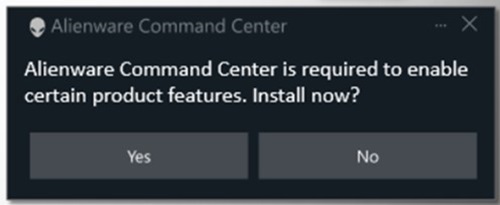
Als u Nee kiest, wordt er nog een bericht op het scherm weergegeven waarin wordt geadviseerd om Dell.com te bezoeken als u van gedachten verandert.

Opmerking: Deze optie is niet van toepassing op oudere versies van de AWCC-applicatie. De AWCC-versie 5.x.x.x van de applicatie is niet langer in ontwikkeling voor updates.
Het Alienware-team werkt voortdurend aan het verbeteren van de nieuwe AWCC-applicatie en werkt aan de implementatie van de nieuwste AWCC-applicatie op oudere apparaten.
Raadpleeg de volgende gids voor meer informatie:
- Documenten en handleidingen van Dell: Gebruikershandleiding Alienware Command Center
Getroffen producten
Alienware Mechanical Gaming Keyboard | AW310K, Alienware RGB Mechanical Gaming Keyboard AW410K, Alienware Tenkeyless Gaming Keyboard AW420K, Alienware Wireless Gaming Mouse AW310M, Alienware RGB Gaming Mouse AW510M
, Alienware Wired/Wireless Gaming Mouse AW610M, Alienware Tri-Mode Wireless Gaming Mouse AW720M, Alienware, Dell All-in-One, Dell Pro All-in-One, Dell Pro Max Micro, Dell Pro Max Slim, Dell Pro Max Tower, Dell Pro Micro, Dell Pro Slim, Dell Pro Tower, Dell Slim, Dell Tower, Inspiron, OptiPlex, Vostro, XPS, G Series, G Series, Alienware, Dell Laptops, Dell Plus, Dell Pro, Dell Pro Max, Dell Pro Plus, Dell Pro Premium, Inspiron, Latitude, Dell Pro Rugged, Vostro, XPS, Fixed Workstations, Mobile Workstations, Alienware Pro Wireless Gaming Headset, Alienware Tri-Mode Wireless Gaming Headset AW725H, Alienware Tri-Mode Wireless Gaming Headset AW920H, Alienware Wired Gaming Mouse AW320M, Alienware Pro Wireless Gaming Keyboard, Alienware Pro Wireless Gaming Mouse, Alienware Tri-Mode Wireless Gaming Keyboard AW920K, Alienware Wired Gaming Headset AW520H, Alienware Dual Mode Wireless Gaming Headset AW720H, Alienware Wireless Gaming Mouse AW620M, Alienware 27 Gaming Monitor AW2723DF, Alienware 27 Gaming Monitor AW2724DM, Alienware 27 Gaming Monitor AW2724HF, Alienware 27 360Hz QD OLED Gaming Monitor AW2725DF, Alienware 27 4K Dual-Resolution Gaming Monitor AW2725QF, Alienware 32 Gaming Monitor AW3225DM, Alienware 32 4K QD OLED Gaming Monitor AW3225QF, Alienware 34 Curved OLED Monitor AW3423DW, Alienware 34 Curved QD OLED Gaming Monitor AW3423DWF, Alienware 34 240Hz QD-OLED Gaming Monitor AW3425DW, Alienware 34 Gaming Monitor AW3425DWM, Alienware 25 Gaming Monitor AW2521H, Alienware 25 Gaming Monitor AW2521HF, Alienware 25 Gaming Monitor AW2521HFA, Alienware 25 Gaming Monitor AW2521HFL, Alienware 25 Gaming Monitor AW2521HFLA, Alienware 27 Gaming Monitor AW2720HF, Alienware 27 Gaming Monitor AW2720HFA, Alienware 27 Gaming Monitor AW2721D, Alienware AW3420DW, Alienware 38 Curved Gaming Monitor AW3821DW, Alienware 55 OLED Monitor AW5520QF, Dell Pro Max Micro XE FCM2250
...
Artikeleigenschappen
Artikelnummer: 000325948
Artikeltype: How To
Laatst aangepast: 29 mei 2025
Versie: 1
Vind antwoorden op uw vragen via andere Dell gebruikers
Support Services
Controleer of uw apparaat wordt gedekt door Support Services.