PowerFlex: Error INVALID_POSTGRES_INSTANCE_ROLE After 4.8 PFMP upgrade
Samenvatting: This article explains the steps to clear the cosmetic alert INVALID_POSTGRES_INSTANCE_ROLE after upgrade from 4.6 to 4.8
Dit artikel is van toepassing op
Dit artikel is niet van toepassing op
Dit artikel is niet gebonden aan een specifiek product.
Niet alle productversies worden in dit artikel vermeld.
Symptomen
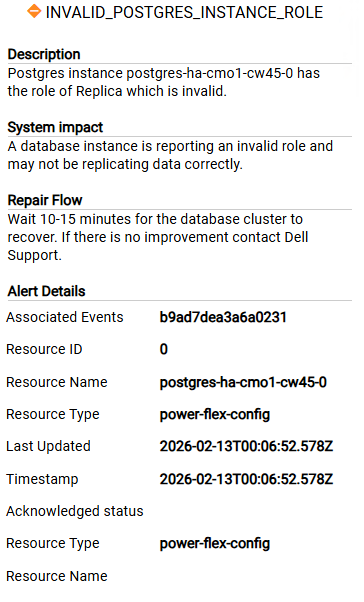
After upgrade from 4.6 to 4.8 the below alerts is triggered and is not cleared by acknowledging the alert
Oorzaak
these are stale alerts from the old CrunchyData PGO database instances (postgres-ha-cmo1-*) that were replaced by CloudNativePG (postgres-ha-cnpg-*) during the 4.8 upgrade.
The old pods and PVCs are gone, the new CNPG cluster is healthy, but the health monitoring configmap still references the old instances, which is why the alerts keep re-firing.
Oplossing
- Check DB health State
delladmin@mvm1:~>kubectl get pods -n powerflex | grep post configure-postgres-prerequirements-0-hw95r 0/1 Completed 0 47d postgres-ha-cnpg-1 1/1 Running 0 47d postgres-ha-cnpg-2 1/1 Running 0 47d postgres-ha-cnpg-3 1/1 Running 0 86m postgres-ha-cnpg-pooler-556778f6fd-2tmd9 1/1 Running 0 21d postgres-ha-cnpg-pooler-556778f6fd-qnp8k 1/1 Running 0 21d postgres-monitor-7fd88546c7-h6tjn 1/1 Running 0 21d postgres-monitor-7fd88546c7-l2wk7 1/1 Running 0 21d - If all DB instanses are Running, manually clear the alerts using this article PowerFlex 4.X: How To Manually Clear Alerts From 4.X PowerFlex Manager UI
- Restart/delete the presentation-service pod to flush cached state
kubectl delete pod -n powerflex $(kubectl get pods -n powerflex | grep presentation | awk '{print $1}')Getroffen producten
PowerFlex rack, ScaleIOArtikeleigenschappen
Artikelnummer: 000453497
Artikeltype: Solution
Laatst aangepast: 16 apr. 2026
Versie: 1
Vind antwoorden op uw vragen via andere Dell gebruikers
Support Services
Controleer of uw apparaat wordt gedekt door Support Services.