Dell Unity: Não é possível detectar uma porta Ethernet ou uma agregação de links na qual a interface de rede do servidor NAS foi configurada
Resumo: O físico remoto da replicação assíncrona deve corresponder ao lado da origem, caso contrário, uma substituição será necessária.
Este artigo aplica-se a
Este artigo não se aplica a
Este artigo não está vinculado a nenhum produto específico.
Nem todas as versões do produto estão identificadas neste artigo.
Sintomas
Um usuário do Unity está recebendo a seguinte mensagem de erro no Unisphere no local de DR:
The system is unable to detect an Ethernet port or link aggregation on which the NAS server network interface was configured. Switch the interface to use another Ethernet port or link aggregation. If this does not help, restart the management software. If the problem persists, contact your service provider.
Causa
Não há nenhuma interface física correspondente na origem para o servidor NAS especificado. Como resultado, ele não pode fazer failover corretamente.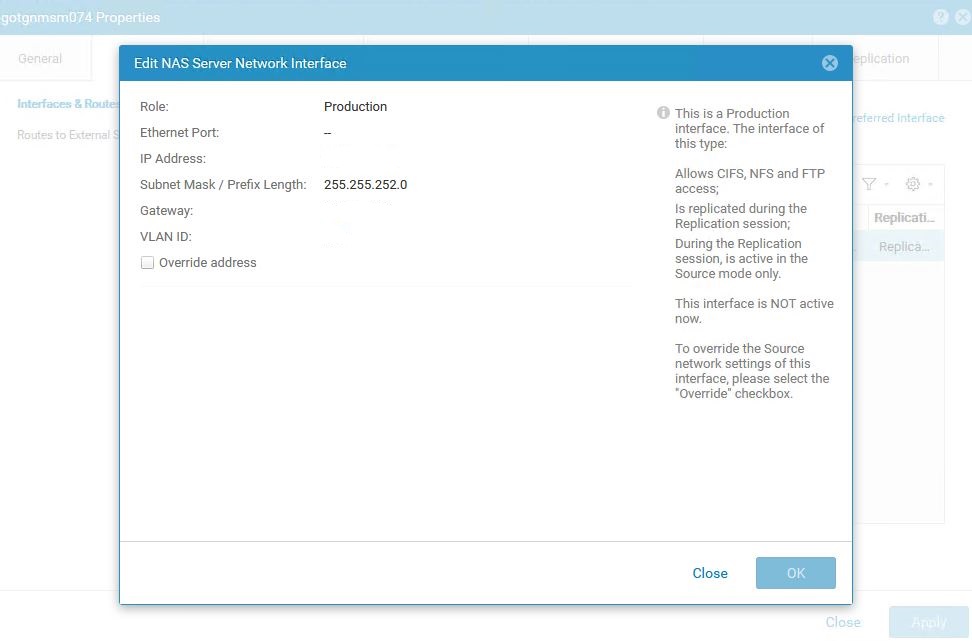
Observe que os IPs foram removidos intencionalmente, no entanto, a chave principal é a Porta Ethernet ausente (traço)
Resolução
- No array de destino do servidor NAS afetado, abra as propriedades do servidor NAS.
- Escolha a guia Rede , selecione o endereço IP atribuído e escolha Editar.
- Na janela Edit NAS Server Interface exibida, marque a caixa de seleção Override IP , configure o mesmo IP que o servidor NAS de produção em uma rede ou interface física diferente ou especifique um IP diferente com uma interface física diferente. Selecione a interface de rede física apropriada de sua escolha.
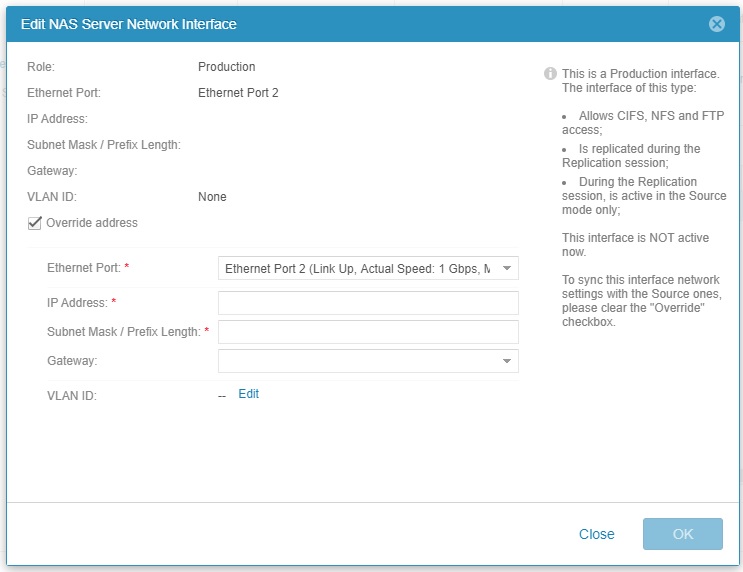
Captura de tela da caixa de seleção Substituir endereço ativada. Observe todos os endereços IP removidos da captura de tela.
Mais informações
Erros de verificação de integridade pré-upgrade:
ERROR_CODE=dm::check_nas_servers_health_2|Error|nasservervdm4 - The system is unable to detect an Ethernet port or link aggregation on which the NAS server network interface was configured. Switch the interface to use another Ethernet port or link aggregation. If this does not help, restart the management software. If the problem persists, contact your service provider. (https://10.xxx.x.xx/help/webhelp/en_US/index.html?
uemcli /net/nas/server show -detail output showing the same error condition :
1:    ID                                          = nas_23
      Name                                        = nasservervdm4
      NetBIOS name                                = nasservervdm4
      SP                                          = spa
      Storage pool                                = pool_2
      Tenant                                      =
      Interface                                   = if_40
      NFS enabled                                 = yes
      NFSv3 enabled                               = yes
      NFSv4 enabled                               = no
      CIFS enabled                                = yes
      Workgroup                                   =
      Windows domain                              = removed.domain.com
      Multiprotocol sharing enabled               = yes
      Unix directory service                      = localThenNis
      Auto user mapping enabled                   = enabled
      Default Unix user                           = N/A
      Default Windows username                    =
      Extended Unix credentials enabled           = no
      Credentials cache retention                 = 15m
      Username translation                        = no
      Packet Reflect enabled                      = no
      Health state                                = Major failure (20)
      Health details                              = "The system is unable to detect an Ethernet port or link aggregation on which the NAS server network interface was configured. Switch the interface to use another Ethernet port or link aggregation. If this does not help, restart the management software. If the problem persists, contact your service provider. (https://10.x.xx.x.x/help/webhelp/en_US/index.html?#unity_t_manage_ns_interfaces_default_rtes.html)"
      Type                                        = 64
      Replication type                            = remote
      Synchronous replication type                = none
      Replication destination                     = yes
      Backup only                                 = yes
      Migration Destination                       = no
      Preferred production interfaces overridden  = Auto synchronized
      Preferred production IPv4 interface         = auto
      Preferred production IPv6 interface         = auto
      Preferred backup and DR test IPv4 interface = auto
      Preferred backup and DR test IPv6 interface = auto
      Source preferred production IPv4 interface  = auto
      Source preferred production IPv6 interface  = auto
      File space used                             = 69085582229504 (62.8T)
      Compression space saved                     = 0
      Compression percent                         = 0%
      Compression ratio                           = 1.0:1
      Data Reduction space saved                  = 0
      Data Reduction percent                      = 0%
      Data Reduction ratio                        = 1.0:1
Produtos afetados
Dell EMC Unity FamilyProdutos
Dell Unity 300, Dell EMC Unity 300F, Dell EMC Unity 350F, Dell EMC Unity XT 380, Dell EMC Unity XT 380F, Dell EMC Unity 400, Dell EMC Unity 400F, Dell EMC Unity 450F, Dell EMC Unity XT 480, Dell EMC Unity XT 480F, Dell EMC Unity 500
, Dell EMC Unity 500F, Dell EMC Unity 550F, Dell EMC Unity 600, Dell EMC Unity 600F, Dell EMC Unity 650F, Dell EMC Unity XT 680, Dell EMC Unity XT 680F, Dell EMC Unity XT 880, Dell EMC Unity XT 880F, Dell EMC Unity Family |Dell EMC Unity All Flash, Dell EMC Unity Family, Dell EMC Unity Hybrid
...
Propriedades do artigo
Número do artigo: 000060348
Tipo de artigo: Solution
Último modificado: 26 set. 2025
Versão: 4
Encontre as respostas de outros usuários da Dell para suas perguntas.
Serviços de suporte
Verifique se o dispositivo está coberto pelos serviços de suporte.