Como se inscrever nos Aconselhamentos técnicos da Dell (DTAs) e nos Aconselhamentos de segurança da Dell (DSAs)
Resumo: Como se inscrever ou cancelar a assinatura de DTAs ou DSAs da Dell.
Este artigo aplica-se a
Este artigo não se aplica a
Este artigo não está vinculado a nenhum produto específico.
Nem todas as versões do produto estão identificadas neste artigo.
Instruções
A Dell Technologies emite avisos sobre produtos Dell para notificá-lo sobre problemas críticos e possíveis impactos no ambiente deles. Configure notificações automatizadas por e-mail sempre que um aconselhamento técnico ou de segurança da Dell for emitido ou apenas quando for emitido um aviso sobre um produto específico.
Para obter as etapas para corrigir um aviso, consulte Gerenciamento de segurança e aconselhamentos técnicos no MyService360. É necessário fazer login no MyService360.
1. Faça login no site https://www.dell.com/support.
2. No canto superior direito, passe o mouse e clique em Preferências da Dell. A página Account Settings & Preferences é exibida.
3. Clique na guia NOTIFICATIONS & ALERTS e clique na guia Product Advisories .
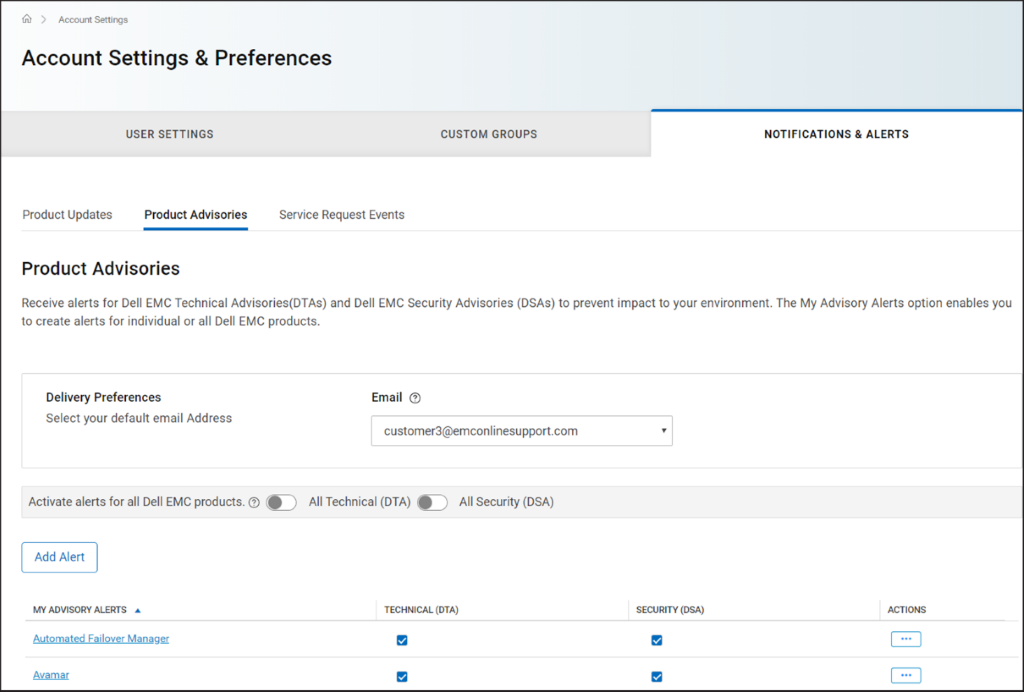
Figura 1 Guia Aconselhamentos
de produto 4. No painel Preferências de Entrega , selecione o endereço de e-mail no qual você deseja receber as notificações.
5. Para receber notificações por e-mail sempre que um aviso for emitido, faça o seguinte:
Nota: Por padrão, são enviadas notificações por e-mail para aconselhamentos técnicos e de segurança. Dependendo de sua necessidade, você pode desmarcar as caixas de seleção nas colunas TECHNICAL (DTA) ou SECURITY (DSA).
Para obter as etapas para corrigir um aviso, consulte Gerenciamento de segurança e aconselhamentos técnicos no MyService360. É necessário fazer login no MyService360.
1. Faça login no site https://www.dell.com/support.
2. No canto superior direito, passe
o mouse e clique em Preferências da Dell. A página Account Settings & Preferences é exibida.
3. Clique na guia NOTIFICATIONS & ALERTS e clique na guia Product Advisories .
Figura 1 Guia Aconselhamentos
de produto 4. No painel Preferências de Entrega , selecione o endereço de e-mail no qual você deseja receber as notificações.
5. Para receber notificações por e-mail sempre que um aviso for emitido, faça o seguinte:
- Para aconselhamentos técnicos, ligue o botão de alternância All Technical (DTA).
- Para aconselhamentos de segurança, ligue o botão de alternância All Security (DSA).
- Clique em Add Alert.
- Digite um nome de produto e clique em Adicionar produto.
- O alerta é criado e exibido na página Product Advisories .
Propriedades do artigo
Número do artigo: 000113250
Tipo de artigo: How To
Último modificado: 18 abr. 2026
Versão: 8
Encontre as respostas de outros usuários da Dell para suas perguntas.
Serviços de suporte
Verifique se o dispositivo está coberto pelos serviços de suporte.