How to Export Windows Event Logs
Resumo: Learn how to export Windows Event Logs using Event Viewer and save system, application, or security logs for troubleshooting and technical support.
Este artigo aplica-se a
Este artigo não se aplica a
Este artigo não está vinculado a nenhum produto específico.
Nem todas as versões do produto estão identificadas neste artigo.
Instruções
- Press the Windows key.
- Type
Event Viewerand then select Event Viewer from the list. - From the left pane, select the type of log to export.
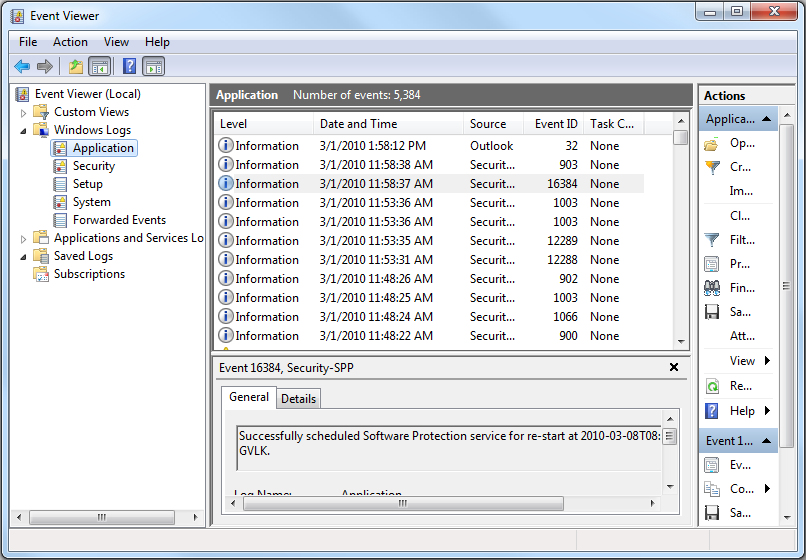
- Save the log by clicking Action and then clicking Save All Events As.

More information can be found at How to Save Event Logs
For information about BIOS event logs for Dell laptops, refer to BIOS Event Logs and Diagnostic Logging on Dell Laptops.
Produtos afetados
Alienware, Dell All-in-One, Dell Pro All-in-One, Dell Pro Max Micro, Dell Pro Max Slim, Dell Pro Max Tower, Dell Pro Micro, Dell Pro Slim, Dell Pro Tower, Dell Slim, Dell Tower, Inspiron, Legacy Desktop Models, OptiPlex, Vostro, XPS, G Series
, G Series, Alienware, Dell Plus, Dell Pro, Dell Pro Max, Dell Pro Plus, Dell Pro Premium, Inspiron, Latitude, Dell Pro Rugged, Vostro, XPS, Legacy Laptop Models, Fixed Workstations, Mobile Workstations, Dell Pro Max Micro XE FCM2250, Dell Pro Max Slim XE FCS1250, Dell Pro Max Tower T2 XE FCT2250, Dell Pro Max 16 XE MC16250, Dell Pro Micro Plus XE QBM1250, Dell Pro Slim Plus XE5 QBS1250, Dell Pro Tower Plus XE5 QBT1250
...
Propriedades do artigo
Número do artigo: 000124382
Tipo de artigo: How To
Último modificado: 10 ago. 2026
Versão: 10
Encontre as respostas de outros usuários da Dell para suas perguntas.
Serviços de suporte
Verifique se o dispositivo está coberto pelos serviços de suporte.