How to Identify the CrowdStrike Falcon Sensor Version
Resumo: Learn to identify the CrowdStrike Falcon Sensor version for issues, process changes, or system requirements. Follow the steps for Windows, Mac, or Linux.
Este artigo aplica-se a
Este artigo não se aplica a
Este artigo não está vinculado a nenhum produto específico.
Nem todas as versões do produto estão identificadas neste artigo.
Instruções
Knowing the CrowdStrike Falcon Sensor version allows you to:
- Identify known issues
- Understand process changes
- Understand system requirements
Affected Products:
- CrowdStrike Falcon Sensor
Affected Operating Systems:
- Windows
- Mac
- Linux
For instructions about how to identify the CrowdStrike Falcon Sensor version, click on Windows, Mac, or Linux.
Note:
- The CrowdStrike Falcon Sensor must be installed before identifying the version. For information about the installation process, reference How to Install CrowdStrike Falcon Sensor.
- For more information about checking the CrowdStrike Falcon Sensor, reference https://supportportal.crowdstrike.com/s/article/Checking-Falcon-Sensor-Version-Locally
.
Windows
- Right-click the Windows start menu, and then click Run.

- In the Run UI, type the following command and then press OK.
cmd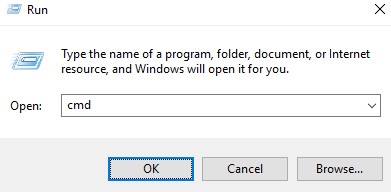
- In Command Prompt, type the following command and then press Enter.
"C:\Program Files\CrowdStrike\CSSensorSettings.exe" –version
- Record the version. In the example, 7.04.17605.0 is the version.
 Note: The version of your sensor may differ from the above screenshot.
Mac
- Locate and then double-click Terminal.

- In Terminal, type the following command and then press Enter.
sysctl cs.version
- Record the version. In the example, the version is 4.18.8013.0.
 Note: The version of your sensor may differ from the above screenshot.
Linux
- On the targeted endpoint, open Terminal.

- In Terminal, type the following command and then press Enter.
sudo /opt/CrowdStrike/falconctl -g --version
- Populate the sudo account password and then press Enter.
- Record the version. In the example, 4.20.6602.0 is the version.
 Note: The version of your sensor may differ from the above screenshot.
Produtos afetados
CrowdStrikePropriedades do artigo
Número do artigo: 000126120
Tipo de artigo: How To
Último modificado: 27 jul. 2026
Versão: 23
Encontre as respostas de outros usuários da Dell para suas perguntas.
Serviços de suporte
Verifique se o dispositivo está coberto pelos serviços de suporte.