Microsoft Edge Runtime Error when Opening SupportAssist
Resumo: Microsoft Edge WebView2 runtime error is displayed when opening SupportAssist for Home PCs v4.0 on computers that does not have the WebView2 runtime installed.
Este artigo aplica-se a
Este artigo não se aplica a
Este artigo não está vinculado a nenhum produto específico.
Nem todas as versões do produto estão identificadas neste artigo.
Sintomas
Affected Products:
- SupportAssist for Home PCs
Affected Versions:
- v4.0
When you open the SupportAssist for Home PCs v4.0 on computers that do not have the WebView2 runtime installed, Edge displays the following messages:
- A suitable version of Microsoft Edge Webview2 Runtime was not detected. Download and install WebView2 Runtime.
- Error occurred while initializing webview2: Object reference not set to an instance of an object.
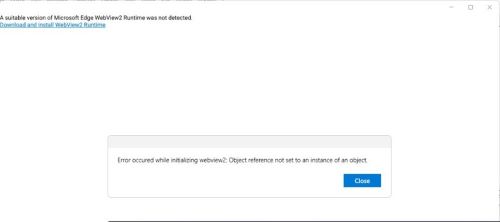
Figure 1: (English Only) Messages displayed when attempting to open SupportAssist without the WebView2 runtime installed
Causa
Microsoft Edge WebView2 runtime is not installed or corrupted.
Resolução
- Open the control panel and verify that the Microsoft edge webview2 runtime is installed.
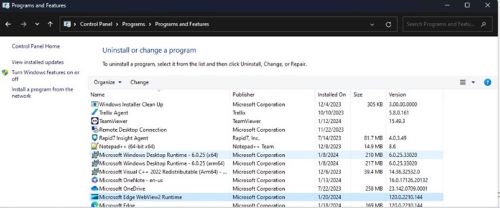
Figure 2: (English Only) Microsoft Edge WebView2 Runtime listed under Programs and Features
- If not installed, then go to step 5.
- If installed, double-click on Microsoft Edge Webview2 Runtime and select repair option and let it complete.
- Now Open SupportAssist UI from the Start menu, the UI should open fine, or else proceed with the next step.
- Download and install the latest version of Microsoft Edge Webview2 Runtime
.
- After you open the above URL, you will find multiple Builds or versions available.
- Sort the latest available version using Last Updated.

Figure 3: (English Only) Sort by Last Updated
- To identify your System Type, go to search bar and type System Information.
- Reference to System Type for the bit version and use appropriate build from the list.
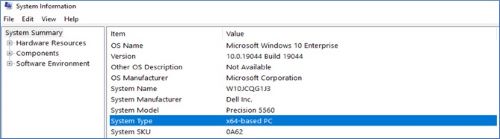
Figure 4: (English Only) Reference System Type for bit version
Produtos afetados
SupportAssist for Home PCsPropriedades do artigo
Número do artigo: 000221725
Tipo de artigo: Solution
Último modificado: 16 set. 2025
Versão: 3
Encontre as respostas de outros usuários da Dell para suas perguntas.
Serviços de suporte
Verifique se o dispositivo está coberto pelos serviços de suporte.