Как определить версию датчика CrowdStrike Falcon
Сводка: Узнайте, как определить версию датчика CrowdStrike Falcon для выявления проблем, изменений процессов или системных требований. Следуйте инструкциям для Windows, Mac или Linux.
Данная статья применяется к
Данная статья не применяется к
Эта статья не привязана к какому-либо конкретному продукту.
В этой статье указаны не все версии продуктов.
Инструкции
Знание версии датчика Falcon CrowdStrike позволяет:
- выявлять известные проблемы;
- понимать изменения процесса;
- понимать системные требования.
Затронутые продукты:
- CrowdStrike Falcon Sensor
Затронутые операционные системы:
- Windows
- Mac
- Linux
Для получения инструкций по определению версии датчика CrowdStrike Falcon выберите Windows, Mac или Linux.
Примечание.
- Датчик CrowdStrike Falcon должен быть установлен перед определением версии. Информацию по установке см. в статье Как установить датчик CrowdStrike Falcon.
- Для получения дополнительной информации о проверке датчика CrowdStrike Falcon см. https://supportportal.crowdstrike.com/s/article/Checking-Falcon-Sensor-Version-Locally
.
Windows
- Нажмите правой кнопкой мыши меню Windows «Пуск», затем нажмите Выполнить.

- В интерфейсе пользователя «Выполнить» введите и нажмите OK.
cmd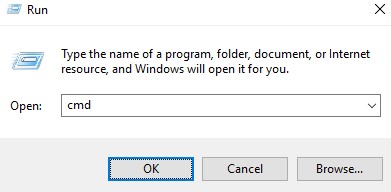
- Введите следующую команду в командной строке, затем нажмите клавишу Enter.
"C:\Program Files\CrowdStrike\CSSensorSettings.exe" –version
- Запишите версию. В указанном примере используется версия 1.4.17605,0.
 Версия датчика может отличаться от указанной на снимке экрана выше.
Mac
- Найдите Терминал и дважды нажмите на него.

- В терминале введите следующую команду и нажмите Enter.
sysctl cs.version
- Запишите версию. В данном примере используется версия 9.9.8013,0.
 Версия датчика может отличаться от указанной на снимке экрана выше.
Linux
- На целевой конечной точке откройте Терминал.

- В терминале введите следующую команду и нажмите Enter.
sudo /opt/CrowdStrike/falconctl -g --version
- Введите пароль для учетной записи sudo и нажмите клавишу Enter.
- Запишите версию. В указанном примере используется версия 4.20.6602.0.
 Версия датчика может отличаться от указанной на снимке экрана выше.
Дополнительная информация
Видео
Затронутые продукты
CrowdStrikeСвойства статьи
Номер статьи: 000126120
Тип статьи: How To
Последнее изменение: 27 июл. 2026
Версия: 23
Получите ответы на свои вопросы от других пользователей Dell
Услуги технической поддержки
Проверьте, распространяются ли на ваше устройство услуги технической поддержки.