NMC: l'installazione ha esito negativo con errore "Unable to Verify Authentication Server's Hostname or Port"
Сводка: L'installazione di NetWorker Management Console (NMC) non riesce su un host Windows con errore: "Unable to verify Authentication Server's hostname or port".
Данная статья применяется к
Данная статья не применяется к
Эта статья не привязана к какому-либо конкретному продукту.
В этой статье указаны не все версии продуктов.
Симптомы
- L'installazione di NetWorker Management Console (NMC) non riesce su un host Windows con un messaggio di errore di autenticazione.
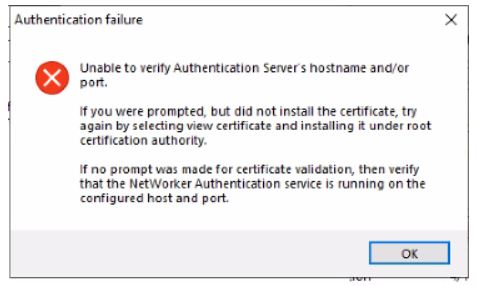
Figura 1: Durante l'installazione di NMC in Windows viene visualizzato un messaggio di errore di autenticazione.
- Il server NMC è installato su un host Windows separato dal server NetWorker.
- Il servizio di autenticazione NetWorker è attivo e in esecuzione.
- La porta 9090 è aperta.
nsrports -t NetWorker_ServerName -p 9090
Причина
L'installazione di NMC negozia con NetWorker Authentication Service su TLS prima della versione 1.2.
NOTA: Per istruzioni sulla convalida dell'handshake TLS tra il server NetWorker e il server NMC, vedere la sezione Informazioni aggiuntive .
Разрешение
Effettuare le seguenti operazioni sul server NetWorker:
- Creare una copia di backup di:
C:\Program Files\EMC NetWorker\nsr\authc-server\tomcat\conf\server.xml.
- Modificare la proprietà
server.xmle cercare la stringa.
Esempio di NetWorker 19.12 (e versioni precedenti):
sslEnabledProtocols="TLSv1.2"
Esempio di Networker 19.13 (e versioni successive):
SSLHostConfig protocols="TLSv1.2"Modificare il valore della stringa del protocollo in:
"TLSv1.2, TLSv1.1, TLSv1"
NOTA: Queste modifiche sono temporanee e vengono eseguite solo per completare l'installazione di NMC. Possono essere ripristinati una volta completata l'installazione di NMC.
- Salvare le modifiche apportate al file.
- Riavviare il servizio NetWorker.
net stop nsrd
net start nsrd
- Installare NetWorker e NMC sul server NMC. Questa volta dovrebbe essere visualizzata la richiesta di installazione del certificato.
NOTA: Se ancora non viene visualizzata l'opzione per installare il certificato, il problema potrebbe essere dovuto a una mancata corrispondenza tra le crittografie annunciate dal sistema operativo del server Authc e quelle utilizzate dalle crittografie Authc della versione di NetWorker. Consultare: NetWorker: NMC server install fails on Windows Host "Unable to verify Authentication Server's Hostame and or Port". - Aggiungere il certificato all'elenco dei certificati attendibili radice.
- Cliccare su Visualizza certificato.
- In Certificate, cliccare su Install Certificate.
- Selezionare Computer locale e cliccare su Avanti.
- Selezionare Place all certificates in the following store, quindi cliccare su Browse.
- Selezionare Autorità di certificazione radice attendibili, quindi fare clic su OK.
- In Certificate Install Wizard, cliccare su Next.
- Cliccare su Finish.
- Viene visualizzata una finestra pop-up che indica che l'importazione è stata eseguita correttamente, quindi cliccare su OK.
- Nella finestra Certificato, cliccare su OK.
- Nella finestra Security Alert, cliccare su Yes.
- Continuare fino al completamento dell'installazione.
Al termine dell'installazione, ripristinare la copia originale di server.xml. Per rendere effettive le modifiche, è necessario riavviare il servizio NetWorker.
Дополнительная информация
Articolo correlato: L'installazione di NMC non riesce sull host Windows "Impossibile verificare il nome host e/o la porta del server di autenticazione"
Convalida TLS:
In un prompt di PowerShell sul server NMC, è possibile eseguire quanto segue: AUTHC_SERVERNAME con l'indirizzo del server AUTHC.
$server = "AUTHC_SERVERNAME"
$port   = 9090

$tcp = [System.Net.Sockets.TcpClient]::new()
$tcp.Connect($server, $port)
$ssl = [System.Net.Security.SslStream]::new(
    $tcp.GetStream(),
    $false,
    { param($sender,$cert,$chain,$errors) $true }
)

try {
    $ssl.AuthenticateAsClient($server)
    "=== Protocol ==="
    $ssl.SslProtocol
    "=== Cipher ==="
    "$($ssl.CipherAlgorithm) ($($ssl.CipherStrength)-bit)"
    "=== Certificate Chain (PEM) ==="
    # Build the chain from the remote leaf certificate
    $remoteCert = [System.Security.Cryptography.X509Certificates.X509Certificate2]::new($ssl.RemoteCertificate)
    $xchain = [System.Security.Cryptography.X509Certificates.X509Chain]::new()
    $null = $xchain.Build($remoteCert)
    $i = 0
    foreach ($elem in $xchain.ChainElements) {
        $i++
        $c = $elem.Certificate
        "----- Certificate $i -----"
        "Subject  : $($c.Subject)"
        "Issuer   : $($c.Issuer)"
        "NotBefore: $($c.NotBefore)"
        "NotAfter : $($c.NotAfter)"
        ""
    }
}
finally {
    $ssl.Dispose()
    $tcp.Dispose()
}
Esempio:
PS C:\Users\Administrator.NETWORKER> $server = "win-srvr02.networker.lan"
PS C:\Users\Administrator.NETWORKER> $port   = 9090
PS C:\Users\Administrator.NETWORKER>
PS C:\Users\Administrator.NETWORKER> $tcp = [System.Net.Sockets.TcpClient]::new()
PS C:\Users\Administrator.NETWORKER> $tcp.Connect($server, $port)
PS C:\Users\Administrator.NETWORKER> $ssl = [System.Net.Security.SslStream]::new(
>>     $tcp.GetStream(),
>>     $false,
>>     { param($sender,$cert,$chain,$errors) $true }
>> )
PS C:\Users\Administrator.NETWORKER>
PS C:\Users\Administrator.NETWORKER> try {
>>     $ssl.AuthenticateAsClient($server)
>>     "=== Protocol ==="
>>     $ssl.SslProtocol
>>     "=== Cipher ==="
>>     "$($ssl.CipherAlgorithm) ($($ssl.CipherStrength)-bit)"
>>     "=== Certificate Chain (PEM) ==="
>>     # Build the chain from the remote leaf certificate
>>     $remoteCert = [System.Security.Cryptography.X509Certificates.X509Certificate2]::new($ssl.RemoteCertificate)
>>     $xchain = [System.Security.Cryptography.X509Certificates.X509Chain]::new()
>>     $null = $xchain.Build($remoteCert)
>>     $i = 0
>>     foreach ($elem in $xchain.ChainElements) {
>>         $i++
>>         $c = $elem.Certificate
>>         "----- Certificate $i -----"
>>         "Subject  : $($c.Subject)"
>>         "Issuer   : $($c.Issuer)"
>>         "NotBefore: $($c.NotBefore)"
>>         "NotAfter : $($c.NotAfter)"
>>         ""
>>     }
>> }
>> finally {
>>     $ssl.Dispose()
>>     $tcp.Dispose()
>> }
=== Protocol ===
Tls12
=== Cipher ===
Aes256 (256-bit)
=== Certificate Chain (PEM) ===
----- Certificate 1 -----
Subject  : CN=WIN-SRVR02.networker.lan, OU=NetWorker, O=DELL, L=Round Rock, S=TX, C=US
Issuer   : CN=WIN-SRVR02.networker.lan, OU=NetWorker, O=DELL, L=Round Rock, S=TX, C=US
NotBefore: 12/12/2025 15:16:03
NotAfter : 12/06/2050 15:16:03
Questo output mostra che il protocollo TLS negoziato è TLSv1.2 e che il server AUTHC utilizza un certificato autofirmato valido.
Затронутые продукты
NetWorker, NetWorker Management ConsoleПродукты
NetWorker FamilyСвойства статьи
Номер статьи: 000219009
Тип статьи: Solution
Последнее изменение: 16 июл. 2026
Версия: 6
Получите ответы на свои вопросы от других пользователей Dell
Услуги технической поддержки
Проверьте, распространяются ли на ваше устройство услуги технической поддержки.