PowerProtect Data Manager: Unable to navigate over VM FLR "Select Files To Recover" pages
Сводка: After upgrading PowerProtect Data Manager (PPDM) to version 19.18, the File Level Restore (FLR) wizard does not allow users to navigate between result pages when browsing files for restore. This prevents selection of any files that appear beyond the first page of results. Dell resolved this defect in PPDM version 19.19. ...
Симптомы
Users are unable to navigate over different result pages after upgrading PPDM to version 19.18 when trying to run an FLR restore of a virtual machine (VM).
This causes an inability to select required files if they are not displayed on the first page.
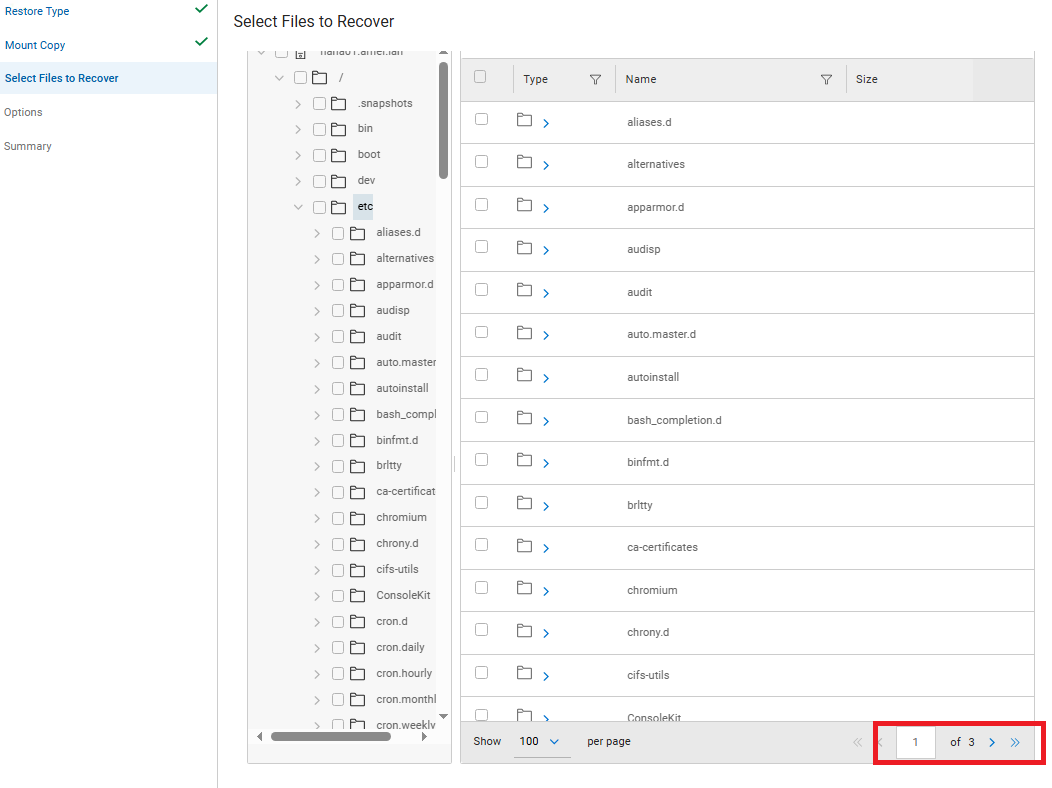
Figure 1. Select Files to Recover, Page 1
Причина
A code defect in PowerProtect Data Manager version 19.18 prevents the FLR file‑browse pagination from functioning correctly. This defect affects only version 19.18.
Разрешение
The issue has been resolved in the PowerProtect release 19.19.0-20. Install the latest PowerProtect Data Manager release to resolve the symptom. If required, contact Dell Support for assistance or with any questions. The newest available releases are available on the PowerProtect Data Manager Drivers & Downloads page.