Avamar : Not able to access Avamar GUI "Avamar Administrator client is not compatible with the selected server" error reported
Сводка: Not able to access Avamar GUI with "Avamar Administrator client is not compatible with the selected server" error reported
Данная статья применяется к
Данная статья не применяется к
Эта статья не привязана к какому-либо конкретному продукту.
В этой статье указаны не все версии продуктов.
Симптомы
Not able to access GUI and the following error is reported:
The Avamar Administrator client is not compatible with the selected server.
The Avamar Administrator client cannot continue and will now exit.
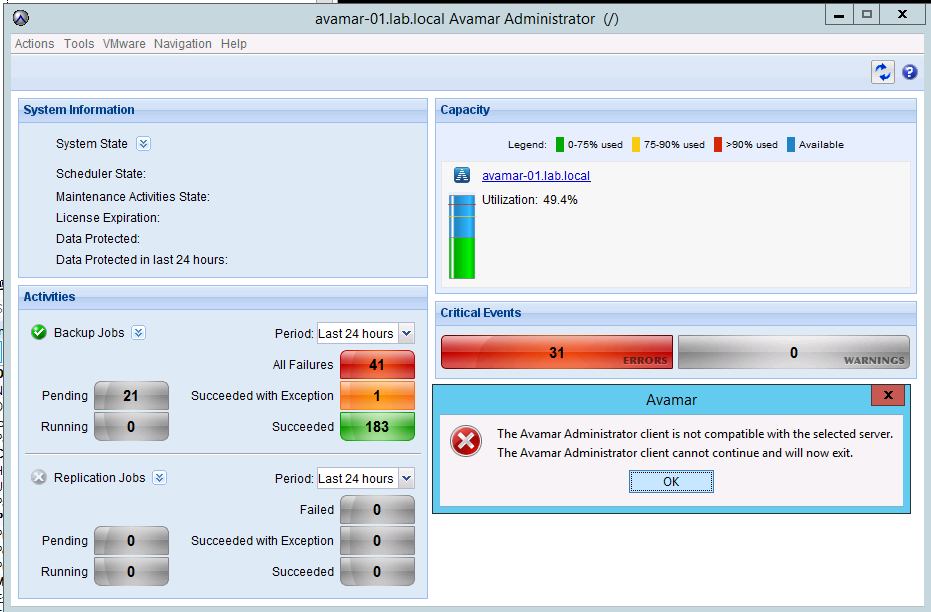
The MCS version has been checked and it matches the Avamar Administrator version.
If the MCS version doesn't match the Avamar Administrator version, download the latest Avamar Administrator version from the Downloads page.
The Avamar Administrator client is not compatible with the selected server.
The Avamar Administrator client cannot continue and will now exit.
The MCS version has been checked and it matches the Avamar Administrator version.
If the MCS version doesn't match the Avamar Administrator version, download the latest Avamar Administrator version from the Downloads page.
Причина
- Under certain circumstances, one or more Java processes can become hung.
- Usually, the hung Java PIDs have quite an old date.
- The following command can be used to confirm:
ps -ef | grep java
Разрешение
- Stop the MCS, EMS/EMT and avinstaller services. The backup scheduler will be stopped with MCS.
dpnctl stop mcs
dpnctl stop ems
dpnctl stop avinstaller
dpnctl stop ems
dpnctl stop avinstaller
- As user "root" kill all java processes
killall java
- Verify no java processes remain
ps -ef | grep java
- As user "admin" restart the services
dpnctl start
- Verify services are running
dpnctl status
Затронутые продукты
AvamarПродукты
Avamar, Avamar ServerСвойства статьи
Номер статьи: 000071469
Тип статьи: Solution
Последнее изменение: 18 Apr 2026
Версия: 5
Получите ответы на свои вопросы от других пользователей Dell
Услуги технической поддержки
Проверьте, распространяются ли на ваше устройство услуги технической поддержки.