SourceOne for File Systems: File activities cannot shortcut items
Сводка: File activities don't getting permission issue when trying to shortcut files.
Данная статья применяется к
Данная статья не применяется к
Эта статья не привязана к какому-либо конкретному продукту.
В этой статье указаны не все версии продуктов.
Симптомы
While running SourceOne File Archive Historical Shortcut activities, you may see that the items are not being processed. The processed counts will grow and failed counts will remain as zero.
When you open the Job Log you will see the below entry:
2020/06/09 11:34:41.558 *** Failed to create shortcut file ***
Name: File_to_be_shortcut.xls.url
File: \\?\UNC\share\folder_1\folder_2\folder_3\File_to_be_shortcut.xls
ID: 00000000D12A5D296B8C0D6AFF1A8ED7C3EFAB1383CE3EFF00
Reason: Access is denied. (-2147024891)
Source: ExDirectoryThread.cpp(5562): CExDirectoryThread::iCreateLinkFile:
Name: File_to_be_shortcut.xls.url
File: \\?\UNC\share\folder_1\folder_2\folder_3\File_to_be_shortcut.xls
ID: 00000000D12A5D296B8C0D6AFF1A8ED7C3EFAB1383CE3EFF00
Reason: Access is denied. (-2147024891)
Source: ExDirectoryThread.cpp(5562): CExDirectoryThread::iCreateLinkFile:
Причина
Share permissions set for the root share are incorrect.
Разрешение
In order to resolve this issue, you need to grant SourceOne account full access on the Security tab and also on the Sharing tab.
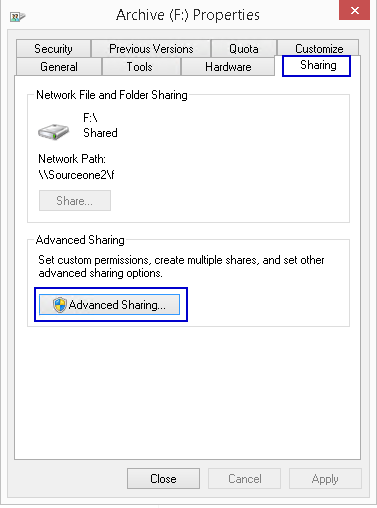
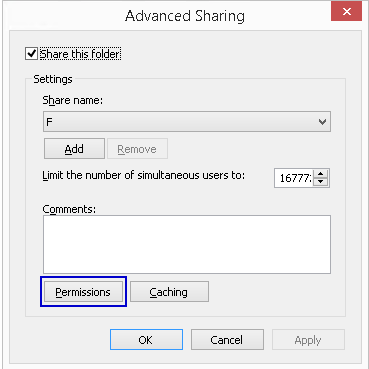
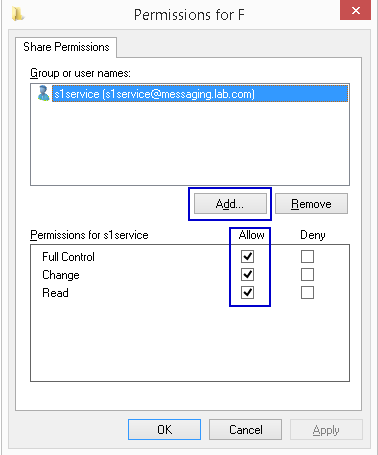
- Access the root share and open the Properties
- Select Sharing tab
- Open Advanced Sharing
- Open Permissions
- Add SourceOne service account with Full Control permissions
Затронутые продукты
SourceOneПродукты
SourceOne, SourceOne for File SystemsСвойства статьи
Номер статьи: 000082343
Тип статьи: Solution
Последнее изменение: 18 Apr 2026
Версия: 5
Получите ответы на свои вопросы от других пользователей Dell
Услуги технической поддержки
Проверьте, распространяются ли на ваше устройство услуги технической поддержки.