Come identificare la versione di Dell Encryption Enterprise o Dell Encryption Personal (in inglese)
Сводка: Informazioni su come identificare la versione di Dell Encryption Enterprise o Dell Encryption Personal seguendo queste istruzioni.
Данная статья применяется к
Данная статья не применяется к
Эта статья не привязана к какому-либо конкретному продукту.
В этой статье указаны не все версии продуктов.
Инструкции
È importante conoscere la versione di Dell Encryption Enterprise (in precedenza Dell Data Protection | Enterprise Edition) o Dell Encryption Personal (in precedenza Dell Data Protection | Personal Edition) per:
- Identificare i problemi noti
- Determinare le differenze dell'interfaccia utente
- Comprendere le modifiche del flusso di lavoro
- Verificare i requisiti di sistema
Prodotti interessati:
- Dell Encryption Enterprise
- Dell Encryption Personal
- Dell Data Protection | Enterprise Edition
- Dell Data Protection | Personal Edition
Sistemi operativi interessati:
- Windows
È possibile determinare la versione in uso tramite l'interfaccia utente del prodotto o il programma di installazione del prodotto. Per ulteriori informazioni, cliccare sulla scheda appropriata.
Interfaccia utente
è necessario installare Dell Encryption Enterprise o Dell Encryption Personal prima di identificare la versione tramite l'interfaccia utente.
- Accedere al computer Windows.
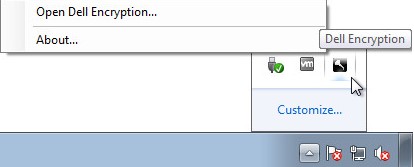
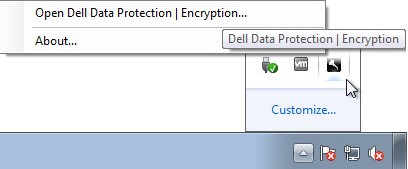
- Nell'area di notifica Windows cliccare con il pulsante destro del mouse sull'icona Dell Encryption (in precedenza Dell Data Protection | Encryption) e scegliere Open Dell Encryption oppure Open Dell Data Protection | Encryption.
- L'immagine seguente mostra l'opzione Dell Encryption.
- L'immagine seguente mostra l'opzione Dell Data Protection Encryption.
- L'immagine seguente mostra l'opzione Dell Encryption.
- Nell'interfaccia utente del prodotto, fare clic sull'icona con il punto interrogativo, quindi registrare il numero di versione visualizzato dopo Informazioni sulla versione. I primi tre numeri sono le cifre più importanti da considerare. Nell'esempio, 8.15.0 sono i primi tre numeri.
 La versione del client potrebbe differire dalla schermata sopra.
Programma di installazione
per informazioni sul download del programma di installazione, fare riferimento a Come scaricare Dell Encryption Enterprise o Dell Encryption Personal.
- Cliccare con il pulsante destro del mouse su [INSTALLER] e scegliere Proprietà.
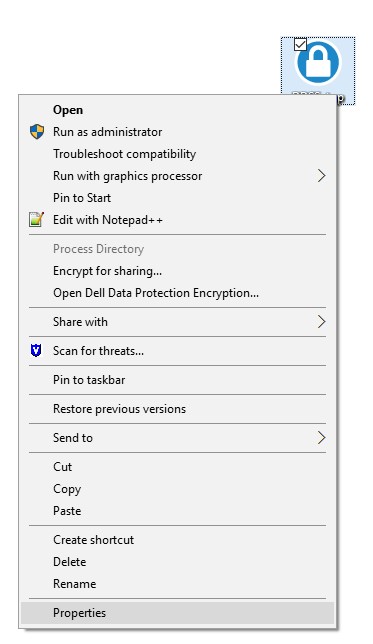 Nota: <PROGRAMMA DI INSTALLAZIONE> =
- Dell Encryption Enterprise:
DDSSetup.exe - Dell Encryption Personal
DDSSetup.exe - Dell Data Protection | Enterprise Edition
DDPSetup.exe - Dell Data Protection | Personal Edition
DDPSetup.exe
- Dell Encryption Enterprise:
- Fare clic sulla scheda Dettagli.

- Registrare la versione del prodotto. I primi tre numeri sono le cifre più importanti da considerare. Nell'esempio, 8.15.0 sono i primi tre numeri.
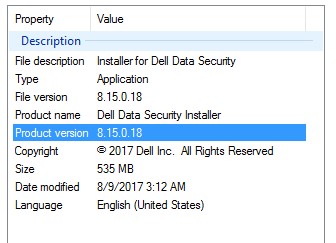 La versione del client potrebbe differire dalla schermata sopra.
Дополнительная информация
Видео
Затронутые продукты
Dell EncryptionСвойства статьи
Номер статьи: 000124591
Тип статьи: How To
Последнее изменение: 15 Jul 2026
Версия: 13
Получите ответы на свои вопросы от других пользователей Dell
Услуги технической поддержки
Проверьте, распространяются ли на ваше устройство услуги технической поддержки.