How to Create Custom VMware Carbon Black Cloud Roles
Сводка: Learn how to create custom administrator roles for VMware Carbon Black Cloud by following these step-by-step instructions for Windows, Mac, and Linux.
Данная статья применяется к
Данная статья не применяется к
Эта статья не привязана к какому-либо конкретному продукту.
В этой статье указаны не все версии продуктов.
Инструкции
This article discusses how to create custom administration roles for the VMware Carbon Black Cloud.
Affected Products:
- VMware Carbon Black Cloud Endpoint
Affected Operating Systems:
- Windows
- Mac
- Linux
- In a web browser, go to <REGION>.conferdeploy.net
Note: <REGION> = Region of tenant
- Americas = https://defense-prod05.conferdeploy.net/
- Europe = https://defense-eu.conferdeploy.net/
- Asia Pacific = https://defense-prodnrt.conferdeploy.net/
- Australia and New Zealand = https://defense-prodsyd.conferdeploy.net
- Americas = https://defense-prod05.conferdeploy.net/
- Sign In to the VMware Carbon Black Cloud.

- In the left menu pane, expand SETTINGS and then click ROLES.
 Note: The layout in the example may differ slightly from your environment.
 - In the upper right, click Add Role.

- In the Add Role menu:
- Populate the Role name.
- Populate a role Description.
- Optionally, Copy permissions from another role.
- Check the appropriate Permissions.
- Click Save.
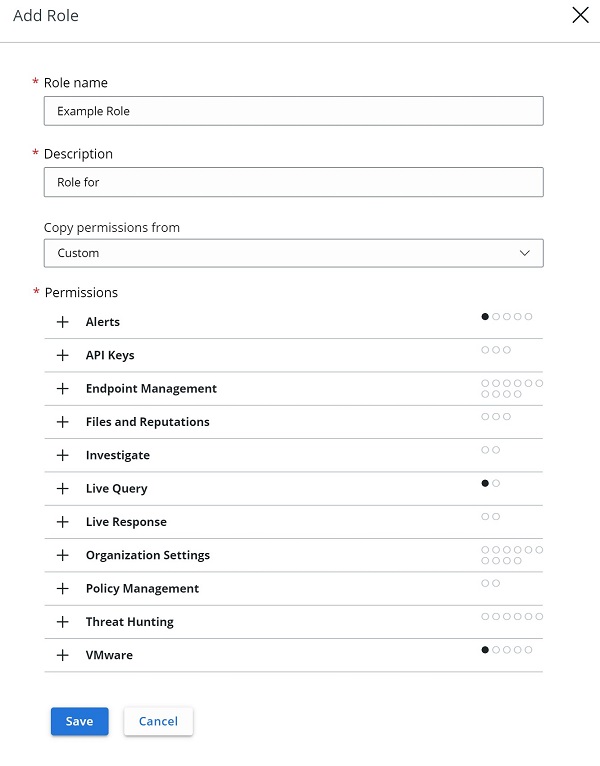 Note: The examples that are used in the screenshot will differ in your environment.

Затронутые продукты
VMware Carbon BlackСвойства статьи
Номер статьи: 000126081
Тип статьи: How To
Последнее изменение: 28 Jul 2026
Версия: 13
Получите ответы на свои вопросы от других пользователей Dell
Услуги технической поддержки
Проверьте, распространяются ли на ваше устройство услуги технической поддержки.