NetWorker. Как указать временной интервал в команде gstclreport
Сводка: В этой статье показано, как задать временной диапазон с помощью команды gstclreport для создания отчетов консоли управления NetWorker Management Console (NMC).
Данная статья применяется к
Данная статья не применяется к
Эта статья не привязана к какому-либо конкретному продукту.
В этой статье указаны не все версии продуктов.
Инструкции
Переменная gstclreport используется для создания отчетов NMC с помощью командной строки на сервере NetWorker Management Console (NMC).
usage: gstclreport [-h] -r reportname -u username
     [-P password] [-a chartselector] [-c charttype]
     [-f filename] [-n fontfamily] [-o orientation]
     [-v viewtype] [-x exporttype] [-C Category argument]
     [-C "Event Time" argument] [-C "Object Name" argument]
     [-C "Object Type" argument] [-C Operation argument]
     [-C "Server Name" argument] [-C "Server Type" argument]
     [-C "User Name" argument]
where:
    -h                          Print this help message
    -r  reportname      The name of the report to run, or full path name like "/Reports/Users/User List"
    -u  username        Log into GST server with given name
    -P  password        Log into GST server with given password
    -a  chartselector   The set of Y axis to display in a chart
    -c  charttype       The chart type [bar | pie | plot | "stacking bar"]
    -f  filename        The name of the export file
    -n  fontfamily      A font family to override the default(COURIERNEW). Please note if invalid
    -o  orientation     The orientation [portrait | landscape]
    -v  viewtype        The view type [table | chart]
    -x  exporttype      The type of export [ pdf | postscript | html | csv | print]
    -C  Category argument       Where argument is a comma separated list of Categorys
    -C  "Event Time" argument   Where argument is a From and To date. Date & Time format is MM/DD/YY & hh:mm:ss
    -C  "Object Name" argument  Where argument is a single Object Name
    -C  "Object Type" argument  Where argument is a single Object Type
    -C  Operation argument      Where argument is a comma separated list of Operations
    -C  "Server Name" argument  Where argument is a comma separated list of Server Names
    -C  "Server Type" argument  Where argument is a single Server Type
    -C  "User Name" argument    Where argument is a comma separated list of User Names
В разных отчетах используются разные операторы времени:
- Во всех статистических данных политики, за исключением сведений о действии, используется параметр «Workflow Start Time». В отчете "Action Details" используется параметр "Время начала действия"
- Для всей статистики восстановления используется параметр «Время начала».
- Для параметра «Использование устройства» используется значение «Time».
- При аудите пользователей используется параметр «Время события».
gstclreport -r "REPORT_PATH -u USER_NAME -P 'PASSWORD' -x REPORT_TYPE -f FILE_NAME -v REPORT_FORMAT -C "OPERATOR" "MONTH DD, YYYY HH:mm AM/PM" "MONTH DD, YYYY HH:mm AM/PM"
Или
gstclreport -r "REPORT_PATH -u USER_NAME -P 'PASSWORD' -x REPORT_TYPE -f FILE_NAME -v REPORT_FORMAT -C "OPERATOR" "MM/DD/YY HH:mm:SS AM/PM" "MM/DD/YY HH:mm:SS AM/PM"
Пример:
nve:/opt/lgtonmc/bin # ./gstclreport -r "/Reports/Users/User Audit" -u administrator -P '!Password1' -x pdf -f test  -v table -C "Event Time" "February 13, 2026 12:00 AM" "February 18, 2026 11:59 PM"
java version "17.0.17" 2025-10-21 LTS
Java(TM) SE Runtime Environment (build 17.0.17+8-LTS-360)
Java HotSpot(TM) 64-Bit Server VM (build 17.0.17+8-LTS-360, mixed mode, sharing)
java version "17.0.17" 2025-10-21 LTS
Java(TM) SE Runtime Environment (build 17.0.17+8-LTS-360)
Java HotSpot(TM) 64-Bit Server VM (build 17.0.17+8-LTS-360, mixed mode, sharing)
Generated report "User Audit" as file test.pdf
Отчет создается с указанным диапазоном времени: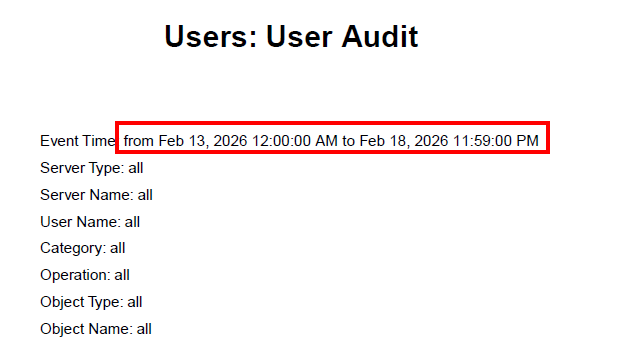
Дополнительная информация
Затронутые продукты
NetWorkerПродукты
NetWorkerСвойства статьи
Номер статьи: 000023243
Тип статьи: How To
Последнее изменение: 19 Feb 2026
Версия: 7
Получите ответы на свои вопросы от других пользователей Dell
Услуги технической поддержки
Проверьте, распространяются ли на ваше устройство услуги технической поддержки.