PowerEdge: 14G server Drive Slot Numbers Missing in Microsoft Storage Spaces Used with a Passive backplane
Сводка: This article details issues that may occur when using Windows Storage Spaces, with a passive backplane, on PowerEdge 14G servers.
Симптомы
Description
Windows Storage Spaces is a technology that is used to virtualize and provision storage. When used with a passive backplane, the LED operations from within the Windows Storage Spaces UI and or PowerShell, may show a status of fail. An example of this is shown below in Figure 1. Also, Drive slot numbers may not enumerate properly when using a Passive backplane. An example of this is shown in Figure 2.
This is expected behavior and is a limitation of how Windows Storage Spaces interacts with passive backplanes. This limitation is not present on Active or Expander backplanes which are recommended and certified for Microsoft S2D/SDS configurations.
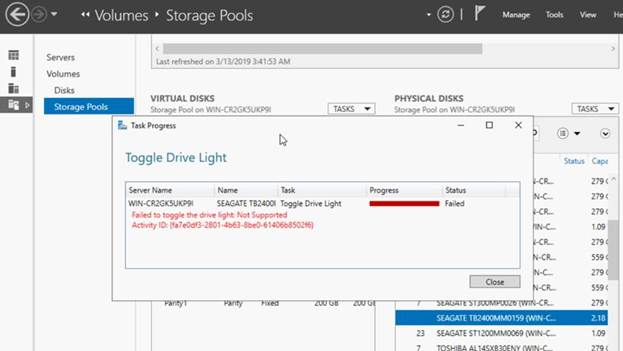
Figure 1: Windows Storage Spaces UI showing failed LED operations
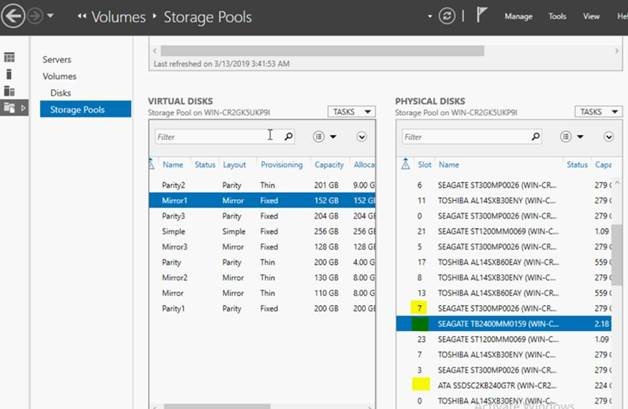
Figure 2: Windows Storage Spaces UI showing incorrectly enumerated Drive slot number
Причина
Разрешение
Solution
When using a passive backplane with Windows Storage Spaces, slot information and LED management is not shown due to incompatibility between Microsoft’s Storage Spaces and Dell 14G Passive backplanes. In order to see the drive slot numbers properly and or to get LED management working, an Active or Expander backplane must be used.
How to Determine a Passive backplane from an Expander backplane: The easiest way to determine a Passive backplane from an Active or Expander backplane is the drive count. Passive backplanes are limited to eight drive slots or less. Active or Expander backplanes have more than eight drive slots.
Дополнительная информация
Further Information
Windows Storage Spaces (WSS) is a feature in Windows Server 2012 onwards that is used to virtualize and provision storage. For more information about Windows Storage Spaces, consult this article