NetWorker: las solicitudes de la API REST fallan con el mensaje de error: HTTP status 404: no encontrado "El recurso solicitado no está disponible"
Сводка: Las consultas de la interfaz de programación de aplicaciones (API) REST de NetWorker fallan con el mensaje de error: HTTP status 404 - No encontrado "El recurso solicitado no está disponible. El servidor de origen no encontró una representación actual para el recurso de destino o no está dispuesto a revelar que existe una". ...
Симптомы
Las solicitudes de la API REST de NetWorker fallan con el mensaje de error: HTTP status 404 - No encontrado "El recurso solicitado no está disponible"
[root@NETWORKER_SERVER]:~# curl -ik GET -u **userid**:'***Password***' -H "Content-Type: application/json" 'https://NETWORKER_SERVER:9090/nwrestapi/v3/global/clients'
curl: (6) Could not resolve host: GET; Name or service not known
HTTP/1.1 404
Content-Type: text/html;charset=utf-8
Content-Language: en
Content-Length: 790
Date: Tue, 04 Jul 2023 12:11:41 GMT
Server: NSR SERVICES for Authentication


<!doctype html><html lang="en"><head><title>HTTP Status 404 – Not Found</title><style type="text/css">body {font-family:Tahoma,Arial,sans-serif;} h1, h2, h3, b {color:white;background-color:#525D76;} h1 {font-size:22px;} h2 {font-size:16px;} h3 {font-size:14px;} p {font-size:12px;} a {color:black;} .line {height:1px;background-color:#525D76;border:none;}</style></head><body><h1>HTTP Status 404 – Not Found</h1><hr class="line" /><p><b>Type</b> Status Report</p><p><b>Message</b> The requested resource [/nwrestapi/v3/global/clients] is not available</p><p><b>Description</b> The origin server did not find a current representation for the target resource or is not willing to disclose that one exists.</p><hr class="line" /><h3>Apache Tomcat/9.0.52</h
Falta la instalación de NetWorker Server nwrestapi directorio.
/nsr/authc/webapps/nwrestapi/
Windows:
C:\Program Files\EMC NetWorker\nsr\authc-server\tomcat\webapps\nwrestapi
El restapi.log No existe o no se está actualizando:
/nsr/logs/restapi/restapi.log
Windows:
C:\Program Files\EMC NetWorker\nsr\logs\restapi\restapi.log
Причина
Las nwrestapi La ruta no existe. Las consultas de la API REST no pueden encontrar ninguno de los terminales ni correlacionar la forma en que debe presentar los datos de las otras bases de datos de NetWorker.
Разрешение
nwrestapi se configura junto con NetWorker authc servicio que utiliza Java Runtime Environment (JRE). Se recomienda utilizar NetWorker Runtime Environment (NRE) para evitar posibles problemas relacionados con Java al configurar authc. Los paquetes de NRE más recientes están disponibles para su descarga desde la página Controladores y descargas de NetWorker de soporte de Dell .
Linux:
- Inicie sesión en NetWorker Server y cambie a root:
sudo su -
- Confirme si NRE está instalado y qué instancia de Java NetWorker está configurado para usar:
rpm -qa | grep nre
cat /nsr/authc/conf/installrc

[root@networker-mc]:~# rpm -qa | grep nre
nre-8.0.15-1.x86_64
[root@networker-mc]:~#
[root@networker-mc]:~# cat /nsr/authc/conf/installrc
JAVA_HOME=/opt/nre/java/latest
- Ejecute el siguiente script para reconfigurar NetWorker:
authcservidor.
/opt/nsr/authc-server/scripts/authc_configure.sh

[root@networker-mc]:~# /opt/nsr/authc-server/scripts/authc_configure.sh

Specify the directory where the Java Standard Edition Runtime Environment (JRE) software is installed [/opt/nre/java/latest]:

The installation process will install an Apache Tomcat instance. For optimum security, EMC NetWorker Authentication Service will use a non-root user (nsrtomcat) to start the Apache Tomcat instance.
If your system has special user security requirements, ensure that proper operational permissions are granted to this non-root user (nsrtomcat).
Please refer to NetWorker Installation Guide.

WARNING: Port 9090 is already in use.

Do you wish to specify a different port number [y]? n

The Apache Tomcat will use "networker-mc.emclab.local" as the host name.
The Apache Tomcat will use "9090" as the port number.

The NetWorker Authentication Service requires a keystore file to configure encryption and to provide SSL support.

EMC recommends that you specify a keystore password that has a minimum of six characters.

Do you want to use the existing keystore /nsr/authc/conf/authc.keystore [y]?

Specify password for the existing keystore:
The install will use the existing certificate "emcauthctomcat" for Apache Tomcat.
The install will use the existing certificate "emcauthcsaml" for Authentication Service.

Creating the installation log in /opt/nsr/authc-server/logs/install.log.

Performing initialization. Please wait...

The installation completed successfully.
authc. Esto se puede hacer con lo siguiente systemctl Comandos:
systemctl stop networker
and
systemctl start networker
- Confirme que se haya creado la siguiente carpeta:
/nsr/authc/webapps/nwrestapi

[root@networker-mc]:~# ls -l /nsr/authc/webapps/nwrestapi/
total 0
drwx------. 2 nsrtomcat nsrtomcat  44 Jul  6 12:22 META-INF
drwx------. 3 nsrtomcat nsrtomcat  21 Jul  6 12:22 v1
drwx------. 3 nsrtomcat nsrtomcat  21 Jul  6 12:22 v2
drwx------. 3 nsrtomcat nsrtomcat  21 Jul  6 12:22 v3
drwx------. 6 nsrtomcat nsrtomcat 107 Jul  6 12:22 WEB-INF
- Si la solicitud en
nwrestapidirectorio creado, ejecute consultas de API REST.
Windows:
- Confirme si NRE está instalado y qué instancia de Java NetWorker está configurado para usar:
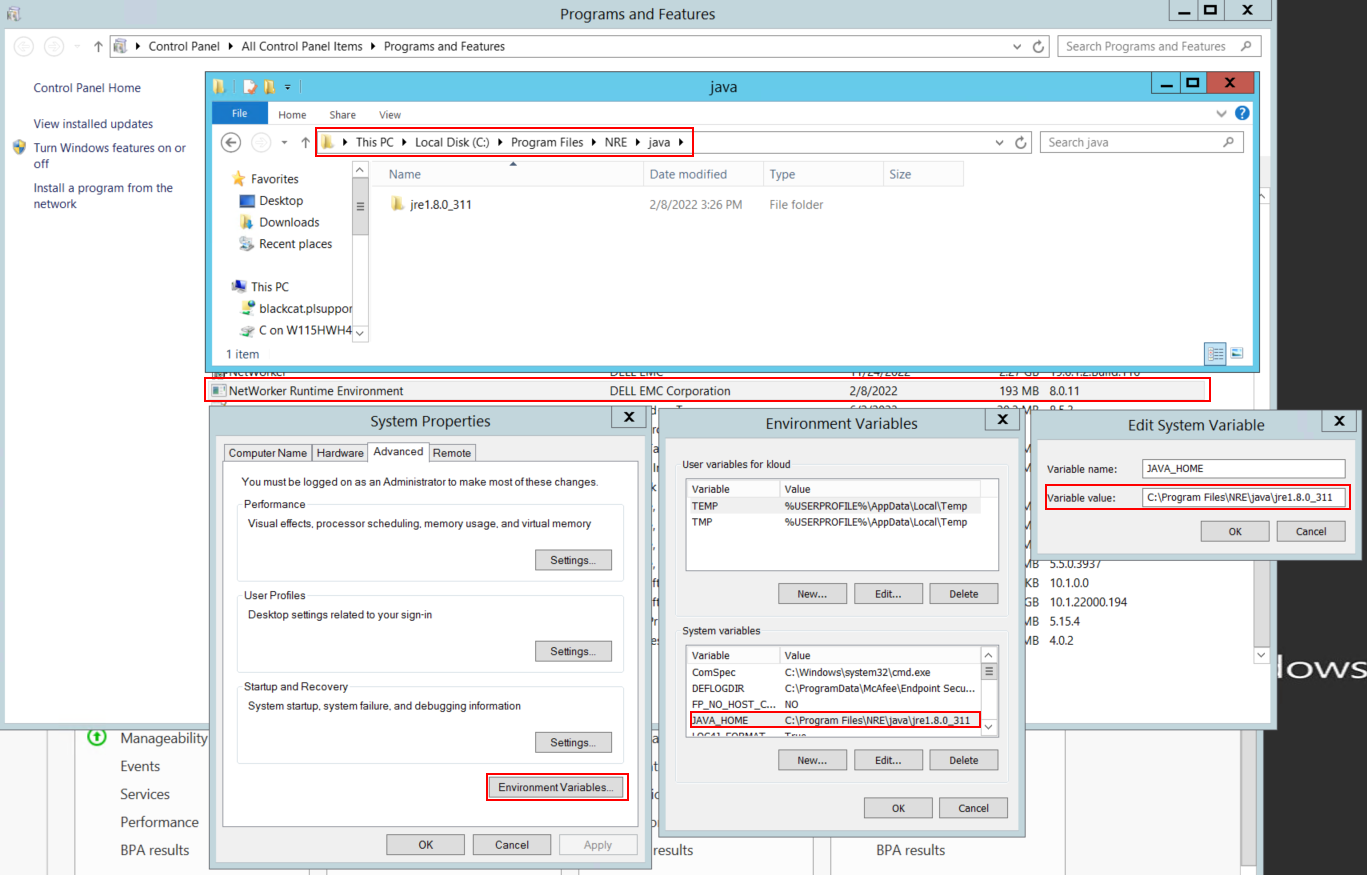
Figura 1: Confirme qué instancia de Java utiliza NetWorker. La variable puede aparecer como JAVA_HOME o NSR_JAVA_HOME.
- Desinstale el paquete de NetWorker. Esto no elimina ninguna de las bases de datos o los recursos de configuración de NetWorker.
- Reinstale NetWorker en la ruta de instalación existente. La reinstalación de NetWorker vuelve a configurar el servicio de autenticación de NetWorker.
- Confirme que exista la siguiente ruta:
C:\Program Files\EMC NetWorker\nsr\authc-server\tomcat\webapps\nwrestapi
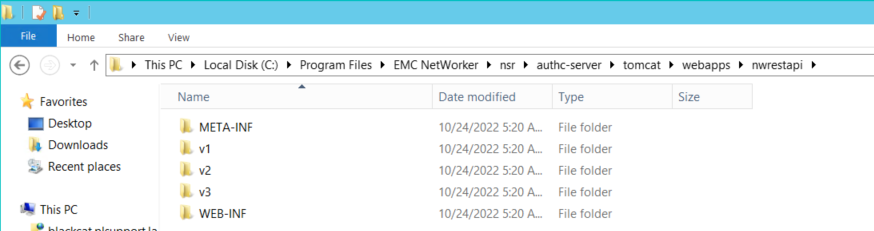
Figura 2: Confirme que el nwrestapi La ruta existe.
- Si la solicitud en
nwrestapidirectorio creado, ejecute consultas de API REST.