NetWorker: żądania interfejsu API REST kończą się niepowodzeniem z komunikatem o błędzie: Status HTTP 404 – Nie znaleziono "Żądany zasób jest niedostępny"
Сводка: Zapytania interfejsu programowania aplikacji (API) NetWorker REST kończą się niepowodzeniem z komunikatem o błędzie: Status HTTP 404 – nie znaleziono "Żądany zasób jest niedostępny. Serwer źródłowy nie znalazł aktualnej reprezentacji zasobu docelowego lub nie chce ujawnić, że taka reprezentacja istnieje". ...
Симптомы
Żądania interfejsu API REST NetWorker kończą się niepowodzeniem z komunikatem o błędzie: Status HTTP 404 – Nie znaleziono "Żądany zasób jest niedostępny"
[root@NETWORKER_SERVER]:~# curl -ik GET -u **userid**:'***Password***' -H "Content-Type: application/json" 'https://NETWORKER_SERVER:9090/nwrestapi/v3/global/clients'
curl: (6) Could not resolve host: GET; Name or service not known
HTTP/1.1 404
Content-Type: text/html;charset=utf-8
Content-Language: en
Content-Length: 790
Date: Tue, 04 Jul 2023 12:11:41 GMT
Server: NSR SERVICES for Authentication


<!doctype html><html lang="en"><head><title>HTTP Status 404 – Not Found</title><style type="text/css">body {font-family:Tahoma,Arial,sans-serif;} h1, h2, h3, b {color:white;background-color:#525D76;} h1 {font-size:22px;} h2 {font-size:16px;} h3 {font-size:14px;} p {font-size:12px;} a {color:black;} .line {height:1px;background-color:#525D76;border:none;}</style></head><body><h1>HTTP Status 404 – Not Found</h1><hr class="line" /><p><b>Type</b> Status Report</p><p><b>Message</b> The requested resource [/nwrestapi/v3/global/clients] is not available</p><p><b>Description</b> The origin server did not find a current representation for the target resource or is not willing to disclose that one exists.</p><hr class="line" /><h3>Apache Tomcat/9.0.52</h
W instalacji serwera NetWorker brakuje atrybutu nwrestapi katalog.
/nsr/authc/webapps/nwrestapi/
Windows:
C:\Program Files\EMC NetWorker\nsr\authc-server\tomcat\webapps\nwrestapi
Tthe restapi.log nie istnieje lub nie jest aktualizowany:
/nsr/logs/restapi/restapi.log
Windows:
C:\Program Files\EMC NetWorker\nsr\logs\restapi\restapi.log
Причина
Klawisze nwrestapi ścieżka nie istnieje. Zapytania interfejsu API REST nie są w stanie znaleźć żadnego punktu końcowego ani skorelować sposobu prezentacji danych z innych baz danych NetWorker.
Разрешение
nwrestapi jest konfigurowany wraz z NetWorker authc usługa wykorzystująca środowisko Java Runtime Environment (JRE). Zaleca się korzystanie ze środowiska NetWorker Runtime Environment (NRE), aby uniknąć potencjalnych problemów związanych z Javą podczas konfigurowania authc. Najnowsze pakiety NRE są dostępne do pobrania ze strony Dell Support NetWorker Drivers & Downloads .
Linux:
- Zaloguj się do serwera NetWorker i przełącz się do katalogu głównego:
sudo su -
- Sprawdź, czy NRE jest zainstalowane i do jakiej instancji Java jest skonfigurowane NetWorker:
rpm -qa | grep nre
cat /nsr/authc/conf/installrc

[root@networker-mc]:~# rpm -qa | grep nre
nre-8.0.15-1.x86_64
[root@networker-mc]:~#
[root@networker-mc]:~# cat /nsr/authc/conf/installrc
JAVA_HOME=/opt/nre/java/latest
- Uruchom następujący skrypt, aby ponownie skonfigurować NetWorker
authcSerwera.
/opt/nsr/authc-server/scripts/authc_configure.sh

[root@networker-mc]:~# /opt/nsr/authc-server/scripts/authc_configure.sh

Specify the directory where the Java Standard Edition Runtime Environment (JRE) software is installed [/opt/nre/java/latest]:

The installation process will install an Apache Tomcat instance. For optimum security, EMC NetWorker Authentication Service will use a non-root user (nsrtomcat) to start the Apache Tomcat instance.
If your system has special user security requirements, ensure that proper operational permissions are granted to this non-root user (nsrtomcat).
Please refer to NetWorker Installation Guide.

WARNING: Port 9090 is already in use.

Do you wish to specify a different port number [y]? n

The Apache Tomcat will use "networker-mc.emclab.local" as the host name.
The Apache Tomcat will use "9090" as the port number.

The NetWorker Authentication Service requires a keystore file to configure encryption and to provide SSL support.

EMC recommends that you specify a keystore password that has a minimum of six characters.

Do you want to use the existing keystore /nsr/authc/conf/authc.keystore [y]?

Specify password for the existing keystore:
The install will use the existing certificate "emcauthctomcat" for Apache Tomcat.
The install will use the existing certificate "emcauthcsaml" for Authentication Service.

Creating the installation log in /opt/nsr/authc-server/logs/install.log.

Performing initialization. Please wait...

The installation completed successfully.
authc. Można to zrobić w następujący sposób systemctl Polecenia:
systemctl stop networker
and
systemctl start networker
- Upewnij się, że został utworzony następujący folder:
/nsr/authc/webapps/nwrestapi

[root@networker-mc]:~# ls -l /nsr/authc/webapps/nwrestapi/
total 0
drwx------. 2 nsrtomcat nsrtomcat  44 Jul  6 12:22 META-INF
drwx------. 3 nsrtomcat nsrtomcat  21 Jul  6 12:22 v1
drwx------. 3 nsrtomcat nsrtomcat  21 Jul  6 12:22 v2
drwx------. 3 nsrtomcat nsrtomcat  21 Jul  6 12:22 v3
drwx------. 6 nsrtomcat nsrtomcat 107 Jul  6 12:22 WEB-INF
- Jeśli
nwrestapiutworzono katalog, uruchom zapytania REST API.
Windows:
- Sprawdź, czy NRE jest zainstalowane i do jakiej instancji Java jest skonfigurowane NetWorker:
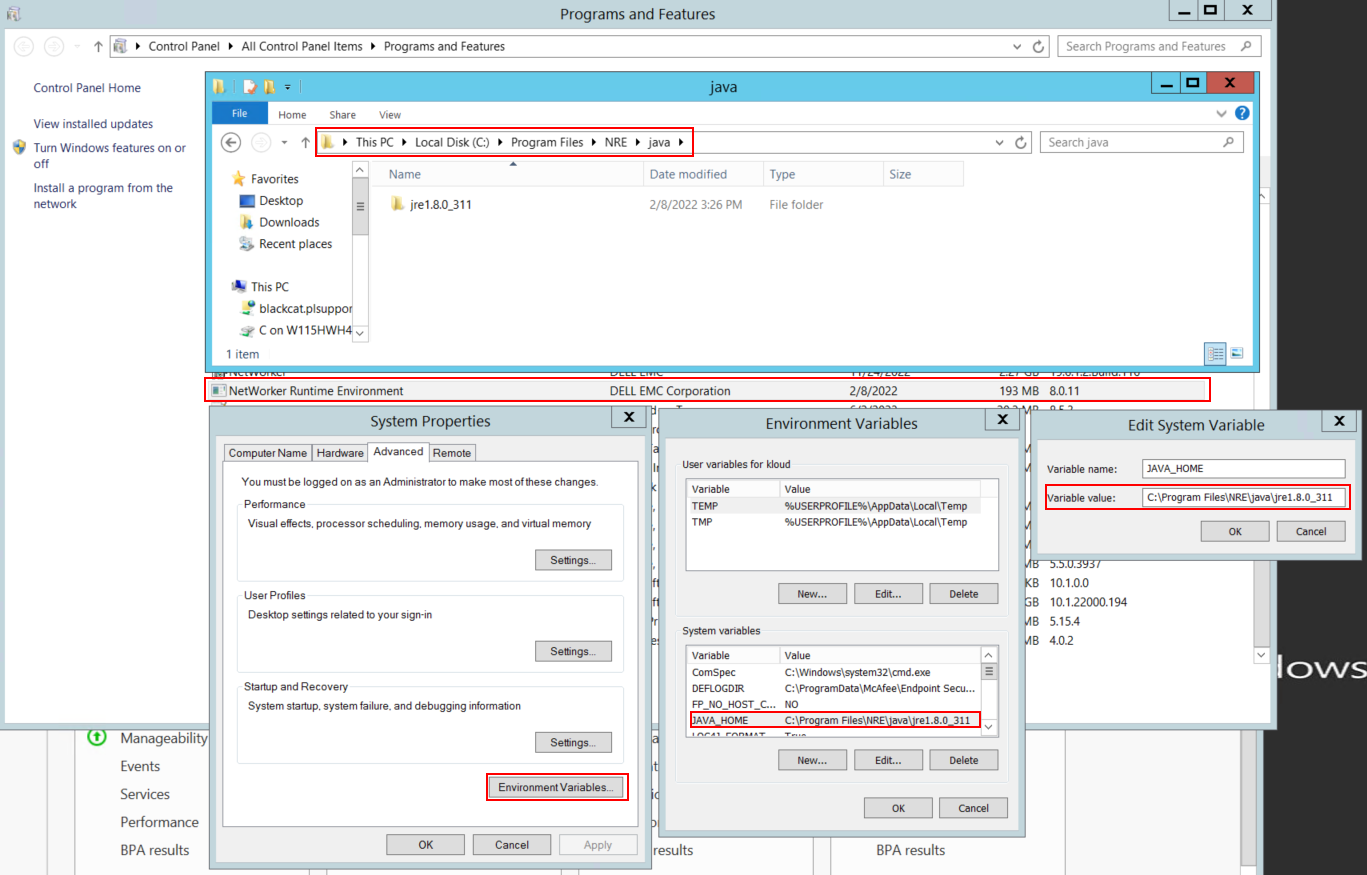
Rysunek 1: Potwierdź, z jakiej instancji Java korzysta NetWorker. Zmienna może wyglądać następująco: JAVA_HOME lub NSR_JAVA_HOME.
- Odinstaluj pakiet NetWorker. Nie powoduje to usunięcia żadnych baz danych NetWorker ani zasobów konfiguracyjnych.
- Zainstaluj ponownie NetWorker na istniejącej ścieżce instalacji. Ponowna instalacja NetWorker powoduje ponowną konfigurację usługi uwierzytelniania NetWorker.
- Upewnij się, że istnieje następująca ścieżka:
C:\Program Files\EMC NetWorker\nsr\authc-server\tomcat\webapps\nwrestapi
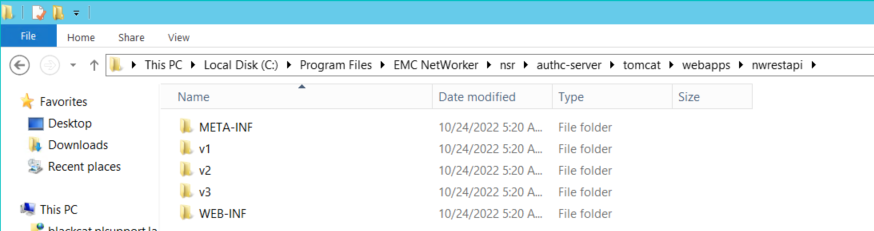
Rysunek 2: Potwierdź, że nwrestapi ścieżka istnieje.
- Jeśli
nwrestapiutworzono katalog, uruchom zapytania REST API.