NetWorker : Les demandes d’API REST échouent avec le message d’erreur suivant : statut HTTP 404 - Not Found « La ressource demandée n’est pas disponible »
Сводка: Échec des requêtes de l’API (Application Programming Interface) REST NetWorker avec le message d’erreur suivant : statut HTTP 404 - Not Found « La ressource demandée n’est pas disponible. Le serveur d’origine n’a pas trouvé de représentation actuelle de la ressource cible ou n’est pas disposé à divulguer l’existence d’une telle représentation. » ...
Симптомы
Les demandes de l’API REST NetWorker échouent avec le message d’erreur suivant : statut HTTP 404 - Not Found « La ressource demandée n’est pas disponible »
[root@NETWORKER_SERVER]:~# curl -ik GET -u **userid**:'***Password***' -H "Content-Type: application/json" 'https://NETWORKER_SERVER:9090/nwrestapi/v3/global/clients'
curl: (6) Could not resolve host: GET; Name or service not known
HTTP/1.1 404
Content-Type: text/html;charset=utf-8
Content-Language: en
Content-Length: 790
Date: Tue, 04 Jul 2023 12:11:41 GMT
Server: NSR SERVICES for Authentication


<!doctype html><html lang="en"><head><title>HTTP Status 404 – Not Found</title><style type="text/css">body {font-family:Tahoma,Arial,sans-serif;} h1, h2, h3, b {color:white;background-color:#525D76;} h1 {font-size:22px;} h2 {font-size:16px;} h3 {font-size:14px;} p {font-size:12px;} a {color:black;} .line {height:1px;background-color:#525D76;border:none;}</style></head><body><h1>HTTP Status 404 – Not Found</h1><hr class="line" /><p><b>Type</b> Status Report</p><p><b>Message</b> The requested resource [/nwrestapi/v3/global/clients] is not available</p><p><b>Description</b> The origin server did not find a current representation for the target resource or is not willing to disclose that one exists.</p><hr class="line" /><h3>Apache Tomcat/9.0.52</h
L’installation de NetWorker Server manque nwrestapi .
/nsr/authc/webapps/nwrestapi/
Windows :
C:\Program Files\EMC NetWorker\nsr\authc-server\tomcat\webapps\nwrestapi
Lla restapi.log n’existe pas ou n’est pas mis à jour :
/nsr/logs/restapi/restapi.log
Windows :
C:\Program Files\EMC NetWorker\nsr\logs\restapi\restapi.log
Причина
Les touches nwrestapi Le chemin n’existe pas. Les requêtes de l’API REST ne parviennent pas à trouver l’un des points de terminaison ou à corréler la façon dont elles doivent présenter les données des autres bases de données NetWorker.
Разрешение
nwrestapi est configuré en même temps que la fonction authc qui utilise Java Runtime Environment (JRE). Il est recommandé d’utiliser NetWorker Runtime Environment (NRE) pour éviter les problèmes potentiels liés à Java lors de la configuration authc. Les derniers packages NRE peuvent être téléchargés à partir de la page Pilotes et téléchargements NetWorker du support Dell .
Linux :
- Connectez-vous au NetWorker Server et passez à l’utilisateur root :
sudo su -
- Confirmez si NRE est installé et quelle instance Java NetWorker est configuré pour utiliser :
rpm -qa | grep nre
cat /nsr/authc/conf/installrc

[root@networker-mc]:~# rpm -qa | grep nre
nre-8.0.15-1.x86_64
[root@networker-mc]:~#
[root@networker-mc]:~# cat /nsr/authc/conf/installrc
JAVA_HOME=/opt/nre/java/latest
- Exécutez le script suivant pour reconfigurer NetWorker
authcServeur.
/opt/nsr/authc-server/scripts/authc_configure.sh

[root@networker-mc]:~# /opt/nsr/authc-server/scripts/authc_configure.sh

Specify the directory where the Java Standard Edition Runtime Environment (JRE) software is installed [/opt/nre/java/latest]:

The installation process will install an Apache Tomcat instance. For optimum security, EMC NetWorker Authentication Service will use a non-root user (nsrtomcat) to start the Apache Tomcat instance.
If your system has special user security requirements, ensure that proper operational permissions are granted to this non-root user (nsrtomcat).
Please refer to NetWorker Installation Guide.

WARNING: Port 9090 is already in use.

Do you wish to specify a different port number [y]? n

The Apache Tomcat will use "networker-mc.emclab.local" as the host name.
The Apache Tomcat will use "9090" as the port number.

The NetWorker Authentication Service requires a keystore file to configure encryption and to provide SSL support.

EMC recommends that you specify a keystore password that has a minimum of six characters.

Do you want to use the existing keystore /nsr/authc/conf/authc.keystore [y]?

Specify password for the existing keystore:
The install will use the existing certificate "emcauthctomcat" for Apache Tomcat.
The install will use the existing certificate "emcauthcsaml" for Authentication Service.

Creating the installation log in /opt/nsr/authc-server/logs/install.log.

Performing initialization. Please wait...

The installation completed successfully.
authc. Pour ce faire, procédez comme suit : systemctl Commandes:
systemctl stop networker
and
systemctl start networker
- Vérifiez que le dossier suivant a été créé :
/nsr/authc/webapps/nwrestapi

[root@networker-mc]:~# ls -l /nsr/authc/webapps/nwrestapi/
total 0
drwx------. 2 nsrtomcat nsrtomcat  44 Jul  6 12:22 META-INF
drwx------. 3 nsrtomcat nsrtomcat  21 Jul  6 12:22 v1
drwx------. 3 nsrtomcat nsrtomcat  21 Jul  6 12:22 v2
drwx------. 3 nsrtomcat nsrtomcat  21 Jul  6 12:22 v3
drwx------. 6 nsrtomcat nsrtomcat 107 Jul  6 12:22 WEB-INF
- Si la
nwrestapiLe répertoire a été créé, exécutez les requêtes de l’API REST.
Windows :
- Confirmez si NRE est installé et quelle instance Java NetWorker est configuré pour utiliser :
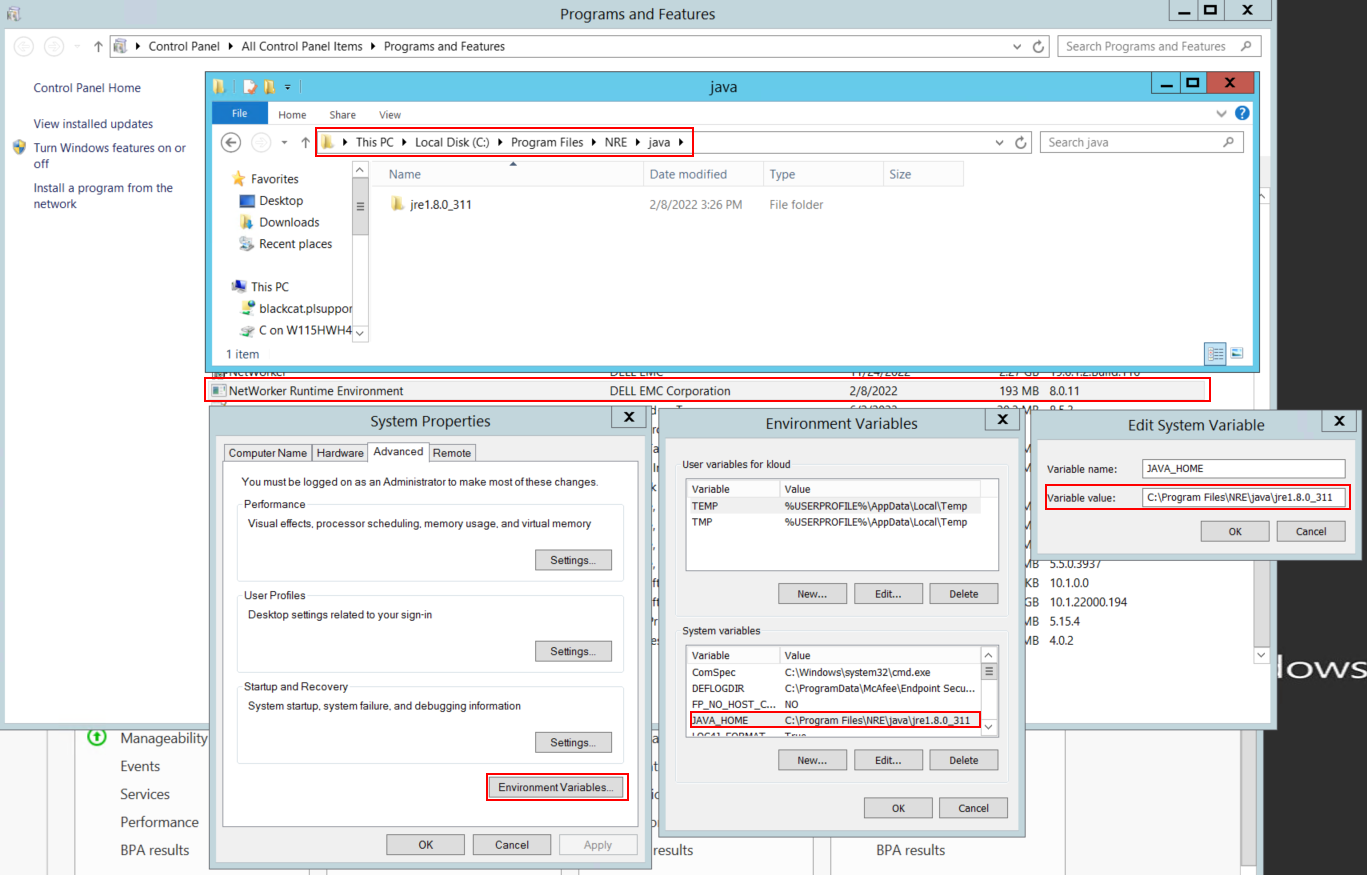
Graphique 1 : Confirmez l’instance Java utilisée par NetWorker. La variable peut se présenter sous la forme JAVA_HOME ou NSR_JAVA_HOME.
- Désinstallez le package NetWorker. Cela ne supprime aucune des bases de données ou ressources de configuration NetWorker.
- Réinstallez NetWorker sur le chemin d’installation existant. La réinstallation de NetWorker permet de reconfigurer le service d’authentification de NetWorker.
- Vérifiez que le chemin suivant existe :
C:\Program Files\EMC NetWorker\nsr\authc-server\tomcat\webapps\nwrestapi

Figure 2 : Vérifiez que le nwrestapi Le chemin existe.
- Si la
nwrestapiLe répertoire a été créé, exécutez les requêtes de l’API REST.