PowerFlex: PM1733a and PM1735a Drives are Missing in iDRAC, Errors Messages PDR5 or PR8
Сводка: Dell PM1735a Non-Volatile Memory Express (NVMe) drive failing in PowerEdge servers.
Симптомы
Dell PowerEdge based servers configured with Dell Samsung PM1735a may report drives as failed, offline, or missing in the iDRAC and operating system. This can occur on a system with an NVMe enabled PERC storage controller or NVMe direct configuration.
If there is a failure, the following error messages can be present in the LifeCycle Controller logs:
PDR5  - Disk arg1 in Backplane 1 in of RAID Controller in SL3 is removed
PDR1001 - Fault detected on drive arg1 in disk drive bay
CTL137 - iDRAC is unable to successfully communicate with the device PCIe SSD in Slot X in Bay Y
PR8 - Device not detected: Dell NVMe PCIe SSD Configuration Data(PCIe SSD in Slot X in Bay Y)
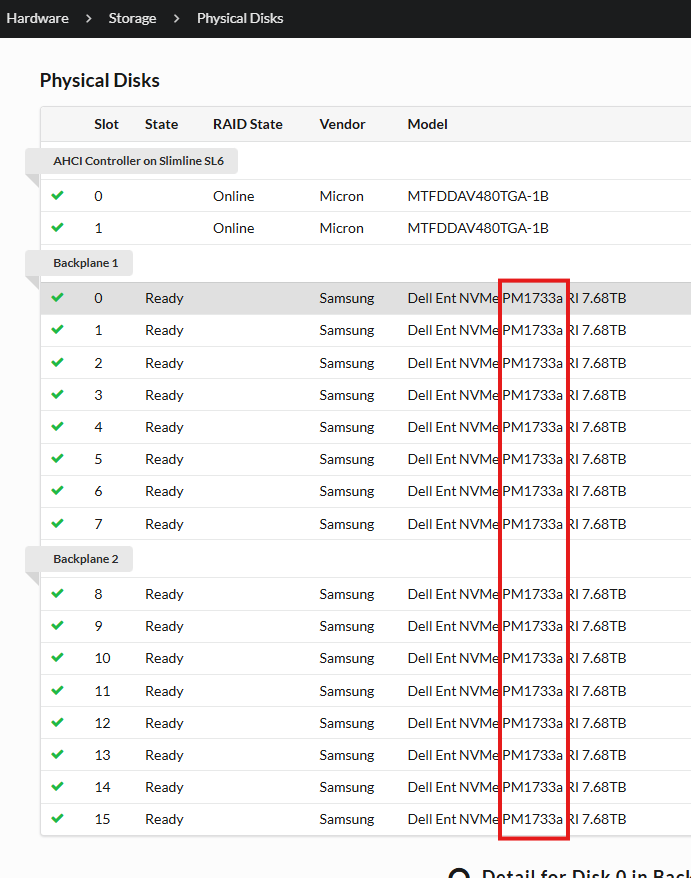
Checked Disk model from iDRAC > Physical Disks:
Причина
Dell Samsung PM1735a drives may assert due to an internal job interfering with a parity update operation.
Разрешение
Dell Technologies recommends updating the PM1733a and PM1735a drive firmware at the earliest available opportunity to avoid future occurrences of this error condition.
Dell Samsung PM1733a and PM1735a drives are available for update using these new firmware versions. Once a drive has entered into a failed state, it is not possible to recover or update it.
See article PowerFlex How to update disk firmware on PowerEdge servers in a PowerFlex Rack or Appliance
Upgrade the disk firmware version to 1.2, which contains the fix.
Impacted Versions
- PowerFlex RCM 3.7.2
- PowerFlex IC 40.372.00
Fixed In Version
- PowerFlex RCM 3.7.8.2 and 3.8.3.2
- PowerFlex IC 48.387.02 and 48.383.02
If an upgrade is not feasible, the Single Component Upgrade (SCU) feature can be utilized with RPQ approval to update the drive firmware for changes out of the RCM or IC compatibility matrix.
- PowerFlex: How to perform a Single Component Upgrade
- PowerFlex: How to enable the Single Component Upgrade feature
Firmware downloads links:
- Not Encrypted Devices firmware download link:
- Self Encrypted Devices (SED) firmware download link:
Дополнительная информация
See similar article PowerFlex: Samsung PM1733a NVMe SSD with Firmware Version 1.x.x Causes High IO Latency and Slow IO Responses