L'agent di decrittografia Dell riporta un nome host diverso nella console di Dell Data Security Server
Сводка: Questo articolo descrive la procedura per risolvere un problema del report di inventario relativo al nome host errato sui client Windows.
Данная статья применяется к
Данная статья не применяется к
Эта статья не привязана к какому-либо конкретному продукту.
В этой статье указаны не все версии продуктов.
Симптомы
Prodotti interessati:
- Dell Encryption
- Dell Endpoint Security Suite Enterprise
Sistemi operativi interessati:
- Windows
Причина
I prodotti Dell Data Security possono riportare il nome host errato durante gli upload dell'inventario sul server se è presente un nome host diverso nel file hosts prima del nome host corrente.
Разрешение
- Modificare il file hosts situato in C:\Windows\System32\drivers\etc.
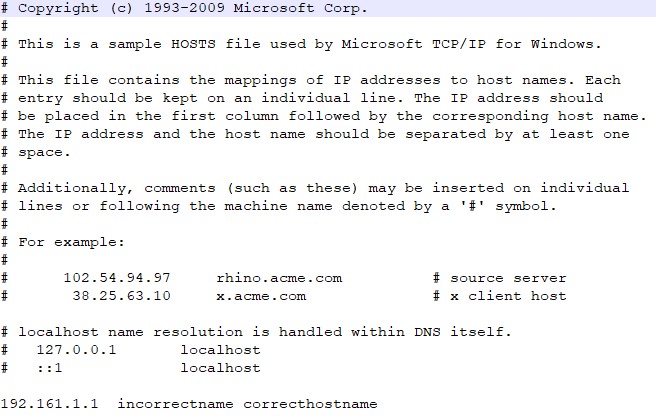
- Modificare l'ordine in modo che il nome host corrente sia la prima voce nel file hosts.
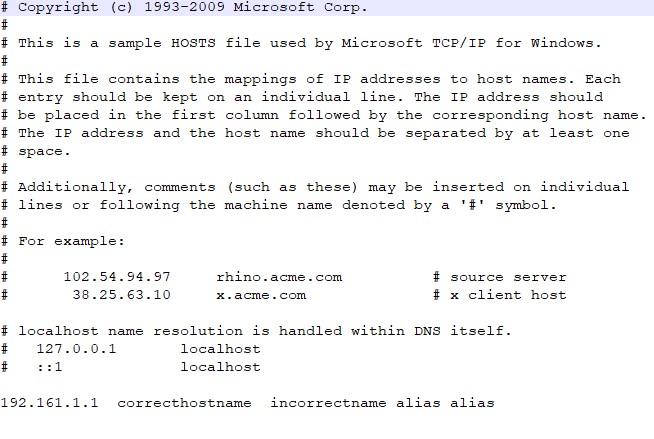
Nota: è comunque possibile avere altri alias nel file hosts posizionati dopo il nome host corrente.
- Al termine , fare clic su >File Save.
- Il nome host cambierà all'interno del server al successivo caricamento dell'inventario.
Per contattare il supporto, consultare l'articolo Numeri di telefono internazionali del supporto di Dell Data Security.
Accedere a TechDirect per generare una richiesta di supporto tecnico online.
Per ulteriori approfondimenti e risorse accedere al forum della community Dell Security.
Дополнительная информация
Видео
Затронутые продукты
Dell Encryption, Dell Endpoint Security Suite EnterpriseСвойства статьи
Номер статьи: 000187320
Тип статьи: Solution
Последнее изменение: 20 May 2024
Версия: 4
Получите ответы на свои вопросы от других пользователей Dell
Услуги технической поддержки
Проверьте, распространяются ли на ваше устройство услуги технической поддержки.