Isilon: How to find the serial number label on an Isilon A100 accelerator node
Сводка: Introduction The serial number label on an Isilon A100 acceleration node is in a different location than the serial number labels on other Isilon nodes. This article describes how to find the serial number label. ...
Данная статья применяется к
Данная статья не применяется к
Эта статья не привязана к какому-либо конкретному продукту.
В этой статье указаны не все версии продуктов.
Инструкции
Procedure
The serial number is printed on a blue label inside the node chassis, as indicated by the following image: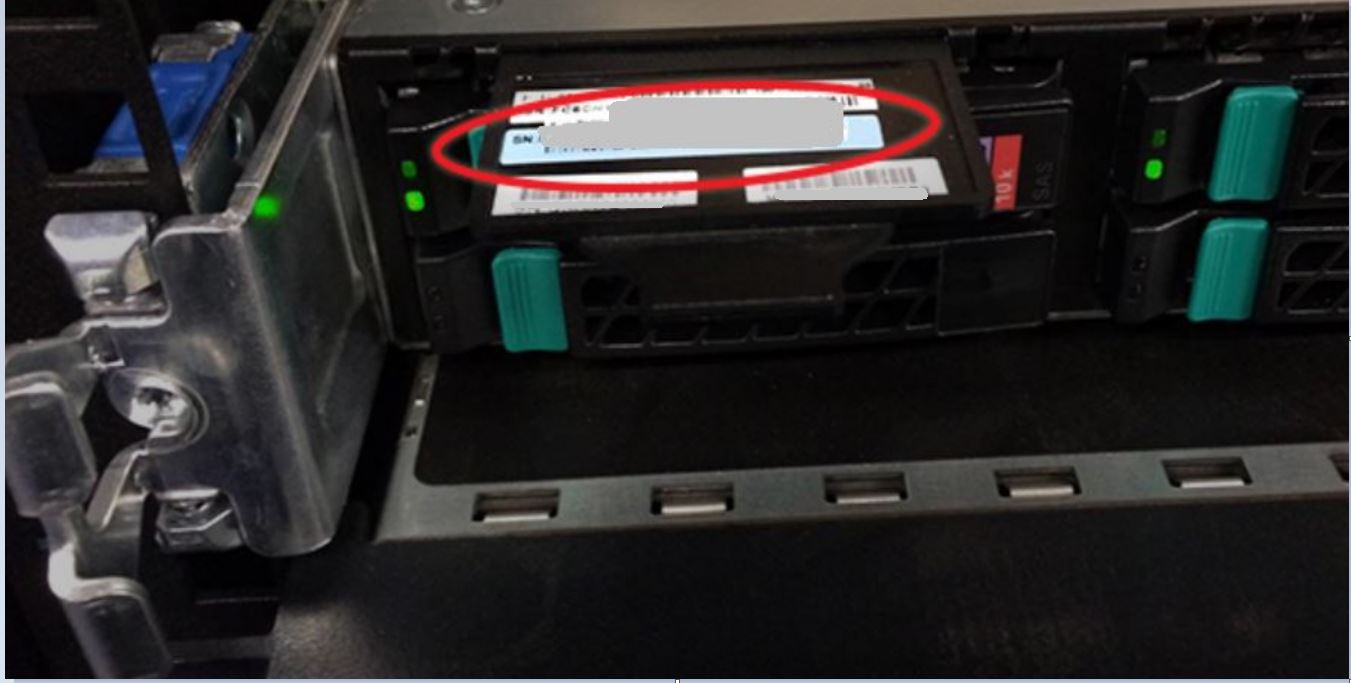
To retrieve the serial number from the chassis:
- Remove the face plate:
- Press both latches inward and to the center simultaneously.
- Pull the face plate off straight toward you while keeping the latches pushed in.
- Locate the black plastic tab sticking out of the chassis at the top-left corner, directly above the leftmost boot drive.
- Pull the tab out to expose the blue serial number label. The serial number starts with "FC6IS" and followed by nine digits.
- When you are done, push the label tab back into the chassis.
- Reinstall the face plate by carefully lining it up with the mount points and then pressing it onto the chassis until it clicks into place.
NOTE
To view the serial number using the OneFS web administration interface or the command-line interface, see PowerScale: Isilon: How to find serial numbers for PowerScale/Isilon nodes. | Dell US
To view a demonstration of this procedure, see the following video.
Затронутые продукты
IsilonПродукты
Isilon, Isilon A100Свойства статьи
Номер статьи: 000020342
Тип статьи: How To
Последнее изменение: 14 Oct 2022
Версия: 3
Получите ответы на свои вопросы от других пользователей Dell
Услуги технической поддержки
Проверьте, распространяются ли на ваше устройство услуги технической поддержки.