How to Obtain the VMware Carbon Black Cloud Endpoint Activation Code
Сводка: Learn how to obtain an activation code for VMware Carbon Black Cloud Endpoint for Windows, Mac, or Linux by following these step-by-step instructions.
Данная статья применяется к
Данная статья не применяется к
Эта статья не привязана к какому-либо конкретному продукту.
В этой статье указаны не все версии продуктов.
Инструкции
The VMware Carbon Black Cloud Endpoint activation code is used to manually install the sensor to the VMware Carbon Black Cloud.
This article discusses how to obtain the activation code.
Affected Products:
- VMware Carbon Black Cloud Endpoint
Affected Operating Systems:
- Windows
- Mac
- Linux
- In a web browser, go to <REGION>.conferdeploy.net.
Note: <REGION> = Region of tenant
- Americas = https://defense-prod05.conferdeploy.net/
- Europe = https://defense-eu.conferdeploy.net/
- Asia Pacific = https://defense-prodnrt.conferdeploy.net/
- Australia and New Zealand = https://defense-prodsyd.conferdeploy.net
- Americas = https://defense-prod05.conferdeploy.net/
- Sign In to the VMware Carbon Black Cloud.

- In the left menu pane, click ENDPOINTS.
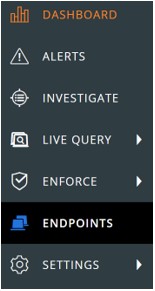 Note: The layout in the example may differ slightly from your environment.
 - In the upper right, select Sensor Options and then click Send installation request.
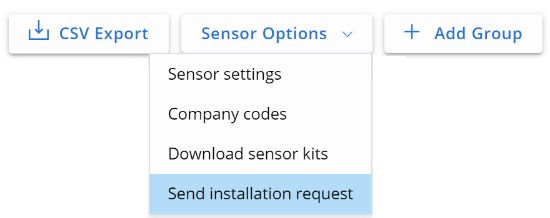
- In the Send Installation Request menu select either:
- Single Request and then go to Step 6
- Multiple Requests and then go to Step 7.

- In the Single Request tab:
- Optionally, populate the user's First name.
- Optionally, populate the user's Last name.
- Populate the user's Email.
- Click Send.
- Go to Step 8.
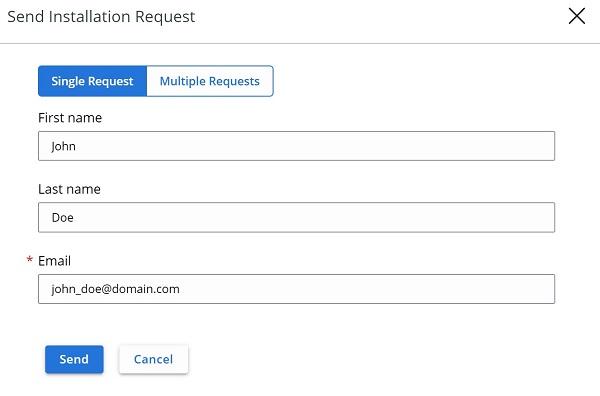
- In the Multiple Requests tab:
- Populate each user's Email separated by a comma.
- Click Send.
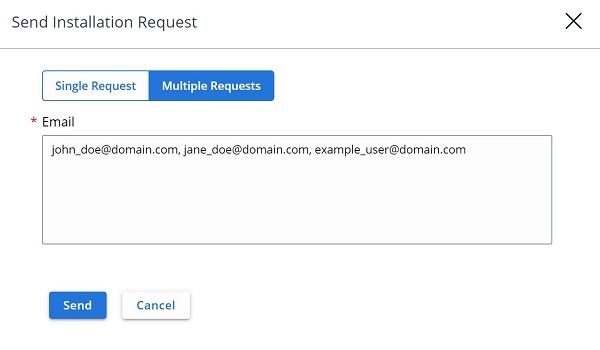
- In the user's email, document the Activation Code.
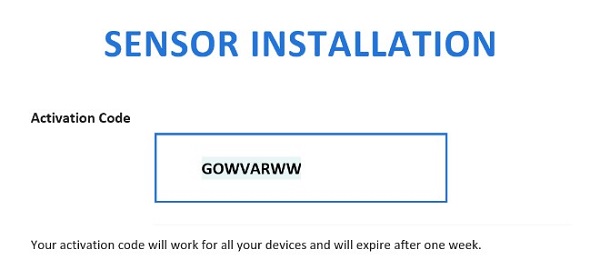 Note:
Note:- The email is sent from noreply@carbonblack.com.
- The Activation Code expires after one week.
- The Activation Code can be resent from VMware Carbon Black Cloud, Endpoints, User, and then Take Action.
- The example in the screenshot will differ in your environment.

Затронутые продукты
VMware Carbon BlackСвойства статьи
Номер статьи: 000126084
Тип статьи: How To
Последнее изменение: 30 Jul 2026
Версия: 13
Получите ответы на свои вопросы от других пользователей Dell
Услуги технической поддержки
Проверьте, распространяются ли на ваше устройство услуги технической поддержки.