NVP-vProxy: Windows VM FLR fails - "robocopy" executable file not found.
Summary: The NetWorker VMware Protection (NVP) integration is configured with the vProxy appliance. vProxy file-level recovery (FLR) mounts without issue but fails quickly on the next step. vProxy FLR with Windows Virtual Machines (VM) uses the robocopy utility to copy files from the FLR mount to the location you specify. The robocopy utility is in the C:WindowsSystem32 directory, which is not in the VM's environment variables path. Add the System32 directory to the VM's environment variables to allow the use of robocopy during vProxy FLR operation. ...
Bu makale şunlar için geçerlidir:
Bu makale şunlar için geçerli değildir:
Bu makale, belirli bir ürüne bağlı değildir.
Bu makalede tüm ürün sürümleri tanımlanmamıştır.
Symptoms
The NetWorker VMware Protection (NVP) integration is configured with the vProxy appliance. vProxy file-level recovery (FLR) mounts without issue, but fails to copy selected files from the vProxy FLR mountpoint.
159373:nsrvproxy_flr_recover: vProxy Log: YYYY/MM/DD HH:MM:SS INFO:   [194] Starting C:\Program Files (x86)\EMC\vProxy FLR Agent\bin\vflrcopy.exe
159373:nsrvproxy_flr_recover: vProxy Log: YYYY/MM/DD HH:MM:SS TRACE:  [194] Testing robocopy options...
159373:nsrvproxy_flr_recover: vProxy Log: YYYY/MM/DD HH:MM:SS TRACE:  [194] Setup completed.
159373:nsrvproxy_flr_recover: vProxy Log: YYYY/MM/DD HH:MM:SS ERROR:  [194] Error copying 'C:\Program Files (x86)\EMC\Vproxy FLR Agent\flr\mountpoints\FLR967615482\01-E$\Projects\File1.txt': exec: "robocopy": executable file not found in %PATH%
159373:nsrvproxy_flr_recover: vProxy Log: YYYY/MM/DD HH:MM:SS ERROR:  [194] Error copying 'C:\Program Files (x86)\EMC\Vproxy FLR Agent\flr\mountpoints\FLR967615482\01-E$\Projects\File2.txt': exec: "robocopy": executable file not found in %PATH%
159373:nsrvproxy_flr_recover: vProxy Log: YYYY/MM/DD HH:MM:SS ERROR:  [194] Error copying 'C:\Program Files (x86)\EMC\Vproxy FLR Agent\flr\mountpoints\FLR967615482\01-E$\Projects\File3.txt': exec: "robocopy": executable file not found in %PATH%
159373:nsrvproxy_flr_recover: vProxy Log: YYYY/MM/DD HH:MM:SS INFO:   [194] File copying completed.
159373:nsrvproxy_flr_recover: vProxy Log: YYYY/MM/DD HH:MM:SS ERROR:  [194] C:\Program Files (x86)\EMC\vProxy FLR Agent\bin\vflrcopy.exe: No objects could be recovered.
159373:nsrvproxy_flr_recover: vProxy Log: YYYY/MM/DD HH:MM:SS TRACE:  [194] C:\Program Files (x86)\EMC\vProxy FLR Agent\bin\vflrcopy.exe exiting with status code 0
152793:nsrvproxy_flr_recover: vProxy Log Ends =================================================
163541:nsrvproxy_flr_recover: FLR recovery failed: error code: 0, error message: No objects could be recovered.
162216:nsrvproxy_flr_recover: FLR recover job completed with errors.
Cause
vProxy FLR with Windows VMs uses the robocopy utility to copy files from the FLR mount to the location you specify. The robocopy utility is in the C:\Windows\System32 directory, which is not in the VM's environment variables path.
Resolution
Add the System32 directory to the VM's environment variables to allow the use of robocopy during vProxy FLR operation.
- While using an administrator account, Open the Windows Control Panel and go to User Accounts > User Accounts and click "Change my environment variables"
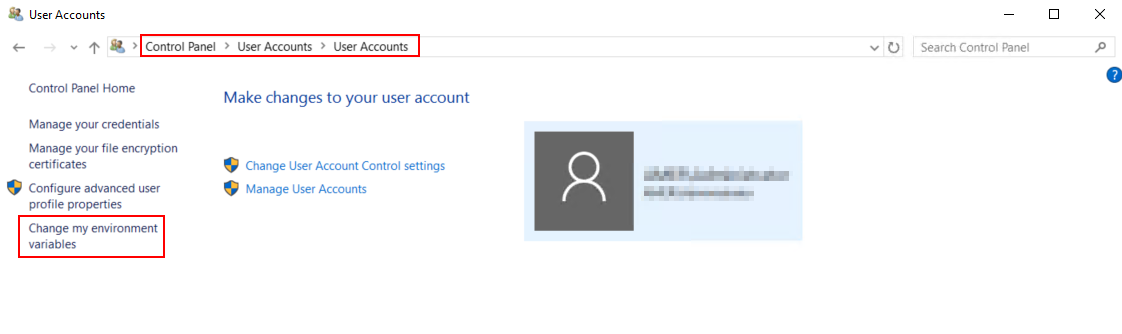
Figure 1: Windows Control panel location for changing system environment variables.
- Select a user variable, scroll-down on the system variables section to the "Path" variable and select it.
- If Path is missing system32, click New and add
%SystemRoot%\system32.
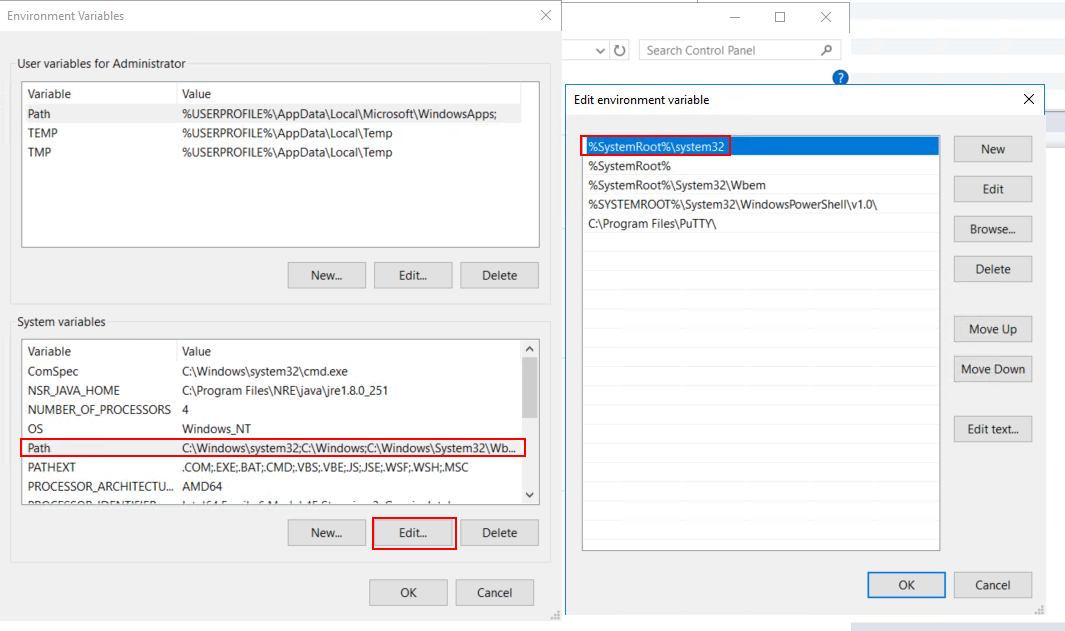
Figure 2: Environment Variables panel options for editing and adding values to the Path system variable.
- Click "OK" in the edit environment variable window, then click "OK" in the Environment Variables window.
- Run the FLR again.
Etkilenen Ürünler
NetWorkerÜrünler
NetWorkerMakale Özellikleri
Article Number: 000031630
Article Type: Solution
Son Değiştirme: 14 Mar 2026
Version: 4
Sorularınıza diğer Dell kullanıcılarından yanıtlar bulun
Destek Hizmetleri
Aygıtınızın Destek Hizmetleri kapsamında olup olmadığını kontrol edin.