NVP vProxy: Failed to lock Virtual Machine for backup: Another vProxy operation is active on VM
Summary: NetWorker VMware Protection (NVP) vProxy operations fail. The error returned is that it fails to local the virtual machine due to another active operation on the Virtual Machine (VM)
Bu makale şunlar için geçerlidir:
Bu makale şunlar için geçerli değildir:
Bu makale, belirli bir ürüne bağlı değildir.
Bu makalede tüm ürün sürümleri tanımlanmamıştır.
Symptoms
vProxy backup failed with "Failed to lock Virtual Machine for backup: Another vProxy operation is active on VM XXX" when there is no active backup job running for the particular VM.
INFO: [@(#) Build number: ###] Another vProxy operation is active on VM vm-XXX: {Operation:Backup StartTime:2017-05-15T10:09:21Z Proxy:<vProxy>SessionId:4cf6f76c-ef6c-435d-880c-77fbaf49exxx}
ERROR: [@(#) Build number: ###] Failed to lock Virtual Machine for backup: Another vProxy operation is active on VM vm-XXX: {Operation:Backup StartTime:2017-05-15T10:09:21Z Proxy:<vProxy> SessionId:4cf6f76c-ef6c-435d-880c-77fbaf49e1xxx}. Session logs can be found on the NetWorker server under ..\nsr\logs\policy\POLICY_NAME\WORKFLOW_NAME
Cause
The VM was marked as "backup locked" due to previous backup error or interruption.
The vmconfig command can be used to verify if the VM is backup locked.
- Log in to vProxy as admin over SSH, then switch to root.
sudo su -
- Change to bin directory
cd /opt/emc/vproxy/bin
- Run below command to load library path:
source ../unit/vproxy.env
- Check if the backup is locked with 'vmconfig' tool using the MoREF value from the session log:
./vmconfig -c info -k "vm-MoRef" -l moref -v vCENTER_NAME -u "vCENTER_USERNAME" -p 'PASSWORD'
Example output
  Searching for virtual machine with MORef "vm-XXX" ...
            Querying vCenter for definition of virtual machine with MORef of "vm-XXX" ...
            Found virtual machine "VM_NAME" with MORef "vm-xxx".
            vm-145501: Name: "VM_NAME".
            vm-145501: CBT Enabled: true.
            vm-145501: Migration Enabled: false.
            vm-145501: Backup Locked: true.
Resolution
Option 1
Use the ProxyHC utility on the vProxy to cleanup: NVP-vProxy: How to use health check tool ProxyHC on vProxy appliance
The syntax required is:
./ProxyHC tasks cleanup
Option 2
- Log in vSphere client
- Select the affected VM
- In the General tab, go to Custom Attributes, click Edit:
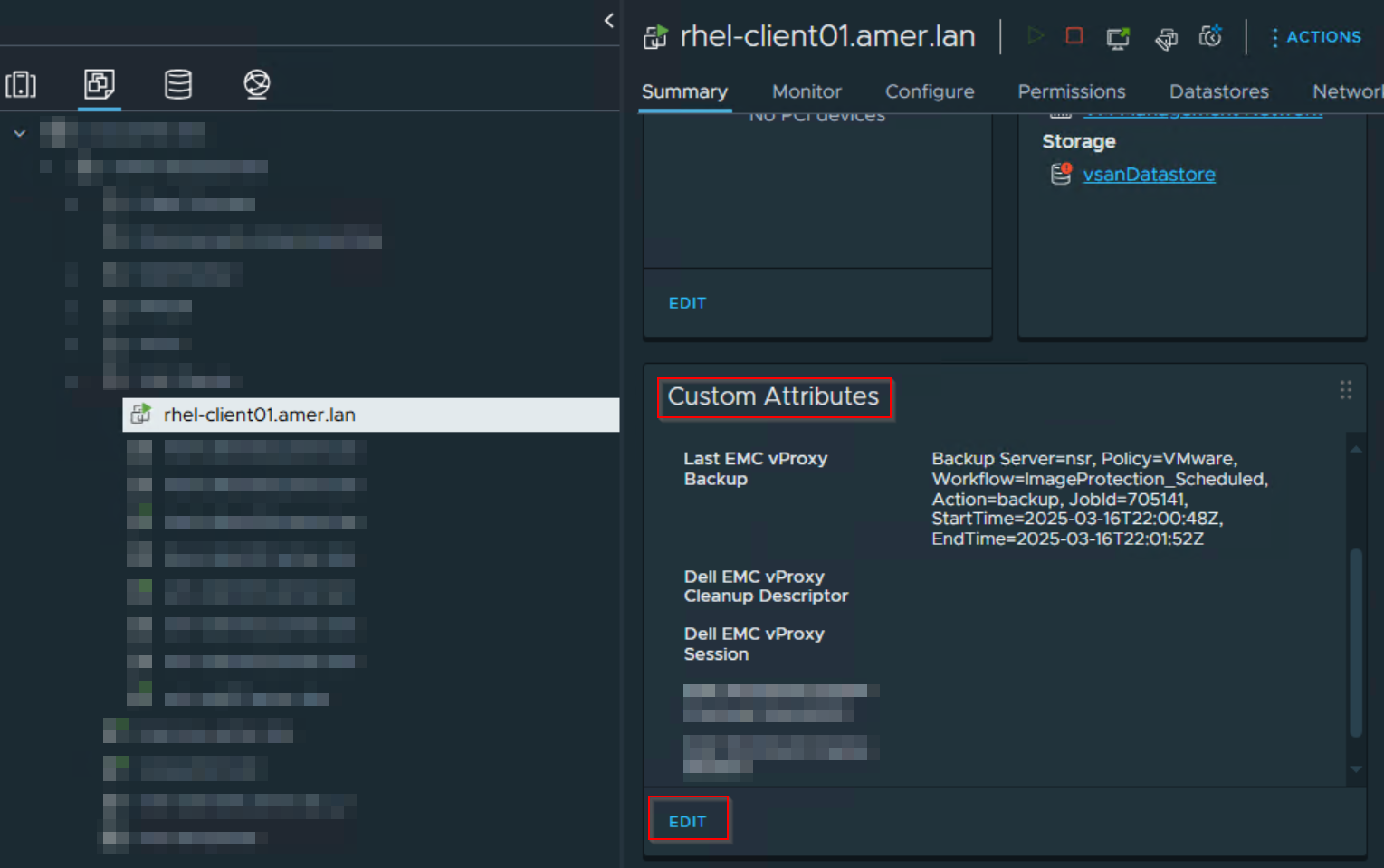
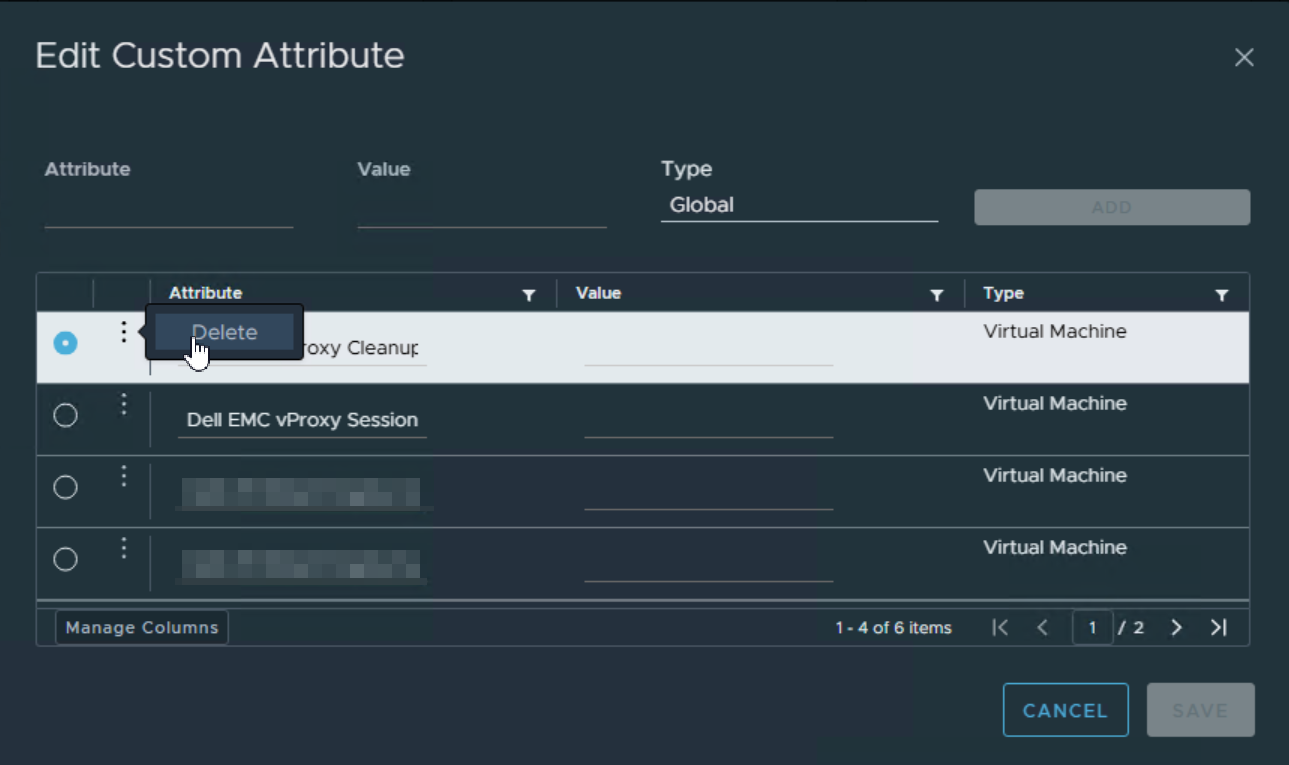
- Select each custom attribute that contains "Dell EMC vProxy," and Delete it:
Etkilenen Ürünler
NetWorker SeriesÜrünler
NetWorker SeriesMakale Özellikleri
Article Number: 000057190
Article Type: Solution
Son Değiştirme: 17 Nis 2026
Version: 8
Sorularınıza diğer Dell kullanıcılarından yanıtlar bulun
Destek Hizmetleri
Aygıtınızın Destek Hizmetleri kapsamında olup olmadığını kontrol edin.