Wat is Dell Pair?
Summary: Het volgende artikel bevat informatie over de software van Dell Pair. Met deze software kunt u uw Dell bluetooth-apparaten gemakkelijker op uw Dell computer aansluiten.
Instructions
Inhoudsopgave:
- Inleiding
- Softwarevereisten
- Dell Pair installeren
- Kenmerken van Dell Pair
- Ondersteunde platforms en randapparatuur
- Probleemoplossing
- Aanvullende informatie
Inleiding
Dell Pair is een softwarehulpprogramma dat beschikbaar is op bepaalde Dell platforms en het koppelen met Dell bluetooth-apparaten ondersteunt. (Bijvoorbeeld: Bluetooth-apparaten zoals uw draadloze muis, toetsenbord of headset.) Wanneer Dell Pair is ingeschakeld, wordt in de gebruikersinterface (UI) van het hulpprogramma automatisch gevraagd om te koppelen met een Dell bluetooth-apparaat binnen het bluetooth-detectiebereik van de Dell computer.
Softwarevereisten
De applicatie Dell Pair heeft de volgende vereisten:
- Windows 11
- Windows 10 (versie 10.0.19041 en hoger.)
- Bluetooth-versie 5.0 of hoger
- Bluetooth is ingeschakeld
Dell Pair installeren
De Dell Pair applicatie is niet langer beschikbaar om te downloaden. Windows 10 versie 1803 en latere versies en Windows 11 bevat Swift Pair met vergelijkbare functionaliteit:

Alle ondersteunende documentatie voor de Dell Pair applicatie vindt u op de Dell Support website:
Kenmerken van Dell Pair
De melding van Dell Pair verschijnt automatisch. Deze verschijnt wanneer een bluetooth-apparaat dat detectie door Dell Pair ondersteunt, wordt ingeschakeld en zich binnen het detectiebereik van de Dell computer bevindt.
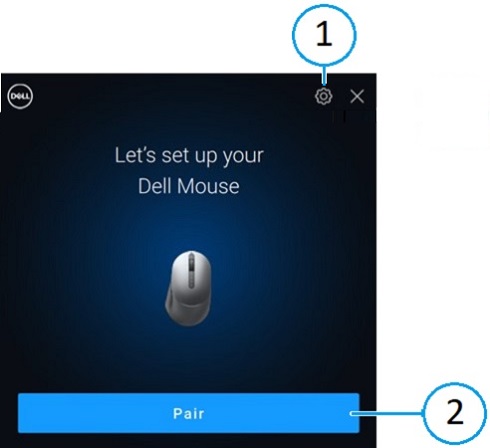
| 1 | Instellingen voor Dell Pair | 2 | Koppelen via bluetooth starten |
Wanneer de gebruikersinterface verschijnt, klikt u op Koppelen om het Dell bluetooth-apparaat met de Dell computer te koppelen.
Open de gebruikersinterface van de Dell Pair applicatie vanuit het menu Start:
- Menu Start
-
Dell
-
Dell Pair
-
-
Wijzig in de gebruikersinterface van Dell Pair de instelling van Dell Pair. Schakel de Dell Pair applicatie in of uit door de schakelaar naar de aan- of uit-stand te schuiven.
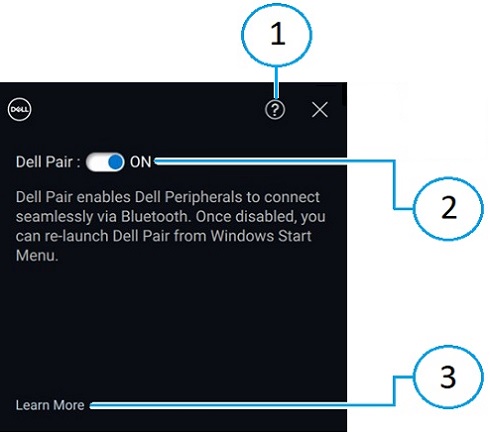
| 1 | Informatie softwareversie | 2 | Hiermee kunt u Dell Pair in- of uitschakelen |
| 3 | Meer informatie |
Ondersteunde platforms en randapparatuur
De software van Dell Pair is vooraf geïnstalleerd op de volgende computers:
| Inspiron | Vostro | XPS | Latitude | Precision |
|---|---|---|---|---|
| 13 5320 | 3440 | 13 9315 | 3330 | 3480 |
| 13 5330 | 5320 | 13 9315 2-in-1 | 3340 | 3490 |
| 14 5420 | 5620 | 13 Plus 9320 | 3440 | 3570 |
| 14 5425 | 5625 | 13 9340 | 3450 | 3571 |
| 14 5430 | 5630 | 14 9350 | 3540 | 3580 |
| 14 5435 | 5635 | 14 9440 | 3550 | 3581 |
| 16 5620 | 5640 | 15 9520 | 5320 | 3590 |
| 14 5440 | 7620 | 15 9530 | 5330 | 3591 |
| 14 5445 | 16 9640 | 5340 | 5470 | |
| 16 5625 | 17 9720 | 5350 | 5480 | |
| 16 5630 | 17 9730 | 5430 | 5490 | |
| 16 5635 | 5431 | 5570 | ||
| 14 5640 | 5440 | 5690 | ||
| 14 5645 | 5450 | 5770 | ||
| 14 Plus 7420 | 5455 | 7670 | ||
| 14 7430 2-in-1 | 5530 | 7680 | ||
| 14 Plus 7430 | 5531 | 7770 | ||
| 14 7435 2-in-1 | 5540 | 7780 | ||
| 14 Plus 7440 | 5550 | |||
| 14 7440 2-in-1 | 7320 | |||
| 14 7445 2-in-1 | 7330 | |||
| 16 Plus 7620 | 7350 | |||
| 16 Plus 7630 | 7350 afneembaar | |||
| 16 Plus 7640 | 7420 | |||
| 16 7630 2-in-1 | 7430 | |||
| 16 7635 2-in-1 | 7450 | |||
| 16 7640 2-in-1 | 7455 | |||
| 7530 | ||||
| 7650 | ||||
| 9330 | ||||
| 9430 | ||||
| 9440 2-in-1 | ||||
| 9450 2-in-1 |
| Dell Pro | Dell Plus | Dell Pro Premium | Dell Pro Plus | Dell Pro Rugged |
|---|---|---|---|---|
| PC14255 | DB16250 | PA13250 | PB13250 | RA13250 |
| PC16255 | DB16255 | PA14250 | PB13255 | RB14250 |
| PB14250 | ||||
| PB14255 | ||||
| PB16250 | ||||
| PB16255 |
| Ondersteunde randapparatuur | ||
|---|---|---|
| Dell Pro compacte stille muis (MS355): u kunt ook de Dell stille muis kiezen | Dell Pro Plus draadloze ANC-headset (Active Noise Cancelling) (WL5024): u kunt ook een Dell Pro draadloze ANC-headset gebruiken | Dell Pro Plus draadloze speakerphone SL525 |
| Dell Pro Compact Silent toetsenbord en muis (KM555): u kunt ook Dell stille toetsenbord en muis kiezen | Dell Pro Premium draadloze ANC headset WL7024: u kunt ook een Dell Premier draadloze ANC headset aanschaffen | |
| Dell Bluetooth-reismuis (MS700) | Dell Pro draadloze headset WL3024: als alternatief Dell draadloze headset | |
Dell Pro Premium samenwerkingstoetsenbord en -muis KM900:
|
Dell Pro Plus oordopjes EB525 | |
| Dell Pro Premium muis MS900 | ||
Probleemoplossing
| Problemen | Mogelijke oplossingen |
|---|---|
| De melding van Dell Pair wordt niet geopend wanneer u een Dell bluetooth-apparaat voor de eerste keer inschakelt. |
|
| Dell Pair meldt een koppelingsfout. |
|
Additional Information
Ondersteuning voor probleemoplossing bluetooth
Informatie over gebruik van bluetooth-apparaten die met uw computer worden gebruikt en over het oplossen van problemen. Vind informatie over stappen voor probleemoplossing, instructiegidsen en relevante supportvideo's voor hulp.
Voor de gebruikershandleiding van Dell Pair bladert u naar de pagina Dell Pair handleiding. Tik of klik op PDF weergeven aan de rechterkant van de gebruikershandleiding, die te vinden is in het gedeelte Handleidingen en documenten .