NetWorker: Żądania interfejsu REST API nie powiodą się z komunikatem o błędzie: Stan HTTP 404 — nie znaleziono "Żądany zasób nie jest dostępny"
Summary: Błędy interfejsu API REST NetWorker kończy się niepowodzeniem z komunikatem o błędzie: Stan HTTP 404 — nie znaleziono "Żądany zasób nie jest dostępny. Serwer origin nie znalazł aktualnego oświadczenia dotyczącego zasobu docelowego lub nie chce ujawniać, że istnieje". ...
Bu makale şunlar için geçerlidir:
Bu makale şunlar için geçerli değildir:
Bu makale, belirli bir ürüne bağlı değildir.
Bu makalede tüm ürün sürümleri tanımlanmamıştır.
Symptoms
Żądania interfejsu API REST NetWorker kończy się niepowodzeniem z komunikatem o błędzie: Stan HTTP 404 — nie znaleziono "Żądany zasób nie jest dostępny"
[root@NETWORKER_SERVER]:~# curl -ik GET -u **userid**:'***Password***' -H "Content-Type: application/json" 'https://NETWORKER_SERVER:9090/nwrestapi/v3/global/clients'
curl: (6) Could not resolve host: GET; Name or service not known
HTTP/1.1 404
Content-Type: text/html;charset=utf-8
Content-Language: en
Content-Length: 790
Date: Tue, 04 Jul 2023 12:11:41 GMT
Server: NSR SERVICES for Authentication
HTTP Status 404 – Not Foundbody {font-family:Tahoma,Arial,sans-serif;} h1, h2, h3, b {color:white;background-color:#525D76;} h1 {font-size:22px;} h2 {font-size:16px;} h3 {font-size:14px;} p {font-size:12px;} a {color:black;} .line {height:1px;background-color:#525D76;border:none;}
HTTP Status 404 – Not Found
Type Status Report
Message The requested resource [/nwrestapi/v3/global/clients] is not available
Description The origin server did not find a current representation for the target resource or is not willing to disclose that one exists.
Apache Tomcat/9.0.52 W instalacji serwera NetWorker brakuje katalogu nwrestapi.
Linux: /nsr/authc/webapps/nwrestapi/

Windows: C:\Program Files\EMC NetWorker\nsr\authc-server\tomcat\webapps\nwrestapi
Plik restapi.log nie istnieje lub nie aktualizuje się:
Linux: /nsr/logs/restapi/restapi.log

Windows: C:\Program Files\EMC NetWorker\nsr\logs\restapi\restapi.log
Cause
Ścieżka nwrestapi nie istnieje. Kwerendy interfejsu REST API nie mogą znaleźć żadnego z punktów końcowych ani korelować sposobu prezentowania danych z innych baz danych NetWorker.
Resolution
Nwrestapi jest skonfigurowany wraz z usługą authc networker, która korzysta z środowiska Java Runtime Environment. Zaleca się używanie środowiska Runtime Environment (NRE) NetWorker, aby uniknąć potencjalnych problemów związanych z java podczas konfigurowania authc. Najnowsze pakiety NRE są dostępne do pobrania ze strony Sterowniki i pliki do pobrania Dell Support NetWorker .
Linux:
Windows:
UWAGA: Może być zainstalowanych wiele wystąpień języka Java. Na przykład nrE i Oracle JRE mogą być instalowane na serwerze. Powyższy krok potwierdza wykorzystanie instalacji oprogramowania NetWorker w języku Java.
Linux:
- Zaloguj się do serwera NetWorker i przełącz się do katalogu głównego:
sudo su -
- Sprawdź, czy zainstalowano nrE i jakie wystąpienie Java NetWorker jest skonfigurowane do używania:
rpm -qa | grep nre
cat /nsr/authc/conf/installrc

[root@networker-mc]:~# rpm -qa | grep nre
nre-8.0.15-1.x86_64
[root@networker-mc]:~#
[root@networker-mc]:~# cat /nsr/authc/conf/installrc
JAVA_HOME=/opt/nre/java/latest
UWAGA: Może być zainstalowanych wiele wystąpień języka Java. Na przykład nrE i Oracle JRE mogą być instalowane na serwerze. Powyższe czynności potwierdzają, z jakiej instalacji Java korzysta NetWorker.
- Uruchom następujący skrypt, aby ponownie skonfigurować serwer NetWorker authc.
/opt/nsr/authc-server/scripts/authc_configure.sh

[root@networker-mc]:~# /opt/nsr/authc-server/scripts/authc_configure.sh

Specify the directory where the Java Standard Edition Runtime Environment (JRE) software is installed [/opt/nre/java/latest]:

The installation process will install an Apache Tomcat instance. For optimum security, EMC NetWorker Authentication Service will use a non-root user (nsrtomcat) to start the Apache Tomcat instance.
If your system has special user security requirements, ensure that proper operational permissions are granted to this non-root user (nsrtomcat).
Please refer to NetWorker Installation Guide.

WARNING: Port 9090 is already in use.

Do you wish to specify a different port number [y]? n

The Apache Tomcat will use "networker-mc.emclab.local" as the host name.
The Apache Tomcat will use "9090" as the port number.

The NetWorker Authentication Service requires a keystore file to configure encryption and to provide SSL support.

EMC recommends that you specify a keystore password that has a minimum of six characters.

Do you want to use the existing keystore /nsr/authc/conf/authc.keystore [y]?

Specify password for the existing keystore:
The install will use the existing certificate "emcauthctomcat" for Apache Tomcat.
The install will use the existing certificate "emcauthcsaml" for Authentication Service.

Creating the installation log in /opt/nsr/authc-server/logs/install.log.

Performing initialization. Please wait...

The installation completed successfully.
UWAGA: Ponowne załadowanie authc wymaga ponownego uruchomienia usługi NetWorker. Można to zrobić za pomocą następujących poleceń systemctl:
systemctl stop networker
and
systemctl start networker.
- Upewnij się, że utworzono następujący folder:
/nsr/authc/webapps/nwrestapi

[root@networker-mc]:~# ls -l /nsr/authc/webapps/nwrestapi/
total 0
drwx------. 2 nsrtomcat nsrtomcat  44 Jul  6 12:22 META-INF
drwx------. 3 nsrtomcat nsrtomcat  21 Jul  6 12:22 v1
drwx------. 3 nsrtomcat nsrtomcat  21 Jul  6 12:22 v2
drwx------. 3 nsrtomcat nsrtomcat  21 Jul  6 12:22 v3
drwx------. 6 nsrtomcat nsrtomcat 107 Jul  6 12:22 WEB-INF
- Jeśli utworzono katalog nwrestapi, uruchom kwerendy interfejsu REST API.
Windows:
- Sprawdź, czy zainstalowano nrE i jakie wystąpienie Java NetWorker jest skonfigurowane do używania:
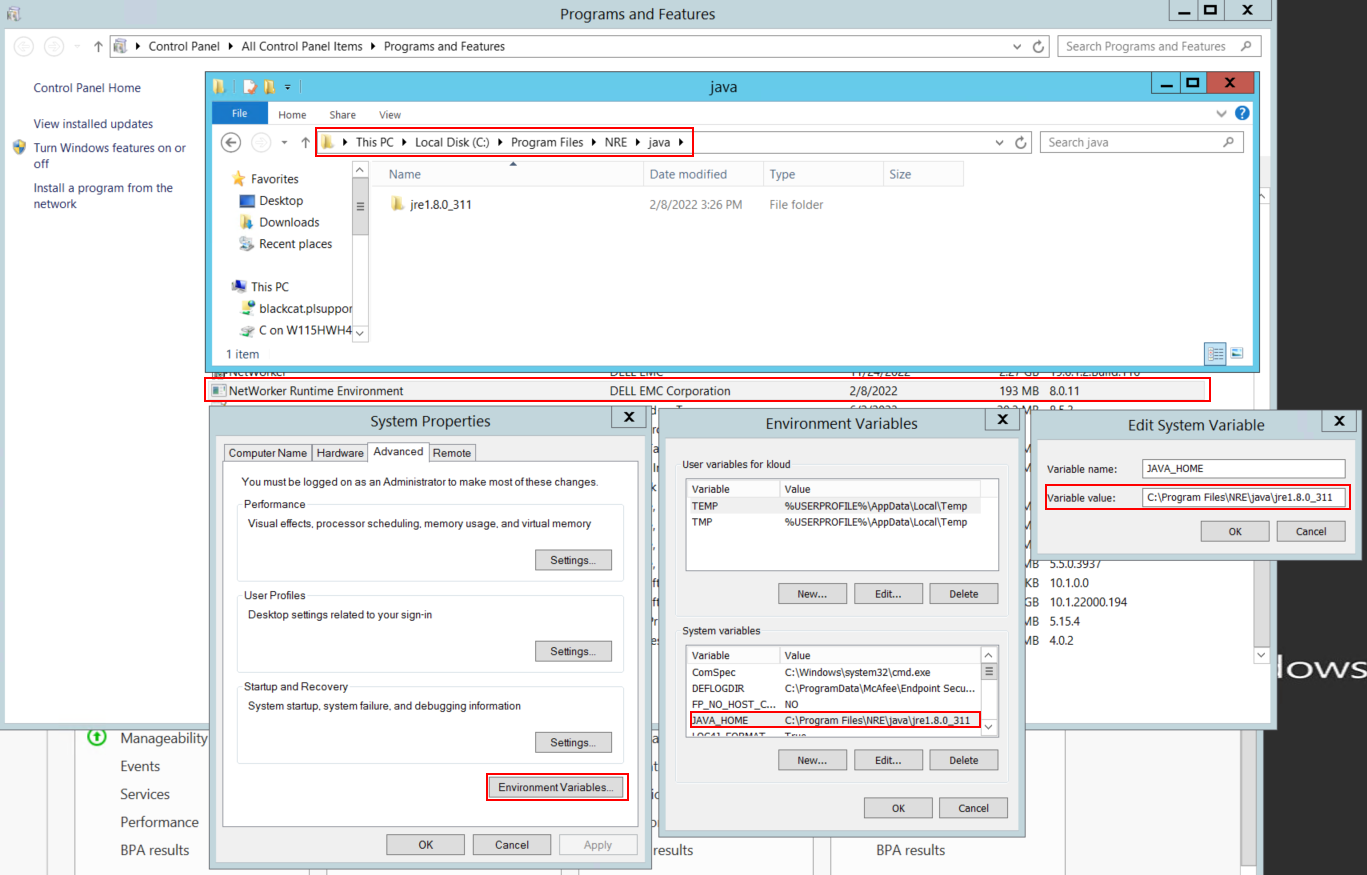
Rysunek 1. Sprawdź, jakiej instancji Java używa NetWorker.
UWAGA: Może być zainstalowanych wiele wystąpień języka Java. Na przykład nrE i Oracle JRE mogą być instalowane na serwerze. Powyższy krok potwierdza wykorzystanie instalacji oprogramowania NetWorker w języku Java.
- Odinstaluj pakiet NetWorker. Nie spowoduje to usunięcia żadnych baz danych NetWorker ani zasobów konfiguracyjnych.
- Zainstaluj ponownie program NetWorker na istniejącej ścieżce instalacji. Ponowna instalacja networker ponownie konfiguruje usługę uwierzytelniania NetWorker.
- Upewnij się, że istnieje następująca ścieżka:
C:\Program Files\EMC NetWorker\nsr\authc-server\tomcat\webapps\nwrestapi
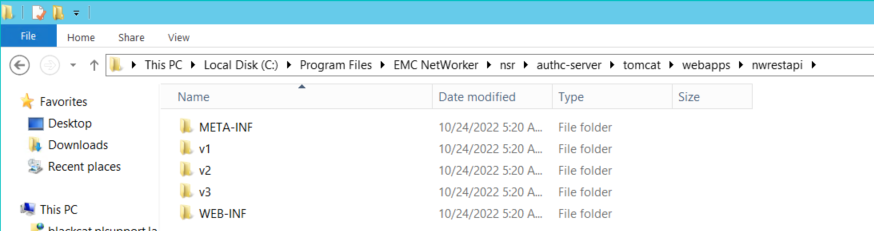
Rysunek 2: Potwierdź, że ścieżka NetWorker authc istnieje.
- Jeśli utworzono katalog nwrestapi, uruchom kwerendy interfejsu REST API.
Etkilenen Ürünler
NetWorkerÜrünler
NetWorker Family, NetWorker SeriesMakale Özellikleri
Article Number: 000215602
Article Type: Solution
Son Değiştirme: 27 Mar 2025
Version: 7
Sorularınıza diğer Dell kullanıcılarından yanıtlar bulun
Destek Hizmetleri
Aygıtınızın Destek Hizmetleri kapsamında olup olmadığını kontrol edin.