NetWorker:REST API 要求失敗,並顯示錯誤訊息:HTTP 狀態 404 - 找不到「要求的資源無法使用」
Summary: NetWorker REST API 查詢失敗,並顯示錯誤訊息:HTTP 狀態 404 - 找不到「要求的資源無法使用」。來源伺服器找不到目標資源目前的表示,或不想揭露其中一個存在。」
Bu makale şunlar için geçerlidir:
Bu makale şunlar için geçerli değildir:
Bu makale, belirli bir ürüne bağlı değildir.
Bu makalede tüm ürün sürümleri tanımlanmamıştır.
Symptoms
NetWorker REST API 要求失敗,並顯示錯誤訊息:HTTP 狀態 404 - 找不到「要求的資源無法使用」
[root@NETWORKER_SERVER]:~# curl -ik GET -u **userid**:'***Password***' -H "Content-Type: application/json" 'https://NETWORKER_SERVER:9090/nwrestapi/v3/global/clients'
curl: (6) Could not resolve host: GET; Name or service not known
HTTP/1.1 404
Content-Type: text/html;charset=utf-8
Content-Language: en
Content-Length: 790
Date: Tue, 04 Jul 2023 12:11:41 GMT
Server: NSR SERVICES for Authentication
HTTP Status 404 – Not Foundbody {font-family:Tahoma,Arial,sans-serif;} h1, h2, h3, b {color:white;background-color:#525D76;} h1 {font-size:22px;} h2 {font-size:16px;} h3 {font-size:14px;} p {font-size:12px;} a {color:black;} .line {height:1px;background-color:#525D76;border:none;}
HTTP Status 404 – Not Found
Type Status Report
Message The requested resource [/nwrestapi/v3/global/clients] is not available
Description The origin server did not find a current representation for the target resource or is not willing to disclose that one exists.
Apache Tomcat/9.0.52 NetWorker 伺服器安裝缺少 nwrestapi 目錄。
Linux: /nsr/authc/webapps/nwrestapi/

Windows: C:\Program Files\EMC NetWorker\nsr\authc-server\tomcat\webapps\nwrestapi
restapi.log 不存在或未更新:
Linux: /nsr/logs/restapi/restapi.log

Windows: C:\Program Files\EMC NetWorker\nsr\logs\restapi\restapi.log
Cause
nwrestapi 路徑不存在。REST 應用程式發展介面查詢找不到任何端點,或將其應如何顯示來自其他 NetWorker 資料庫的資料相互關聯。
Resolution
nwrestapi 是與使用 JAVA Runtime Environment 的 NetWorker authc 服務一起設定。建議使用 NetWorker Runtime Environment (NRE),以避免設定 authc 時可能發生的 JAVA 相關問題。可從Dell Support NetWorker 驅動程式與下載頁面下載最新的 NRE 套件。
Linux:
Windows:
注意:可能已安裝多個 JAVA 例項。例如,NRE 和 Oracle JRE 皆可安裝在伺服器上。上述步驟會確認 NetWorker 使用的 JAVA 安裝。
Linux:
- 登入 NetWorker 伺服器,然後切換至 root:
sudo su -
- 確認是否已安裝 NRE,以及 NetWorker 設定要使用的 JAVA 例項:
rpm -qa | grep nre
cat /nsr/authc/conf/installrc

[root@networker-mc]:~# rpm -qa | grep nre
nre-8.0.15-1.x86_64
[root@networker-mc]:~#
[root@networker-mc]:~# cat /nsr/authc/conf/installrc
JAVA_HOME=/opt/nre/java/latest
注意:可能已安裝多個 JAVA 例項。例如,NRE 和 Oracle JRE 皆可安裝在伺服器上。上述步驟會確認 NetWorker 使用的 JAVA 安裝。
- 執行下列腳本,重新設定 NetWorker authc 伺服器。
/opt/nsr/authc-server/scripts/authc_configure.sh

[root@networker-mc]:~# /opt/nsr/authc-server/scripts/authc_configure.sh

Specify the directory where the Java Standard Edition Runtime Environment (JRE) software is installed [/opt/nre/java/latest]:

The installation process will install an Apache Tomcat instance. For optimum security, EMC NetWorker Authentication Service will use a non-root user (nsrtomcat) to start the Apache Tomcat instance.
If your system has special user security requirements, ensure that proper operational permissions are granted to this non-root user (nsrtomcat).
Please refer to NetWorker Installation Guide.

WARNING: Port 9090 is already in use.

Do you wish to specify a different port number [y]? n

The Apache Tomcat will use "networker-mc.emclab.local" as the host name.
The Apache Tomcat will use "9090" as the port number.

The NetWorker Authentication Service requires a keystore file to configure encryption and to provide SSL support.

EMC recommends that you specify a keystore password that has a minimum of six characters.

Do you want to use the existing keystore /nsr/authc/conf/authc.keystore [y]?

Specify password for the existing keystore:
The install will use the existing certificate "emcauthctomcat" for Apache Tomcat.
The install will use the existing certificate "emcauthcsaml" for Authentication Service.

Creating the installation log in /opt/nsr/authc-server/logs/install.log.

Performing initialization. Please wait...

The installation completed successfully.
注意:需要重新開機 NetWorker 服務,以重載 authc。您可以使用下列 Systemctl 命令完成:
systemctl stop networker
and
systemctl start networker.
- 確認已建立下列資料夾:
/nsr/authc/webapps/nwrestapi

[root@networker-mc]:~# ls -l /nsr/authc/webapps/nwrestapi/
total 0
drwx------. 2 nsrtomcat nsrtomcat  44 Jul  6 12:22 META-INF
drwx------. 3 nsrtomcat nsrtomcat  21 Jul  6 12:22 v1
drwx------. 3 nsrtomcat nsrtomcat  21 Jul  6 12:22 v2
drwx------. 3 nsrtomcat nsrtomcat  21 Jul  6 12:22 v3
drwx------. 6 nsrtomcat nsrtomcat 107 Jul  6 12:22 WEB-INF
- 如果已建立 nwrestapi 目錄,請執行 REST API 查詢。
Windows:
- 確認是否已安裝 NRE,以及 NetWorker 設定要使用的 JAVA 例項:
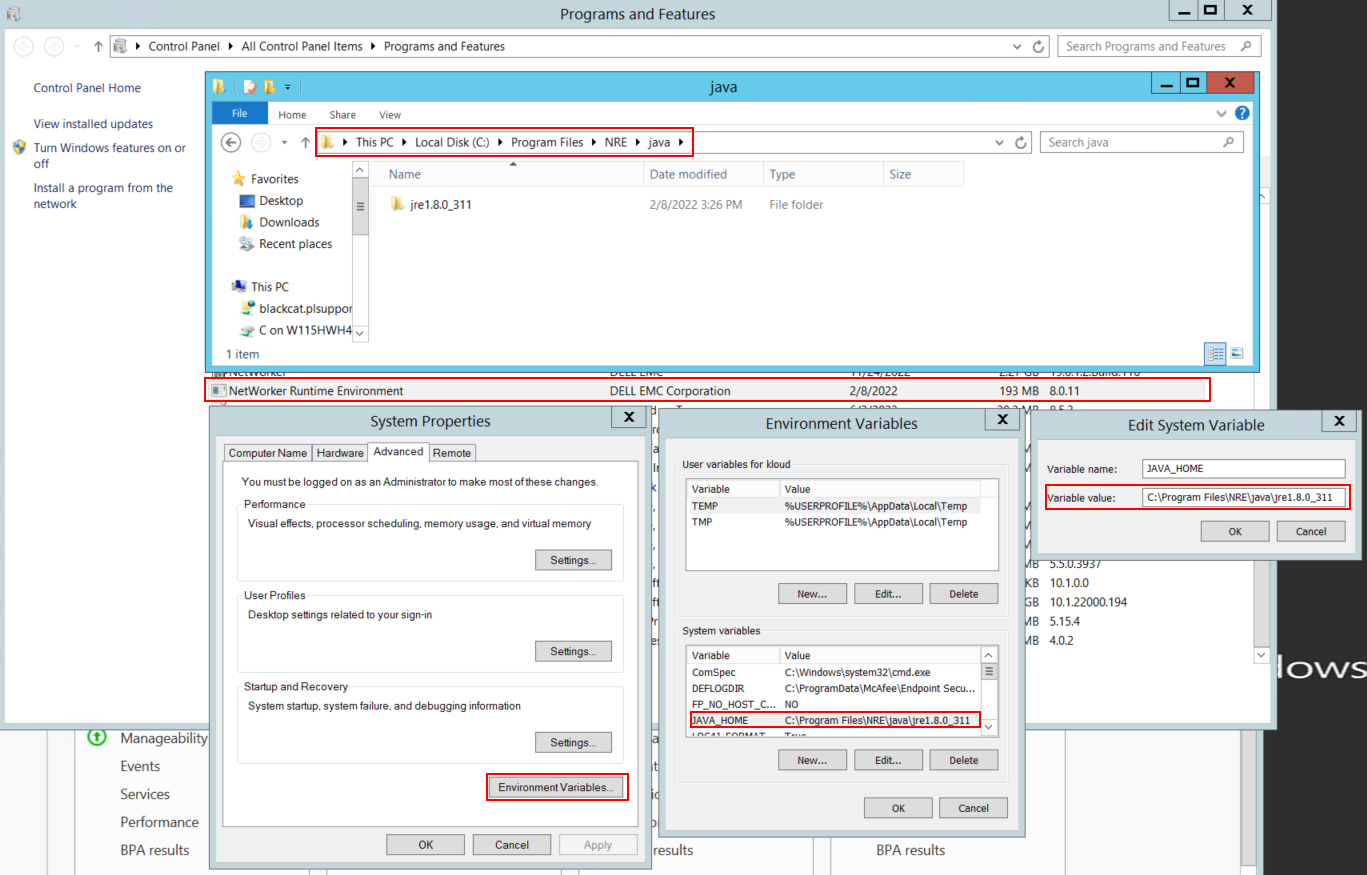
圖 1:確認 NetWorker 使用的 JAVA 例項。
注意:可能已安裝多個 JAVA 例項。例如,NRE 和 Oracle JRE 皆可安裝在伺服器上。上述步驟會確認 NetWorker 使用的 JAVA 安裝。
- 卸載 NetWorker 套件。這不會移除任何 NetWorker 資料庫或組態資源。
- 在現有的安裝路徑上重新安裝 NetWorker。重新安裝 NetWorker 會重新設定 NetWorker 的驗證服務。
- 確認以下路徑是否存在:
C:\Program Files\EMC NetWorker\nsr\authc-server\tomcat\webapps\nwrestapi

圖 2:確認 NetWorker authc 路徑存在。
- 如果已建立 nwrestapi 目錄,請執行 REST API 查詢。
Etkilenen Ürünler
NetWorkerÜrünler
NetWorker Family, NetWorker SeriesMakale Özellikleri
Article Number: 000215602
Article Type: Solution
Son Değiştirme: 27 Mar 2025
Version: 7
Sorularınıza diğer Dell kullanıcılarından yanıtlar bulun
Destek Hizmetleri
Aygıtınızın Destek Hizmetleri kapsamında olup olmadığını kontrol edin.