OpenShift Virtualization: Failed to clone VM if the VM has disks with "hotpluggable" option enabled
Summary: Due to OpenShift Virtualization limitation, VM cannot be cloned if it has disks with "hotpluggable" option enabled.
Bu makale şunlar için geçerlidir:
Bu makale şunlar için geçerli değildir:
Bu makale, belirli bir ürüne bağlı değildir.
Bu makalede tüm ürün sürümleri tanımlanmamıştır.
Symptoms
If a VM has disks with "hotpluggable" option enabled, clone the VM will fail.
The newly cloned VM will stay at "WaitingForVolumeBinding" state.
The newly cloned VM will stay at "WaitingForVolumeBinding" state.
The VM "hotpluggable" option will be enabled in the following scenarios:
- The user adds a new disk (from an existing PVC) with interface type "SCSI" to an existing and running VM.
- The user creates a VM via YAML and sets "hotpluggable: true" explicitly.
Cause
It is an OpenShift Virtualization limitation.
Resolution
Disable "hotpluggable" option before VM clone operation.
Two options to disable it:
- Edit the YAML of VM and set "hotpluggable: false" for the disks explicitly.
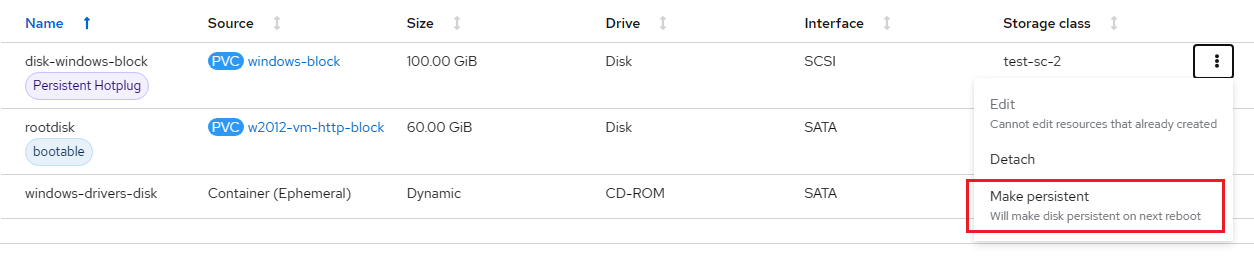
- On OpenShift Virtualization UI, select the "Hotplug" disk and click the "Make persistent" button.
For example:
Etkilenen Ürünler
APEX Cloud Platform for Red Hat OpenShiftMakale Özellikleri
Article Number: 000217670
Article Type: Solution
Son Değiştirme: 20 Şub 2026
Version: 3
Sorularınıza diğer Dell kullanıcılarından yanıtlar bulun
Destek Hizmetleri
Aygıtınızın Destek Hizmetleri kapsamında olup olmadığını kontrol edin.